

Apple Launches 'Get Productive' Promotion for iOS and Mac With Discounted Productivity Apps - MacRumorsOpen MenuShow RoundupsShow Forums menuVisit ForumsOpen Sidebar
Skip to Content

Apple Launches 'Get Productive' Promotion for iOS and Mac With Discounted Productivity Apps

by

Apple's iOS and Mac App Stores were today updated with new "Get Productive" sections, offering discounted prices on many popular productivity apps for iOS devices and Macs.

In the iOS App Store, the 19 discounted apps include Fantastical 2 for iPhone and iPad, Workflow, Clear, Duet Display, Calendars 5, and more. Apps are available for up to 60 percent off their regular prices.
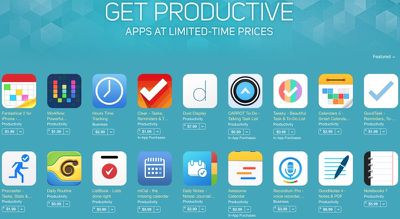
getproductivepromotion
In the Mac App Store, there are 20 apps available at discounted prices up to 75 percent off, including popular offerings like Day One, Byword, iA Writer Pro, iTranslate, mSecure, iStudiez Pro, Notability, and more.

Apple has also named ProCam 2 as its App of the Week, and as a result, the camera and photo editing app is available at no cost, instead of at its regular $1.99 price. [Direct Link]

The iPad version of the app, ProCam XL 2 is also free. [Direct Link]

Top Rated Comments

Saddington Avatar
150 months ago
pretty excited to have my small indie app, Desk App (https://itunes.apple.com/us/app/desk-writing-blogging-notetaking/id915839505?mt=12&ign-mpt=uo%3D4), represented! pretty honored and humbled, that's for sure!
Score: 12 Votes (Like | Disagree)
Traverse Avatar
150 months ago
You know, I've really turned my iPad in quite the productive little machine.

My 15" MacBook stays docked to a large external monitor at home and I take my iPad 3 with a Logitech Ultrathin Smart Cover to school. I use Word (and occasionally OneNote) to take notes during lectures or annotate professor supplied power points as they talk. I use Excel for iOS for some (very light) spreadsheet organization. I'm using PDF expert to read and annotate over 400 pages of PDFs for this terms classes. I've stopped printing PowerPoint slides and notes and simply consolidate them all into one large (50 to 200 page) PDF to study for exams. All my files stay in sync via Dropbox. I use Calendar and various Reminders lists to stay onto of my tasks and I stay on top of my emails throughout the day instead of letting them pile up until I'm home.

When I get home I pick up where I left off on my Mac to finish papers, work on my online class presentations, and work on my thesis (but I read the thesis PDFs and data on the iPad).

Together they make a pretty good team. My Mac is excellent for my heavy lifting tasks and my iPad works perfect as a light on-the-go device. The ability to use a keyboard in a more traditional laptop fashion when taking notes, but detach it into a more "book" like form factor for reading and annotating PDFs is a big help especially since some of my PDFs are rendered as one image so I can't highlight individual text on my Mac, but I can draw or freeform highlight on my iPad.
Score: 7 Votes (Like | Disagree)
150 months ago
we all need several todo lists, one for each calendar app we download. put that in one of your notes app.
Score: 7 Votes (Like | Disagree)
150 months ago
Anti-productivity. You guys want productivity? Stop investigating and buying / trying apps and just get back to work.
Score: 4 Votes (Like | Disagree)
roland.g Avatar
150 months ago
we all need several todo lists, one for each calendar app we download. put that in one of your notes app.

Or you could just use Omnifocus 2.
Score: 3 Votes (Like | Disagree)
tevion5 Avatar
150 months ago
Perhaps the software development team in charge of quality control at Apple would do well to take a similar initiative.
Score: 2 Votes (Like | Disagree)

Popular Stories

Apple Event Logo

Apple Working on All-New Operating System

Wednesday July 29, 2026 11:39 am PDT by
Apple is developing an all-new operating system that is essentially a mix of tvOS, watchOS, and iOS, according to Bloomberg's Mark Gurman. In a report this week, he said the operating system will feature a grid of icons, widgets, and apps, along with customizable clock faces. The new software platform is intended for Apple's long-rumored smart home hub. With built-in facial recognition,...
imac video apple feature

Apple Made Its Second-Biggest Acquisition Ever This Year

Wednesday July 29, 2026 12:03 pm PDT by
Apple this year acquired Israeli startup Q.ai for close to $2 billion, according to the Financial Times. That would make this Apple's second-biggest acquisition ever, after it paid $3 billion for the popular headphone maker Beats in 2014. This is also the largest known Apple acquisition since the company purchased Intel's smartphone modem business and patents for $1 billion in 2019. Q.ai...
Dynamic Island iPhone 18 Pro Feature

iPhone 18 Pro: Twelve Changes Coming to Apple's Next Flagship

Thursday July 30, 2026 3:43 am PDT by
We're less than two months out from the launch of Apple's premium next-generation smartphone lineup, and while we're not expecting a dramatic change in terms of functionality, there are still several enhancements rumored to be coming to the iPhone 18 Pro and iPhone 18 Pro Max. One thing worth noting is that Apple is reportedly planning a major change to its iPhone release cycle this year,...

🔗 Related Apple News & Rumors

Stay updated with the latest Apple ecosystem news and verified rumors











































