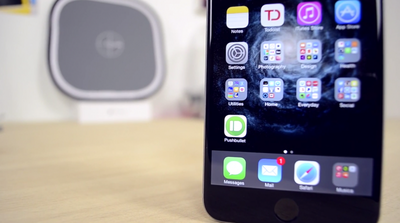
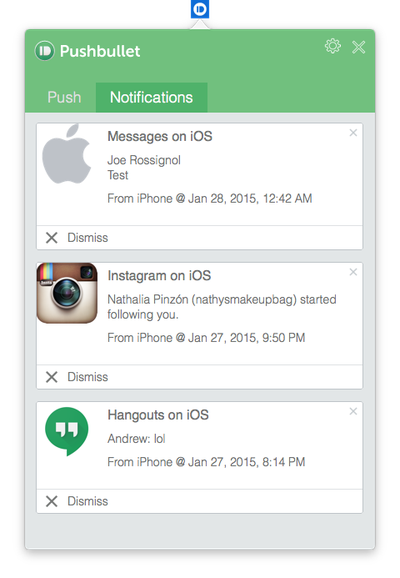
Following the release of Pushbullet for iOS, Mac, and Safari, we have been testing out the new software to see how well it keeps notifications, links, photos and other files in sync between devices. Pushbullet is the marriage of AirDrop, Notifyr and other OS X Yosemite features in one package, but is it a worthwhile alternative? Find out our first impressions in our hands-on video ahead.
The process of setting up Pushbullet takes just a few minutes. Depending on which platforms or web browsers you want to send and receive links and files between, download the Pushbullet apps or extensions that you need and make sure that iOS to Mac notifications and universal copy and paste are enabled in each app's preferences. iOS and Mac apps are available alongside Safari, Chrome, Firefox and Opera extensions.
You can optimize your experience further by going into the Mac app's preferences and checking off specific apps that you would like to receive iOS notifications from. For instance, if you already receive mail notifications on your desktop, then you probably don't need Pushbullet pushing the same mail notifications from your iPhone. Notification settings can be configured for both stock and third-party apps.
Pushbullet for iPhone has four tabs: Pushbullet, Contacts, Channels and Settings. The main launch screen allows you to compose a message, add links, attachments or maps, and send it to another device you have set up Pushbullet on. Contacts displays a list of your paired devices, contacts and subscriptions. Channels provides push notification feeds that you can subscribe to. Last, the Settings tab gives you a few options such as your choice of Safari or Chrome for opening links and Apple Maps or Google Maps for opening addresses.
While much of its core functionality is already possible through other apps and services, Pushbullet for the most part has proved to be a faster and more reliable solution for quickly sending notes, links, files and more between a smartphone and computer or vice versa. Channels also provide a great way for receiving notifications from a particular source so that you can stay informed at all times.
Overall, Pushbullet is a worthwhile recommendation for iPhone, iPad, Mac and Safari users that are looking to move lots of content between devices. Pushbullet for iOS [Direct Link], Pushbullet for Mac [Direct Link] and the Safari extension are all free to download, making the software an even more valuable option for multi-device users.
I "appreciate" that this article is a review of an application, yet there's not a single link to the actual https://www.pushbullet.com/ (https://www.pushbullet.com/) website itself... just Arn's "AppShopper" links, and direct App Store links.
So yeah... https://www.pushbullet.com has a blog and a help page, in case anyone's interested. :D
is there any way to use this app without having a Facebook or Google account?
Is that why the app is free? Because they're accessing and selling our social media statistics/details?
It's great that they were able to give us what Apple promised us but failed to deliver a few years ago: iOS notifications on Macs. Well Apple promised synced notifications but this is still pretty good.
There are synced notifications between iOS and OS X. I believe they are just for apps under the Apple umbrella though.
Friday October 30, 2026 3:20 pm PDT by Joe Rossignol
In a memo shared with Apple Stores and Apple Authorized Service Providers this week, and later obtained by MacRumors, Apple provided technicians with guidance on how to diagnose and address the iPhone Duo's inner display cracking issue.
If a customer reports the issue, Apple advised technicians to inspect the iPhone Duo and repair or replace it in accordance with their standard procedures....
Thursday October 29, 2026 1:47 pm PDT by Joe Rossignol
While the new iPad mini has an OLED display, the device does not support ProMotion, meaning the display's refresh rate is limited to 60Hz instead of 120Hz.
ProMotion support would have allowed for the iPad mini's refresh rate to automatically adjust from 10Hz to 120Hz depending on the content being displayed, but evidently Apple has kept the feature exclusive to the iPad Pro among iPad...
Thursday October 29, 2026 11:52 am PDT by Joe Rossignol
In the U.S. and most other countries, Apple's website shows the new iPad mini being held by pinched fingers, but this is not the case in South Korea.
The new iPad mini shown with pinched fingers on Apple's website in the U.S.
On its South Korean website, Apple simply shows an image of the iPad mini on its own.
The new iPad mini shown without pinched fingers on Apple's website in South Korea ...




















































Top Rated Comments
So yeah... https://www.pushbullet.com has a blog and a help page, in case anyone's interested. :D
Is that why the app is free? Because they're accessing and selling our social media statistics/details?
I hear ya....
I am really tired of Google or Facebook trying to get in the middle of everything I might do online.
There are synced notifications between iOS and OS X. I believe they are just for apps under the Apple umbrella though.