

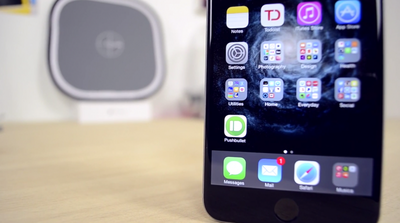
Following the release of Pushbullet for iOS, Mac, and Safari, we have been testing out the new software to see how well it keeps notifications, links, photos and other files in sync between devices. Pushbullet is the marriage of AirDrop, Notifyr and other OS X Yosemite features in one package, but is it a worthwhile alternative? Find out our first impressions in our hands-on video ahead.
Pushbullet
The process of setting up Pushbullet takes just a few minutes. Depending on which platforms or web browsers you want to send and receive links and files between, download the Pushbullet apps or extensions that you need and make sure that iOS to Mac notifications and universal copy and paste are enabled in each app's preferences. iOS and Mac apps are available alongside Safari, Chrome, Firefox and Opera extensions.

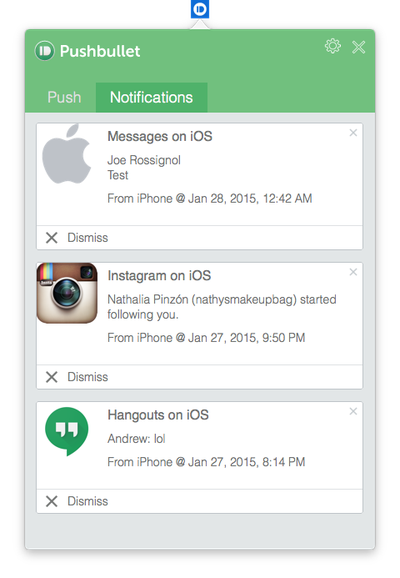
You can optimize your experience further by going into the Mac app's preferences and checking off specific apps that you would like to receive iOS notifications from. For instance, if you already receive mail notifications on your desktop, then you probably don't need Pushbullet pushing the same mail notifications from your iPhone. Notification settings can be configured for both stock and third-party apps.


Pushbullet for iPhone has four tabs: Pushbullet, Contacts, Channels and Settings. The main launch screen allows you to compose a message, add links, attachments or maps, and send it to another device you have set up Pushbullet on. Contacts displays a list of your paired devices, contacts and subscriptions. Channels provides push notification feeds that you can subscribe to. Last, the Settings tab gives you a few options such as your choice of Safari or Chrome for opening links and Apple Maps or Google Maps for opening addresses.
Pushbullet
While much of its core functionality is already possible through other apps and services, Pushbullet for the most part has proved to be a faster and more reliable solution for quickly sending notes, links, files and more between a smartphone and computer or vice versa. Channels also provide a great way for receiving notifications from a particular source so that you can stay informed at all times.

Overall, Pushbullet is a worthwhile recommendation for iPhone, iPad, Mac and Safari users that are looking to move lots of content between devices. Pushbullet for iOS [Direct Link], Pushbullet for Mac [Direct Link] and the Safari extension are all free to download, making the software an even more valuable option for multi-device users.


Top Rated Comments

aziatiklover Avatar
144 months ago
Got to sign in with Facebook or Google? No thanx I like to keep my data private.
Score: 8 Votes (Like | Disagree)
bushido Avatar
144 months ago
better download now before Apple decides to pull it for whatever random reason
Score: 5 Votes (Like | Disagree)
Hedwigg Avatar
144 months ago
I "appreciate" that this article is a review of an application, yet there's not a single link to the actual https://www.pushbullet.com/ (https://www.pushbullet.com/) website itself... just Arn's "AppShopper" links, and direct App Store links.

So yeah... https://www.pushbullet.com has a blog and a help page, in case anyone's interested. :D
Score: 4 Votes (Like | Disagree)
illitrate23 Avatar
144 months ago
is there any way to use this app without having a Facebook or Google account?
Is that why the app is free? Because they're accessing and selling our social media statistics/details?
Score: 4 Votes (Like | Disagree)
KdParker Avatar
144 months ago
Got to sign in with Facebook or Google? No thanx I like to keep my data private.

I hear ya....

I am really tired of Google or Facebook trying to get in the middle of everything I might do online.
Score: 3 Votes (Like | Disagree)
WhoDaKat Avatar
144 months ago
It's great that they were able to give us what Apple promised us but failed to deliver a few years ago: iOS notifications on Macs. Well Apple promised synced notifications but this is still pretty good.

There are synced notifications between iOS and OS X. I believe they are just for apps under the Apple umbrella though.
Score: 2 Votes (Like | Disagree)

Popular Stories

Aston Martin CarPlay Ultra Screen

Apple's CarPlay Ultra to Expand to These Vehicle Brands Later This Year

Sunday February 1, 2026 10:08 am PST by
Last year, Apple launched CarPlay Ultra, the long-awaited next-generation version of its CarPlay software system for vehicles. Nearly nine months later, CarPlay Ultra is still limited to Aston Martin's latest luxury vehicles, but that should change fairly soon. In May 2025, Apple said many other vehicle brands planned to offer CarPlay Ultra, including Hyundai, Kia, and Genesis. In his Powe...
iOS 26

iOS 26.3 and iOS 26.4 Will Add These New Features to Your iPhone

Tuesday February 3, 2026 7:47 am PST by
We are still waiting for the iOS 26.3 Release Candidate to come out, so the first iOS 26.4 beta is likely still at least a week or two away. Following beta testing, iOS 26.4 will likely be released to the general public in March or April. Below, we have recapped known or rumored iOS 26.3 and iOS 26.4 features so far. iOS 26.3 iPhone to Android Transfer Tool iOS 26.3 makes it easier...
Apple Logo Black

Apple's Next Launch is 'Imminent'

Sunday February 1, 2026 12:31 pm PST by
The calendar has turned to February, and a new report indicates that Apple's next product launch is "imminent," in the form of new MacBook Pro models. "All signs point to an imminent launch of next-generation MacBook Pros that retain the current form factor but deliver faster chips," Bloomberg's Mark Gurman said on Sunday. "I'm told the new models — code-named J714 and J716 — are slated...
Apple MacBook Pro M4 hero

New MacBook Pros Reportedly Launching Alongside macOS 26.3

Sunday February 1, 2026 5:42 am PST by
Apple is planning to launch new MacBook Pro models with M5 Pro and M5 Max chips alongside macOS 26.3, according to Bloomberg's Mark Gurman. "Apple's faster MacBook Pros are planned for the macOS 26.3 release cycle," wrote Gurman, in his Power On newsletter today. "I'm told the new models — code-named J714 and J716 — are slated for the macOS 26.3 software cycle, which runs from...
iOS 26 Home Feature

Apple Gives Final Warning to Home App Users

Tuesday February 3, 2026 8:55 am PST by
In 2022, Apple introduced a new Apple Home architecture that is "more reliable and efficient," and the deadline to upgrade and avoid issues is fast approaching. In an email this week, Apple gave customers a final reminder to upgrade their Home app by February 10, 2026. Apple says users who do not upgrade may experience issues with accessories and automations, or lose access to their smart...















