Running with Crayons today announced Alfred Remote, an iOS app that turns an iPhone or iPad into a remote control for various tasks on a user's Mac, from controlling a screensaver to launching apps (via The Verge).

Designed with parity of the Alfred app on the Mac App Store in mind, Alfred for iOS also allows users to expand into systemwide interactions with their desktop computers. Users with a Powerpack addition to their Alfred 2 experience, which costs about $25, can then use the Remote to control Powerpack-exclusive features via iOS.
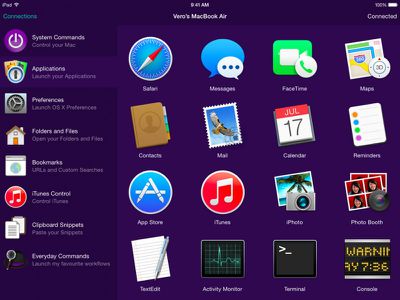
applications
These include iTunes playback, copying and pasting from iOS to OS X, running user-defined scripts, AppleScripts, and terminal commands, and creating and controlling custom Workflows for enhanced productivity. Normal features like opening websites and setting a screensaver are available to all users.

With a single touch on your iOS device, you can control many Alfred 2 actions on your Mac, including:
- Show Alfred 2 on your Mac
- System Commands: Lock, restart, shut down, log out or sleep your Mac, eject all devices, quit all apps and empty trash
- Launch Applications and System Preferences on your Mac
- Open files and folders you've defined on your Mac
- Open websites and bookmarks, or pop up Alfred with a custom search filled in
- Replace hard to remember hotkey combinations and keywords with icons on iOS

To be able to fully use the features of each app, users will need both Alfred 2 for Mac and Alfred Remote for iOS, and have both of them running on the same Wi-Fi connection.

Alfred Remote can be purchased from the App Store for $4.99. [Direct Link]

Alfred 2 for Mac is a free download, with an option to upgrade with the Powerpack options.

Top Rated Comments

steve217 Avatar
144 months ago
This would be really useful for restarting iTunes from the couch when it quits responding.
Score: 4 Votes (Like | Disagree)
critter13 Avatar
144 months ago
chrome

google chrome remote desktop works pretty well and is free.
Score: 3 Votes (Like | Disagree)
extricated Avatar
144 months ago
I don't want to jump on a hater's bandwagon, but I'm not seeing this as particularly useful (to me).
Does anyone have some experience with Alfred or maybe some ideas on ways it could prove useful or timesaving?
Score: 2 Votes (Like | Disagree)
roland.g Avatar
144 months ago
Sorry but this immediately makes me think of this.

Score: 2 Votes (Like | Disagree)
jayducharme Avatar
144 months ago
I'm not sure what the point of this is. Does it replace a trackpad or mouse? If it's just a launcher, I don't see how it saves me much work over simply launching apps the normal way on my Mac. I have a hotkey for Spotlight. I type the first two letters of the app and hit return, and the app launches. That seems quicker than what I can accomplish with Alfred.

As far as iTunes control goes, I have iTunes Match and can access all my media on my iPhone anyway. So controlling iTunes on my Mac would be redundant.
Score: 2 Votes (Like | Disagree)
bilboa Avatar
144 months ago
I haven't used it in a while, but it had a keyboard when I used it last. I think it required selecting the text box with the remote and then the keyboard should pop up automatically (it's one of the benefits of using the app instead of the Apple remote). I'll try it again when I get home tonight.

This is still how it works. Just select the text box, and you'll be able to use your normal iOS keyboard to enter searches. In fact I'd say that's the main benefit of using the Remote app instead of the Apple TV remote, though I find navigating through menus and lists to be quicker using the Remote app as well.
Score: 1 Votes (Like | Disagree)

Popular Stories

Aston Martin CarPlay Ultra Screen

Apple's CarPlay Ultra to Expand to These Vehicle Brands Later This Year

Sunday February 1, 2026 10:08 am PST by
Last year, Apple launched CarPlay Ultra, the long-awaited next-generation version of its CarPlay software system for vehicles. Nearly nine months later, CarPlay Ultra is still limited to Aston Martin's latest luxury vehicles, but that should change fairly soon. In May 2025, Apple said many other vehicle brands planned to offer CarPlay Ultra, including Hyundai, Kia, and Genesis. In his Powe...
iOS 26

iOS 26.3 and iOS 26.4 Will Add These New Features to Your iPhone

Tuesday February 3, 2026 7:47 am PST by
We are still waiting for the iOS 26.3 Release Candidate to come out, so the first iOS 26.4 beta is likely still at least a week or two away. Following beta testing, iOS 26.4 will likely be released to the general public in March or April. Below, we have recapped known or rumored iOS 26.3 and iOS 26.4 features so far. iOS 26.3 iPhone to Android Transfer Tool iOS 26.3 makes it easier...
Apple Logo Black

Apple's Next Launch is 'Imminent'

Sunday February 1, 2026 12:31 pm PST by
The calendar has turned to February, and a new report indicates that Apple's next product launch is "imminent," in the form of new MacBook Pro models. "All signs point to an imminent launch of next-generation MacBook Pros that retain the current form factor but deliver faster chips," Bloomberg's Mark Gurman said on Sunday. "I'm told the new models — code-named J714 and J716 — are slated...
Apple MacBook Pro M4 hero

New MacBook Pros Reportedly Launching Alongside macOS 26.3

Sunday February 1, 2026 5:42 am PST by
Apple is planning to launch new MacBook Pro models with M5 Pro and M5 Max chips alongside macOS 26.3, according to Bloomberg's Mark Gurman. "Apple's faster MacBook Pros are planned for the macOS 26.3 release cycle," wrote Gurman, in his Power On newsletter today. "I'm told the new models — code-named J714 and J716 — are slated for the macOS 26.3 software cycle, which runs from...
iOS 26 Home Feature

Apple Gives Final Warning to Home App Users

Tuesday February 3, 2026 8:55 am PST by
In 2022, Apple introduced a new Apple Home architecture that is "more reliable and efficient," and the deadline to upgrade and avoid issues is fast approaching. In an email this week, Apple gave customers a final reminder to upgrade their Home app by February 10, 2026. Apple says users who do not upgrade may experience issues with accessories and automations, or lose access to their smart...