

Fleksy Keyboard for iOS Gains New Extensions, Theme Packs - MacRumorsOpen MenuShow RoundupsShow Forums menuVisit ForumsOpen Sidebar
Skip to Content

Fleksy Keyboard for iOS Gains New Extensions, Theme Packs

With iOS 8, Apple began allowing third-party keyboards for the first time, and over the last few months, dozens of feature-rich keyboards have hit the market. With an ever-increasing number of keyboard options available, it's becoming increasingly difficult for keyboard developers to stand out

Fleksy, a company that has long had an Android-based keyboard and was one of the first to launch a keyboard for iOS, is aiming to get itself back into the public eye with a major 5.0 update. The new version of Fleksy introduces a slew of features, including several customizable extensions and dozens of premium themes. With Extensions, Fleksy is now able to go beyond simple text insertion, offering additional features that extend Fleksy's functionality.

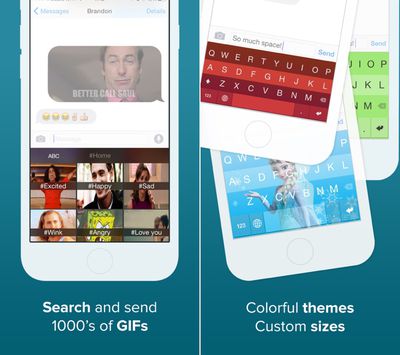
iOS extensions being offered include GIFs, one-handed typing (for iPhone 6 and 6 Plus), a Number Row, Cursor Control, and Rainbow Key Pops. The GIF feature allows users to browse and share animated images, while Cursor Control allows users to move the cursor using the spacebar.
fleksyupdate
The Number Row adds numbers to the top of the keyboard, Rainbow Key Pops add a pop of color with each key press, and the one-handed typing feature moves the keyboard to the side of the screen. Users can install up to three extensions at once via the Fleksy app, and Extensions can be changed out at any tie. It's also possible for users to purchase additional slots for $0.99.

"We're unlocking the keyboard's true potential with this update," said Kosta Eleftheriou, Fleksy CEO and Co-Founder. "Keyboards are our primary input method. With Extensions we mean to revolutionize not only text input, but all input; making it faster, easier, and more fun. Why switch back and forth between apps to do things that can be done via the keyboard?"

The updated version of Fleksy is far more customizable, with an additional 30 themes available for purchase. Themes are organized into several different classes including Personal, Trendy, Branded, Dynamic, and Translucent.

Branded themes, for example, include Frozen and Hunger Games, while other available themes offer a variety of different colors. The themes are bundled into packs of two or three and can be purchased in-app for $0.99 to $2.99. Along with the iOS version, Fleksy for Android is receiving many of the same features, along with additional Extensions that allow for text shortcuts and an invisible keyboard.

Fleksy can be downloaded from the App Store for $0.99. [Direct Link]

Popular Stories

Four iPhone 18 Pro Colors Mock Feature

iPhone 18 Pro and iPhone Ultra: Pre-Orders and Release Date

Thursday July 30, 2026 6:12 am PDT by
Apple has yet to reveal when the iPhone 18 Pro and iPhone Ultra will be announced and released, but the dates usually follow a familiar pattern. Labor Day is September 7 this year. The last time the holiday fell on that day was in 2020, but the iPhone event that year was delayed until October due to the COVID-19 pandemic. So, the last time Labor Day was on September 7 in a normal year was in ...
Apple Event Logo

Apple Working on All-New Operating System

Wednesday July 29, 2026 11:39 am PDT by
Apple is developing an all-new operating system that is essentially a mix of tvOS, watchOS, and iOS, according to Bloomberg's Mark Gurman. In a report this week, he said the operating system will feature a grid of icons, widgets, and apps, along with customizable clock faces. The new software platform is intended for Apple's long-rumored smart home hub. With built-in facial recognition,...
Dynamic Island iPhone 18 Pro Feature

iPhone 18 Pro: Twelve Changes Coming to Apple's Next Flagship

Thursday July 30, 2026 3:43 am PDT by
We're less than two months out from the launch of Apple's premium next-generation smartphone lineup, and while we're not expecting a dramatic change in terms of functionality, there are still several enhancements rumored to be coming to the iPhone 18 Pro and iPhone 18 Pro Max. One thing worth noting is that Apple is reportedly planning a major change to its iPhone release cycle this year,...

Top Rated Comments

Patriks7 Avatar
152 months ago
I have tried many of these keyboards and I always keep coming back to the stock one as it seems to work the best for me. Am I the only one?
Score: 23 Votes (Like | Disagree)

rsocal Avatar
152 months ago
I have tried many of these keyboards and I always keep coming back to the stock one as it seems to work the best for me. Am I the only one?

I still like the stock iOS keyboard the best as well.
Score: 8 Votes (Like | Disagree)
152 months ago
This is awesome for the kids, I think. For me, however, I will pass.

The stock keyboard works well and I dont have to worry about my data going anywhere else.
Score: 7 Votes (Like | Disagree)
ck2875 Avatar
152 months ago
What I find really dodgy is that the developer changed the IAP pricing descriptions.

Before, it listed the prices for each IAP (i.e. $0.99, etc) and with the new update they have changed it to say "GET" in the same manner that Apple now displays the price for free apps in the App Store.

This is no doubt an attempt to confuse the unattentive consumer into thinking its going to be free then tapping through the pop up without realizing they're paying for it.

Before:

fleksy gains new extensions image

After Update:

fleksy gains new extensions image

After Pressing 'GET':

fleksy gains new extensions image
Score: 6 Votes (Like | Disagree)
BeyondtheTech Avatar
152 months ago
I have tried many of these keyboards and I always keep coming back to the stock one as it seems to work the best for me. Am I the only one?

Am I the only one who's also tried many keyboards but bothered not to invest in any of them because - even at the current iOS 8.1.2 - the OS is still so buggy that the third-party keyboard occasionally won't even open, forcing me to force-quit the app and relaunch it just to get it to work?
Score: 6 Votes (Like | Disagree)
Keane16 Avatar
152 months ago
I have tried many of these keyboards and I always keep coming back to the stock one as it seems to work the best for me. Am I the only one?
Yeah it does work the best IMHO, though I'm forcing myself to use Swype for reasons I don't yet understand. I downloaded a Klingon keyboard only to remember I can't speak Klingon. So my experience with third-party keyboards has been fairly tragic, albeit self-inflicted woes.
Same here.

I tried all the popular free ones. Not much I liked. Then when Swype became free thought I'd give it a proper try. So I uninstalled the stock keyboard and tried for a full month. Swyping was novel for a couple of days. But by the end I was just frustrated by the inconsistent auto-correct, and I realised NEVER Swyped, always tapped. It was also slower having to tap and hold to access the emoji keyboard.

So I'm back on the trusty stock keyboard, for me the most accurate and the one I'm quickest with.
Score: 4 Votes (Like | Disagree)

🔗 Related Apple News & Rumors

Stay updated with the latest Apple ecosystem news and verified rumors












































