

iOS 8.1 Brings iCloud Photo Library to All Users, With Images Accessible on iOS Devices, iCloud.com - MacRumorsOpen MenuShow RoundupsShow Forums menuVisit ForumsOpen Sidebar
Skip to Content

iOS 8.1 Brings iCloud Photo Library to All Users, With Images Accessible on iOS Devices, iCloud.com

iOS 8.1, released to the public earlier today, included Apple Pay support as its most notable feature, but it also brought several other updates to the mobile operating system, including iCloud Photo Library. With iOS 8.1, the iCloud Photo Library beta is now available to all iOS 8 users, as is a new iCloud Photos app that can be found within iCloud.com.

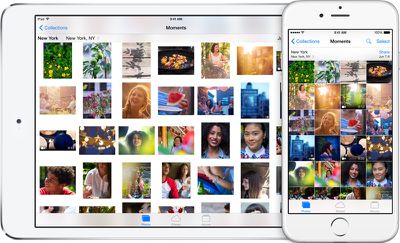
First introduced during WWDC, iCloud Photo Library stores all of the photos and videos that a user takes in iCloud, making them available on the iPhone, iPad, iPod touch, and Macs through iCloud.com. It will also work with the Photos app that Apple is creating for the Mac, which is expected in early 2015.
icloudphotolibraryhero

iCloud Photo Library. You’re never without your camera. Now you’ll never be without your photos. Every photo and video you take now lives in iCloud — giving you the freedom to access your library from any device, anytime you want. So you can view a photo from last week or last year no matter where you are.

iCloud Photo Library is designed to keep all of a user's photos synced on all of their devices at all times. When an image is edited on an iOS device in the Photos app with Apple's built-in editing tools, those changes are immediately uploaded to iCloud and visible on other devices right away.

iCloud Photo Library is also designed to free up valuable storage space on iOS devices. Full high-resolution photos and videos are stored in the cloud, while smaller versions of the images are displayed on devices, taking up far less storage space. iCloud Photo Library uses the iCloud storage space of each user, with 20GB of storage space available for $0.99 per month. Apple's iCloud storage plans go up to 1TB, which is priced at $19.99 per month.

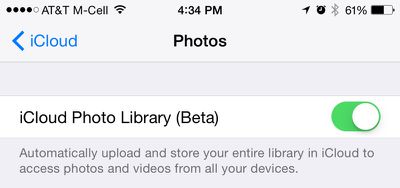
iCloud Photo Library can be enabled on iOS devices in the Settings app by going to iCloud > Photos and toggling on "iCloud Photo Library." The Settings app also lets users choose whether to optimize iPhone storage or download and keep original full-sized photos on their devices.
icloudphotolibrarysettings
Once iCloud Photo Library is enabled, images and videos stored on iOS devices will be automatically uploaded to the cloud. They can be viewed as usual within the Photos app for iOS, and on the web, they can be viewed through the new iCloud Photos app on iCloud.com.

icloudphotosapp
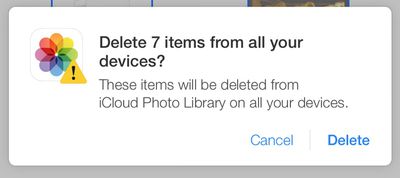
In the iCloud Photos app, users can perform several actions that are also available in the iOS version of the Photos app. Images can be favorited, which sends them to a special "Favorites" album, they can be downloaded in full resolution, or deleted, which removes the photos from iCloud Photo Library on all devices. From the main "Moments" view, it's also possible to click on the "Select Photos" option to delete or download multiple images at once.
deleteitemsicloudcom
iCloud Photo Library does not appear to be working flawlessly at the current point in time, which is likely why it's still given "beta" status. In MacRumors own testing, deleting some photos from the iCloud Photos app did not delete the photos from the iPhone 6 Plus they were taken on. A later sync even returned the photos to iCloud.com.

While iCloud Photo Library was available to developers during the iOS 8 beta testing period, Apple opted to pull it from the iOS 8 golden master ahead of iOS 8's public release and demote it to beta status.

The reason behind iCloud Photo Library's removal from the release version of iOS 8 was unclear, but it is possible Apple delayed the release in light of the negative press iCloud received in early September due to the celebrity photo leak.

With Apple having taken significant steps to bolster the security of iCloud, adding two-step verification and sending security emails when changes are made to iCloud or a device is restored, the company appears ready to let the public have full access to the new photo storage feature.


Tag: iOS 8.1
Related Forum: iOS 8

Popular Stories

iPhone Duo Display Cracking

Apple Alerts Stores to iPhone Duo's Display Cracking Issue

Friday October 30, 2026 3:20 pm PDT by
In a memo shared with Apple Stores and Apple Authorized Service Providers this week, and later obtained by MacRumors, Apple provided technicians with guidance on how to diagnose and address the iPhone Duo's inner display cracking issue. If a customer reports the issue, Apple advised technicians to inspect the iPhone Duo and repair or replace it in accordance with their standard procedures....


iPad mini OLED feature 1

Apple Executive Comments on New iPad Mini Lacking 120Hz Display

Thursday October 29, 2026 1:47 pm PDT by
While the new iPad mini has an OLED display, the device does not support ProMotion, meaning the display's refresh rate is limited to 60Hz instead of 120Hz. ProMotion support would have allowed for the iPad mini's refresh rate to automatically adjust from 10Hz to 120Hz depending on the content being displayed, but evidently Apple has kept the feature exclusive to the iPad Pro among iPad...
Pinched iPad Mini

Apple Avoids Showing Pinched Fingers on iPad Mini Page in South Korea

Thursday October 29, 2026 11:52 am PDT by
In the U.S. and most other countries, Apple's website shows the new iPad mini being held by pinched fingers, but this is not the case in South Korea. The new iPad mini shown with pinched fingers on Apple's website in the U.S. On its South Korean website, Apple simply shows an image of the iPad mini on its own. The new iPad mini shown without pinched fingers on Apple's website in South Korea ...

Top Rated Comments

Kariya Avatar
157 months ago
celebrities will love this....hackers will love this even more!
Tired joke.

Celebs with Android phones, BlackBerries were victims too. iCloud wasn't hacked, it was social engineering.
Score: 35 Votes (Like | Disagree)
157 months ago
celebrities will love this....hackers will love this even more!
Score: 7 Votes (Like | Disagree)
157 months ago
Let's hope Apple does not decide to buy dropbox and try to "icloudify" them. They have truly made the "cloud"services area really really confusing. It should be much simplier and much less confusing than it is currently. Have used dropbox for years now, it works, it works well, and I don't get confused and stumped about what it's doing with my documents.
Score: 5 Votes (Like | Disagree)
157 months ago
Me shudders with memories of very beta "MobileMe" that was not quite ready for prime time. This camper passing until the kinks are worked out and it's more bug free.

Once burned, twice shy as they say!


"If one wants to live on the edge of high technology, you gotta be prepared to bleed.......been there, dome that, got the tee-shirt!"
Score: 5 Votes (Like | Disagree)
157 months ago
There is nothing respectful about tossing aside the gift of human intellect and choosing to ignore the truth.


If you can handle using Pages, Numbers, Keynote, etc. than what makes you think this is so bad? It's exactly the same.


The message pops up EVERY SINGLE time and clearly states "This photo will be deleted from iCloud Photo Library on ALL of your devices". It is ignorant and deceitful to pretend otherwise.


Yeah, if you want to use this service for >5GB you pay money. NOBODY IS MAKING YOU USE THIS. You can still do whatever you were doing up until now.


You downloaded an OPTIMIZED version. What don't you understand? The full version is on iCloud, and if you turn the full version setting on you can access it. Maybe it the future the web app will download full versions. ITS A BETA (any idea what that means or is the term confusing?).


Let's see, you are wrong about iCloud apps being confusing, you are wrong about the delete warning, you are wrong about what size is stored in iCloud, and you are wrong about this using up all a device's storage when in fact it doesn't require (do you know the difference between use if available and require?) any storage whatsoever. I'd call that pretty darn ignorant and mistaken.
Proline, you are incorrect. I hope that others reading this realize that you are making statements that are simply not true. It is not opinion, it is fact, at least in how the system is working for me (I point that out in the case that maybe I have some odd setting, but I don't believe I do).

1) I just took a photo using an iPhone 5.
2) I logged into iCloud.com, and within about 30 seconds the photo disappeared.
3) I picked up my iPhone and deleted the photo...THERE WAS NO WARNING WHATSOEVER. The photo was deleted instantly (albeit moved to the "Recently Deleted" album, not deleted, but I hope I am not being ignorant and I do realize you can restore from the recently deleted album if you'd like). The message DOES NOT pop up every single time as you so contend (at least on my phone).
4) I returned to iCloud.com and within 30 seconds the photo was removed.

There was no message. If you want to assert that it wasn't "officially deleted and you can restore from the recently deleted album", I'll give you that. And recovering the photo from recently deleted does put it back into All Photos and back into iCloud. (From what I can tell there is no recently deleted album on iCloud.com, so you would need to use the device you deleted from to recover.)

In terms of the optimized version being downloaded, that again is something I confirmed through actually taking a photo, viewing its EXIF data from the original on the phone, downloading the uploaded copy from iCloud, and then viewing that version's EXIF data. I did not "accidentally" download any optimized version. I downloaded the 1 and only version that was on iCloud, and it is not a full resolution file as Apple has indicated.

If you would re-read the initial posting I made, the one you emphatically attacked, you will see that I in fact stated, and I quote from the original post: "I am not sure if this is related to the service being a beta". I realize it is a beta. I also wrote in my initial post "Let's hope that Apple has plans to really improve this service."

This thread is currently 8 pages and 178 postings. But when comment about this being confusing, you assert, and I quote again, "No it isn't. Only to you." Ok.

To the others that come to this site for constructive commenting, learning, and assistance, I hope that you find what you are after without being attacked by such condescending members as proline.
Score: 4 Votes (Like | Disagree)
157 months ago
apperently i dont get it ...

wasn't the iCloud Photo Libary supposed to store ALL of your Photos and Videos so you can "make up valuable room on your iOS devices"?

But when i want to delete certain photos from my iPhone they are sent to the "recently deleted fotos folder" and will be deleted from iCloud within 30days too???

sorry but that doesn't make sense to me ... am i doing it right?

Exactly my thoughts. It seems like the total opposite! Now you need a 64GB+ iPhone besides your 64GB+ iPad to be able to use iCloud Photo Library and upload ALL your photos.

There should be an option to not download photos locally, just upload new ones. And be able to see your photos in iCloud when your are connected to Internet.

Sometimes I hate apple.
Score: 4 Votes (Like | Disagree)
Latest Stories
Apple Watch Ultra 4 Hits All-Time Low Price With Amazon's $99 Discount
17 hours ago
Reminder: Apple's Big Discount on Beats 360 Ear Cushions Ends Today
17 hours ago
Here's a New Tour of Apple's HomeView Software
17 hours ago
Apple Reveals New iPad Mini's Battery Capacity
18 hours ago
Top Stories: Apple's Big MacBook Pro, iPad mini and iMac Updates
19 hours ago
'Pluribus' Season 2 Reportedly Starts Production Today
1 day ago
iPhone 18 Pro Sales Surge in China, Offsetting Decline in U.S. and Japan
1 day ago
HomeView Software 27.2: Wallpapers, Control Center, and More
1 day ago
Apple Alerts Stores to iPhone Duo's Display Cracking Issue
1 day ago
iOS 27.3 Will Enable These Apple Intelligence Features in China
1 day ago
Apple Says iOS 27.3 Beta Coming Next Week
1 day ago
Apple's Flash Storage Suppliers Are Finally 'Getting Their Revenge'
2 days ago
14 New Things Your iPhone Can Do in iOS 27.2
2 days ago
iPhone Duo Review: One Week Later
2 days ago
Samsung Mocks iPhone Duo Display Cracks in New Ad Campaign
2 days ago
The MacRumors Show: OLED MacBook Pro, iPad Mini 8, and More
2 days ago
MacBook Pro With Touch Display: 15 More Details Revealed
2 days ago
Russia Places Apple on State Surveillance Registry
2 days ago
Halloween Weekend Brings Discounts on Apple Accessories and Pre-Orders
2 days ago
Apple Has Released More Than 25 New Products in the Past Two Months
2 days ago
Local Code Launches as Free, Private AI Assistant Tool for Mac
2 days ago
Apple Acquires Ascend.io
2 days ago
HomePod Mini 2 Launches Today: All the New Features
2 days ago
AirTag 2 4-Pack Drops to New Low Price of $69.99
2 days ago
Rian Johnson's iPhone Camera App Goes Viral
2 days ago
Where Did All the iPhone Duos Go? Mostly to Apple's Stores
2 days ago
Apple's Touchscreen MacBook Pro Could Ship 1.5M Units in 2027
2 days ago
New Apple TV 4K and iPad Mini: RAM Amounts Revealed
2 days ago
Apple Executive Comments on New iPad Mini Lacking 120Hz Display
3 days ago
Here's a Hands-On Look at HomePod Mini 2's New Two-Tone Colors
3 days ago

🔗 Related Apple News & Rumors

Stay updated with the latest Apple ecosystem news and verified rumors










































