

With iOS 8 bringing support for system wide third-party keyboards for the first time, developers have been coming up with creative ways to introduce new functionality to the keyboard, beyond simply making it quicker to type.

Translator Keyboard is a new third-party keyboard designed to allow users to quickly translate their text from one language to another, without the need for a separate translation app.

Translator Keyboard is able to provide a much simpler experience than the copy-paste workflow that many translation apps have had to settle for in the past. As well as making translation quicker and more convenient, Translator Keyboard is the perfect tool for bite-size translation, such as iMessaging colleagues abroad, participating in online chat or discussions in another language, or skypeing with those from another country.

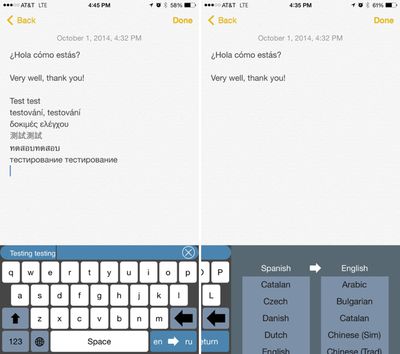
To use Translator Keyboard, users simply need to select the language they plan to type in and a second language to translate to. A small bar above the keyboard displays what's being typed as it as entered, and when a sentence is complete, hitting the return button will submit it to be translated.
translator2
Translation from one language to another takes just a few seconds and the translated text is inserted directly into the text field. In Messages, for example, a user could type a sentence like "Hello, how are you?" in English, translate it to Spanish using the keyboard, and the person receiving the message would see only "Hola, ¿cómo estás?"

The app allows users to translate to 44 different languages and translate from 30 different languages, and switching between languages is done with a simple swipe on the keyboard.

Translator Keyboard is built using the Microsoft Translate API, and for that reason, it requires users to enable "Allow Full Access" because typed text is submitted for online translation. A privacy section within the app states that all text submitted for translation will be kept private and will not be stored or shared.

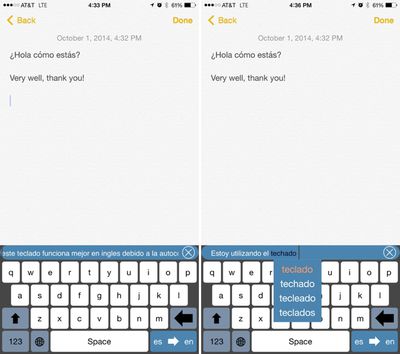
The app has built-in autocorrection that allows users to tap on a word that has been miscorrected to pull up a list of other possible word suggestions, which can be useful when attempting to type a word that needs a special character. More often, though, autocorrect makes it difficult to type in a language that is not English as every other word has to be fixed, slowing typing considerably. Disabling autocorrect is not currently possible, but according to the developer, the option will be added in a future update.
translator1
Along with autocorrect issues, there are a few minor problems with the keyboard, such as its inability to allow users to backspace or delete content in the main text field (deleting something that's been entered requires switching to another keyboard), but it provides a useful way to conduct a conversation in two different languages via an app like Messages or make quick translations in an app like Notes.

Translator Keyboard can be downloaded from the App Store for $1.99. [Direct Link]

Top Rated Comments

minhvn Avatar
148 months ago
Sounds useful, but that is the ugliest thing I've ever seen.
Score: 9 Votes (Like | Disagree)
rorschach Avatar
148 months ago
Form follows function.

Except where Apple is concerned, sadly.
Form shouldn't follow function, nor the other way around. Form and function should be deeply intertwined.
Score: 4 Votes (Like | Disagree)
greytmom Avatar
148 months ago
Now that is cool.
Score: 3 Votes (Like | Disagree)
Jeffoz Avatar
148 months ago
Ok, so you can type in English, but the reply is in the foreign language that you presumably do not understand. Is everybody living in the Star Wars universe? I'm not sure i understand what this is for.

Yes, this is weird. I've send the developer this thing and hopes he will reply as it can be really usefull for me but not how it is right now.
Score: 1 Votes (Like | Disagree)
mainstreetmark Avatar
148 months ago
Ok, so you can type in English, but the reply is in the foreign language that you presumably do not understand. Is everybody living in the Star Wars universe? I'm not sure i understand what this is for.
Score: 1 Votes (Like | Disagree)
Jeffoz Avatar
148 months ago
Didn't work at all for me. Phone froze up a bit, then keyboard wouldn't return at all. Plus you can't use the microphone to transcribe text. Hopefully updates soon, because it's a great idea!

You have to activate first in the settings "Give full access" otherwise it freezes like you say.

----------

I downloaded it and it works quite well. I'm dutch and my girlfriend is polish but we communicate in english.

Now i've said something in English and she sees this as Polish which is nice. But then comes the problem. She has android or even if she had iOS but didn't use this keyboard. She talks back to me in polish... But the keyboard of course doesn't translate this so i have no clue what she is saying..

In that case you can't have converstations...
Score: 1 Votes (Like | Disagree)

Popular Stories

Aston Martin CarPlay Ultra Screen

Apple's CarPlay Ultra to Expand to These Vehicle Brands Later This Year

Sunday February 1, 2026 10:08 am PST by
Last year, Apple launched CarPlay Ultra, the long-awaited next-generation version of its CarPlay software system for vehicles. Nearly nine months later, CarPlay Ultra is still limited to Aston Martin's latest luxury vehicles, but that should change fairly soon. In May 2025, Apple said many other vehicle brands planned to offer CarPlay Ultra, including Hyundai, Kia, and Genesis. In his Powe...
Apple Logo Black

Apple's Next Launch is 'Imminent'

Sunday February 1, 2026 12:31 pm PST by
The calendar has turned to February, and a new report indicates that Apple's next product launch is "imminent," in the form of new MacBook Pro models. "All signs point to an imminent launch of next-generation MacBook Pros that retain the current form factor but deliver faster chips," Bloomberg's Mark Gurman said on Sunday. "I'm told the new models — code-named J714 and J716 — are slated...
iOS 26

iOS 26.3 and iOS 26.4 Will Add These New Features to Your iPhone

Tuesday February 3, 2026 7:47 am PST by
We are still waiting for the iOS 26.3 Release Candidate to come out, so the first iOS 26.4 beta is likely still at least a week or two away. Following beta testing, iOS 26.4 will likely be released to the general public in March or April. Below, we have recapped known or rumored iOS 26.3 and iOS 26.4 features so far. iOS 26.3 iPhone to Android Transfer Tool iOS 26.3 makes it easier...
Apple MacBook Pro M4 hero

New MacBook Pros Reportedly Launching Alongside macOS 26.3

Sunday February 1, 2026 5:42 am PST by
Apple is planning to launch new MacBook Pro models with M5 Pro and M5 Max chips alongside macOS 26.3, according to Bloomberg's Mark Gurman. "Apple's faster MacBook Pros are planned for the macOS 26.3 release cycle," wrote Gurman, in his Power On newsletter today. "I'm told the new models — code-named J714 and J716 — are slated for the macOS 26.3 software cycle, which runs from...
iOS 26 Home Feature

Apple Gives Final Warning to Home App Users

Tuesday February 3, 2026 8:55 am PST by
In 2022, Apple introduced a new Apple Home architecture that is "more reliable and efficient," and the deadline to upgrade and avoid issues is fast approaching. In an email this week, Apple gave customers a final reminder to upgrade their Home app by February 10, 2026. Apple says users who do not upgrade may experience issues with accessories and automations, or lose access to their smart...















