Apple Releases OS X Yosemite Developer Preview 7

Apple today released a new version of OS X Yosemite to developers, two weeks after releasing the sixth Developer Preview and three months after unveiling the new desktop operating system at its annual Worldwide Developers Conference.

The update, build 14A343f, can be downloaded from the Mac App Store and through the Mac Developer Center. There's also a new version of Xcode 6, an OS X Server 4.0 Developer Preview, and an updated version of Apple Configurator 1.7.
yosemite_dp_7_dev
OS X Yosemite brings a flatter, more modern look to OS X, with an emphasis on translucency and redesigned dock, windows, and more. It also includes a multitude of new features, such as improved integration with iOS 8 through Continuity, a new "Today" view in Notification Center that offers integration with third-party apps, a retooled Spotlight search with new data sources, and several new features for apps like Mail, Safari, and Messages.

Over the course of the beta testing period, each Developer Preview has added new features and refined the look and performance of OS X Yosemite. DP 4, for example, added a revamped version of iTunes with a streamlined design and support for Family Sharing, while an earlier beta introduced a new Dark Mode. Developer Preview 6 added several new icons, a new look for the dashboard, and new Yosemite-themed wallpapers.

Today's Developer Preview is limited to registered developers, but in late July, Apple made a version of OS X Yosemite available to the public as part of a wide-ranging beta test. The pre-release version of Yosemite available to those participating in the public beta program has not received as many updates as the developer version and is on its second iteration. Apple is expected to release Yosemite to the public in the fall.

Notable changes in Developer Preview 7:

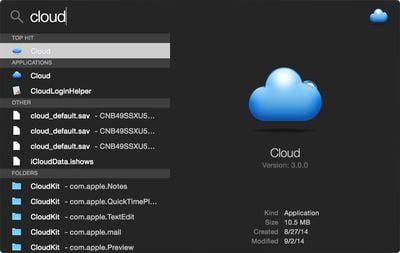
Dark Mode: Dark Mode has been tweaked slightly, and there's a new look for Spotlight when Dark Mode is enabled.
spotlightdarkmode
Icons: There are new icons for Migration Assistant, Dashboard, Disk Utility, ColorSync Utility, and Keychain Access.

newyosemiteicons
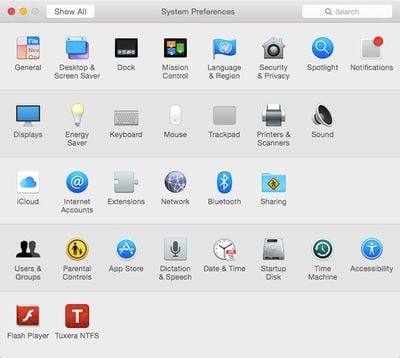
System Preferences: There are several new and modified icons in System Preferences, including a new look for Language & Region and Startup Disk.
systempreferencesicons
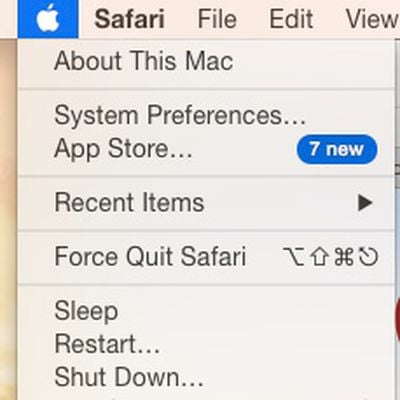
Software Update: The "Software Update" option has been removed from the main Apple menu, with App Store now displaying available software updates.

softwareupdateremoved

Related Forum: OS X Yosemite

Popular Stories

Aston Martin CarPlay Ultra Screen

Apple's CarPlay Ultra to Expand to These Vehicle Brands Later This Year

Sunday February 1, 2026 10:08 am PST by
Last year, Apple launched CarPlay Ultra, the long-awaited next-generation version of its CarPlay software system for vehicles. Nearly nine months later, CarPlay Ultra is still limited to Aston Martin's latest luxury vehicles, but that should change fairly soon. In May 2025, Apple said many other vehicle brands planned to offer CarPlay Ultra, including Hyundai, Kia, and Genesis. In his Powe...
iOS 26

iOS 26.3 and iOS 26.4 Will Add These New Features to Your iPhone

Tuesday February 3, 2026 7:47 am PST by
We are still waiting for the iOS 26.3 Release Candidate to come out, so the first iOS 26.4 beta is likely still at least a week or two away. Following beta testing, iOS 26.4 will likely be released to the general public in March or April. Below, we have recapped known or rumored iOS 26.3 and iOS 26.4 features so far. iOS 26.3 iPhone to Android Transfer Tool iOS 26.3 makes it easier...
Apple Logo Black

Apple's Next Launch is 'Imminent'

Sunday February 1, 2026 12:31 pm PST by
The calendar has turned to February, and a new report indicates that Apple's next product launch is "imminent," in the form of new MacBook Pro models. "All signs point to an imminent launch of next-generation MacBook Pros that retain the current form factor but deliver faster chips," Bloomberg's Mark Gurman said on Sunday. "I'm told the new models — code-named J714 and J716 — are slated...
Apple MacBook Pro M4 hero

New MacBook Pros Reportedly Launching Alongside macOS 26.3

Sunday February 1, 2026 5:42 am PST by
Apple is planning to launch new MacBook Pro models with M5 Pro and M5 Max chips alongside macOS 26.3, according to Bloomberg's Mark Gurman. "Apple's faster MacBook Pros are planned for the macOS 26.3 release cycle," wrote Gurman, in his Power On newsletter today. "I'm told the new models — code-named J714 and J716 — are slated for the macOS 26.3 software cycle, which runs from...
iOS 26 Home Feature

Apple Gives Final Warning to Home App Users

Tuesday February 3, 2026 8:55 am PST by
In 2022, Apple introduced a new Apple Home architecture that is "more reliable and efficient," and the deadline to upgrade and avoid issues is fast approaching. In an email this week, Apple gave customers a final reminder to upgrade their Home app by February 10, 2026. Apple says users who do not upgrade may experience issues with accessories and automations, or lose access to their smart...

Top Rated Comments

keysofanxiety Avatar
149 months ago
Way too many sarcastic/pedantic remarks already. For what it's worth, there are actually people (myself included) who are interested to see the release notes.

Thank you to the people who will be giving useful feedback about this update. :)
Score: 21 Votes (Like | Disagree)
Watabou Avatar
149 months ago
New Spotlight dark theme!
Score: 18 Votes (Like | Disagree)
flottenheimer Avatar
149 months ago
NEW!
A set of Jennifer Lawrence photos has been added to Wallpapers.
Score: 17 Votes (Like | Disagree)
Erastopic Avatar
149 months ago
Finders sidebar selection is now the same darker translucency which they included for Reminders, etc in DP6 and I like it more than the blue.
Score: 14 Votes (Like | Disagree)
Kar98 Avatar
149 months ago
New features?

Scans your iPhoto library for nudes, zips them and uploads them to imgur.
Score: 13 Votes (Like | Disagree)
Dephibio Avatar
149 months ago
Correct me if I'm wrong, but it seems the Wi-Fi indicator has bolder lines.

Score: 11 Votes (Like | Disagree)