

Hands-On Installation and Usage of TouchPal's Gesture Keyboard for iOS 8 - MacRumorsOpen MenuShow RoundupsShow Forums menuVisit ForumsOpen Sidebar
Skip to Content

Hands-On Installation and Usage of TouchPal's Gesture Keyboard for iOS 8

Following Apple's announcement at its Worldwide Developers Conference earlier this month that iOS 8 would include support for third-party keyboards on a systemwide basis, a number of companies working on the technology indicated that they would be moving forward with plans to support iOS. Among those companies was TouchPal, with quickly released a video showing an early version of its sliding gesture keyboard in action.

TouchPal has now released its first alpha version of its keyboard for iOS 8 to select media outlets, giving a good look at how third-party keyboard will work on iOS 8.
touchpal_installation
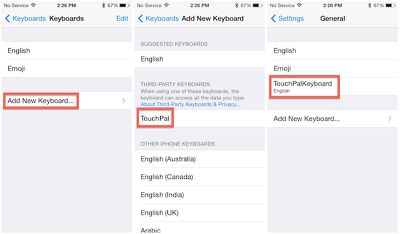
Installation is straightforward, leveraging a traditional App Store app to add TouchPal as an option when adding new keyboard in the Settings app. Once TouchPal is added, users can simply rearrange their installed keyboards in their preferred order, and rotate through each one while in use by tapping the globe key. Users who have activated the emoji keyboard on their devices will be familiar with that process.

Once activated, TouchPal is available anywhere a keyboard is traditionally used, such as in Mail, Messages, Safari, Notes, iWork apps, and third-party apps.
touchpal_usage
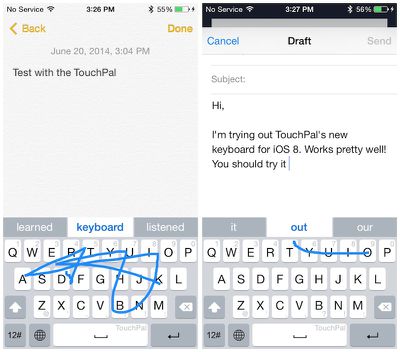
TouchPal's keyboard is similar to the perhaps more well-known one from Swype, allowing users to drag a finger in one continuous motion as they spell out the word. Based on the pattern drawn by the user, TouchPal suggests several options for the intended word, with highest-ranked option highlighted in the middle of the suggestions bar. Hitting the space bar or touching the word accepts the suggestion.

Numbers and common punctuation marks are input right from the main keyboard screen simply by flicking up or down on the proper key. Additional punctuation marks and emoticons are available by tapping the "12#" key at the lower left.

In our testing, there were definitely some glitches, particularly when switching between keyboards, but it is still early in the development process and Apple and third-party keyboard companies will continue to refine their implementations in the coming months leading up to the public release of iOS 8 this fall.


Related Forum: iOS 8

Popular Stories

Apple Event Logo

Apple Working on All-New Operating System

Wednesday July 29, 2026 11:39 am PDT by
Apple is developing an all-new operating system that is essentially a mix of tvOS, watchOS, and iOS, according to Bloomberg's Mark Gurman. In a report this week, he said the operating system will feature a grid of icons, widgets, and apps, along with customizable clock faces. The new software platform is intended for Apple's long-rumored smart home hub. With built-in facial recognition,...
imac video apple feature

Apple Made Its Second-Biggest Acquisition Ever This Year

Wednesday July 29, 2026 12:03 pm PDT by
Apple this year acquired Israeli startup Q.ai for close to $2 billion, according to the Financial Times. That would make this Apple's second-biggest acquisition ever, after it paid $3 billion for the popular headphone maker Beats in 2014. This is also the largest known Apple acquisition since the company purchased Intel's smartphone modem business and patents for $1 billion in 2019. Q.ai...
Four iPhone 18 Pro Colors Mock Feature

iPhone 18 Pro and iPhone Ultra: Pre-Orders and Release Date

Thursday July 30, 2026 6:12 am PDT by
Apple has yet to reveal when the iPhone 18 Pro and iPhone Ultra will be announced and released, but the dates usually follow a familiar pattern. Labor Day is September 7 this year. The last time the holiday fell on that day was in 2020, but the iPhone event that year was delayed until October due to the COVID-19 pandemic. So, the last time Labor Day was on September 7 in a normal year was in ...

Top Rated Comments

Lapidus Avatar
158 months ago
Don't know why, but I never seemed interested in this feature.
Score: 10 Votes (Like | Disagree)
158 months ago
Don't know why, but I never seemed interested in this feature.

Then honestly, you have no idea what you are missing. Once you get used to it, old school single key typing seems prehistoric.
Score: 9 Votes (Like | Disagree)
Jalopybox Avatar
158 months ago
Had this on Android. Worked well, used it twice. Never used it again. Feels unnatural.

Score: 6 Votes (Like | Disagree)
158 months ago
Then honestly, you have no idea what you are missing. Once you get used to it, old school single key typing seems prehistoric.

Agreed. Swype is probably one of the coolest features of Android.
Score: 3 Votes (Like | Disagree)
WildCowboy Avatar
158 months ago
about freaking time! but i hate that it requires to download an actual "app" (even if its an obvious choice by apple) i hate the thought of having all those "apps" on my springboard just to get a feature activated and no longer actually need the "icon". wonder if the keyboard would stick even if i delete the app "icon" from the springboard?

If you delete the app, it stops working. An entry for it remains in the Settings section for keyboards, but it's blank and you can't use the keyboard.

At least that's how it currently works through beta.
Score: 3 Votes (Like | Disagree)
158 months ago
about freaking time! but i hate that it requires to download an actual "app" (even if its an obvious choice by apple) i hate the thought of having all those "apps" on my springboard just to get a feature activated and no longer actually need the "icon". wonder if the keyboard would stick even if i delete the app "icon" from the springboard?
You can probably delete those apps after installing the keyboard, as was the case with Emoji.
Score: 3 Votes (Like | Disagree)

🔗 Related Apple News & Rumors

Stay updated with the latest Apple ecosystem news and verified rumors










































