iOS 8 Tidbits: Time-Lapse Mode, Request Desktop Site, and Grayscale Mode, and More

During yesterday's keynote, Apple packed a ton of information on iOS 8 into a short period of time, showing off a multitude of new features like interactive notifications, QuickType predictive text, enhancements to group messages, new family sharing options, and more.

Given the time constraints, many new iOS 8 changes went under the radar and while we detailed a few of these yesterday, now that iOS 8 has been downloaded on thousands of developer devices, even more minor additions to the operating system have come to light. Our forum members and iOS 8 users on Twitter have detailed a huge number of the new changes, and we've catalogued the more interesting improvements below.

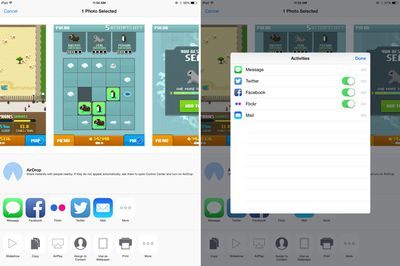
Share sheet customizations - When sharing an image, website, or other type of media, users can now customize their sharing options. The list of apps where content can be shared can be rearranged and disabled, as can the media options like Copy, Print, and AirPlay. Some sheet icons also have a new look that eliminates the black border in iOS 7.
sharescreen
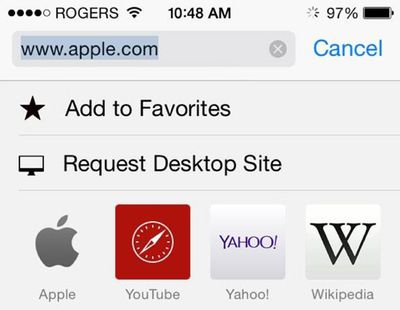
Request desktop site in Safari - As noted by a Twitter user, Safari now includes an option to "Request Desktop Site," which will load the desktop version of a site rather than the mobile version.
requestdesktop
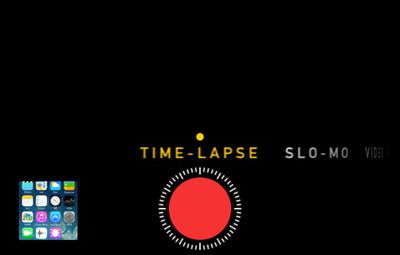
Time-Lapse mode for Camera - The Camera app has gained a new Time-Lapse mode, which captures a series of images and then compiles them into a time-lapse video. There are also new manual exposure controls, which allow exposure to be selected when taking a photo, and a self-timer mode that can be set for three or 10 seconds.
timelapse
DuckDuckGo search - Users can now opt to select DuckDuckGo as their default search option in Safari. DuckDuckGo is known for its anti-tracking stance, opting not to profile its users.

iBooks - iBooks now comes preinstalled on iOS devices with iOS 8. Previously, it was a separate download in the App Store. There's also a new auto night mode and an organization option to group books from a series together.

Messages - Along with several improvements to group message management, there are now options to remove stored messages after a set period of time of 30 days or one year, which will allow users who have extensive iMessage threads to free up valuable space. When adding an image to a message, there's a new feature displaying recent photos for quick insertion.
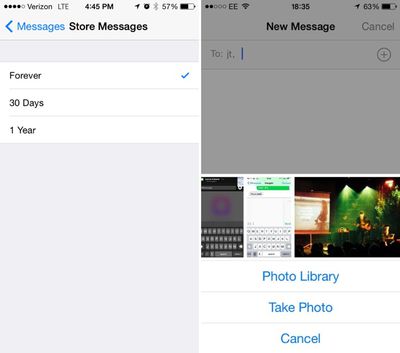
messages
Photos - The Photos app has received new organizational options, including two albums for "Recently Added" and "Recently Deleted." The Recently Deleted section temporarily displays images that have been removed from the app in case of accidental deletion. The date and time a photo was taken is also displayed.

timelapsedelete
WiFi Calling - iOS will include an option for WiFi calling, allowing users to place calls over WiFi instead of cellular when connected to a WiFi network, saving minutes and data. Several carriers, including T-Mobile, have already announced support for the feature.

Grayscale mode - There are several new Accessibility options, including a new "Grayscale" mode that shifts the entire operating system into shades of black and white. There's also Improved Zoom option.
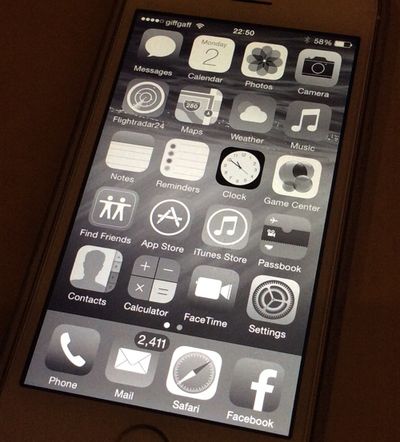
grayscaleios8
Keep up with all of the new changes introduced with iOS 8 on our forums, where our readers are discussing and sharing a seemingly endless number of feature enhancements and tweaks in the "iOS 8, All The Little Things" thread.


Related Forum: iOS 8

Popular Stories

Aston Martin CarPlay Ultra Screen

Apple's CarPlay Ultra to Expand to These Vehicle Brands Later This Year

Sunday February 1, 2026 10:08 am PST by
Last year, Apple launched CarPlay Ultra, the long-awaited next-generation version of its CarPlay software system for vehicles. Nearly nine months later, CarPlay Ultra is still limited to Aston Martin's latest luxury vehicles, but that should change fairly soon. In May 2025, Apple said many other vehicle brands planned to offer CarPlay Ultra, including Hyundai, Kia, and Genesis. In his Powe...
Apple Logo Black

Apple's Next Launch is 'Imminent'

Sunday February 1, 2026 12:31 pm PST by
The calendar has turned to February, and a new report indicates that Apple's next product launch is "imminent," in the form of new MacBook Pro models. "All signs point to an imminent launch of next-generation MacBook Pros that retain the current form factor but deliver faster chips," Bloomberg's Mark Gurman said on Sunday. "I'm told the new models — code-named J714 and J716 — are slated...
iOS 26

iOS 26.3 and iOS 26.4 Will Add These New Features to Your iPhone

Tuesday February 3, 2026 7:47 am PST by
We are still waiting for the iOS 26.3 Release Candidate to come out, so the first iOS 26.4 beta is likely still at least a week or two away. Following beta testing, iOS 26.4 will likely be released to the general public in March or April. Below, we have recapped known or rumored iOS 26.3 and iOS 26.4 features so far. iOS 26.3 iPhone to Android Transfer Tool iOS 26.3 makes it easier...
Apple MacBook Pro M4 hero

New MacBook Pros Reportedly Launching Alongside macOS 26.3

Sunday February 1, 2026 5:42 am PST by
Apple is planning to launch new MacBook Pro models with M5 Pro and M5 Max chips alongside macOS 26.3, according to Bloomberg's Mark Gurman. "Apple's faster MacBook Pros are planned for the macOS 26.3 release cycle," wrote Gurman, in his Power On newsletter today. "I'm told the new models — code-named J714 and J716 — are slated for the macOS 26.3 software cycle, which runs from...
iOS 26 Home Feature

Apple Gives Final Warning to Home App Users

Tuesday February 3, 2026 8:55 am PST by
In 2022, Apple introduced a new Apple Home architecture that is "more reliable and efficient," and the deadline to upgrade and avoid issues is fast approaching. In an email this week, Apple gave customers a final reminder to upgrade their Home app by February 10, 2026. Apple says users who do not upgrade may experience issues with accessories and automations, or lose access to their smart...

Top Rated Comments

AngerDanger Avatar
152 months ago
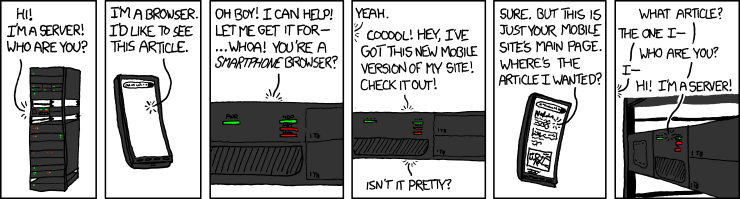
Request desktop site will be massively helpful when dealing with easily distracted servers:

more ios 8 tidbits image (http://xkcd.com/869/)

Score: 51 Votes (Like | Disagree)
KALLT Avatar
152 months ago
I really like the grayscale mode

iOS definitely needs that new dark mode of Yosemite.
Score: 20 Votes (Like | Disagree)
thermal Avatar
152 months ago
Grayscale mode could be interesting if it allows a dramatic improvement in battery life.
Score: 18 Votes (Like | Disagree)
Jay42 Avatar
152 months ago
Grayscale mode could be interesting if it allows a dramatic improvement in battery life.

Haha because displaying gray pixels requires less power than color ones? It's about how bright the backlight is, not the color of the lcd pixels!
Score: 11 Votes (Like | Disagree)
JoEw Avatar
152 months ago
You can already request desktop websites in chrome for iOS.

I thought everyone knew that.

But some of us (majority) prefer safari on IOS.
Score: 10 Votes (Like | Disagree)
CrazyForApple Avatar
152 months ago
I really like the grayscale mode
Score: 10 Votes (Like | Disagree)