

Google today debuted two new standalone iOS apps for documents and spreadsheets. Google Docs and Google Sheets are designed to allow users to create and access documents and spreadsheets on their mobile devices.

Before the introduction of Google Docs and Google Sheets, documents were only accessible via Google Drive or the web. Google is also planning to release a Google Slides app in the near future, further growing its line of productivity apps on the iPad and the iPhone.
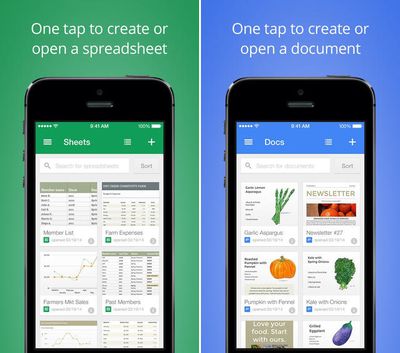
googledocs
The apps are designed with offline support built in, so viewing, editing, and creating files can be done without an Internet connection. Google Docs supports opening and editing documents that have been previously worked on via another device and documents can be shared and edited by multiple users at the same time.

With Google Docs you can:

- Create new documents or open and edit any that you started on the web or another device.
- Share documents and work together with others in the same document at the same time
- Get stuff done anytime–even without an internet connection
- Add and respond to comments
- Never worry about losing your work–everything is automatically saved as you type

Google Sheets functions similarly, allowing multiple users to work on documents in the app or on the web. The app supports formatting of cells, sorting data, and more.

With Google Sheets you can:

- Create new spreadsheets or open and edit any that you started on the web or another device.
- Share spreadsheets and work together with others in the same spreadsheet at the same time
- Get stuff done anytime–even without an internet connection
- Format cells, enter/sort data, perform various sheet operations, and more
- Never worry about losing your work–everything is automatically saved as you type

Both of Google’s new apps can be downloaded from the App Store at no cost.

- Google Docs [Direct Link]
- Google Sheets [Direct Link]

Top Rated Comments

Lapidus Avatar
154 months ago
In a few years, I guess this will be the popularity order:
Google > Apple > Microsoft
Score: 7 Votes (Like | Disagree)
C DM Avatar
154 months ago
Again with the horrible, fake 3D bevel on the app icon. Luckily I have no intention of using these apps.
Luckily something inconsequential like that has no effect on the functionality/usefulness of an app.
Score: 5 Votes (Like | Disagree)
MyopicPaideia Avatar
154 months ago
I disagree, strongly.

There are two things that matter in picking an office suite:
1 - How easy is collaboration?
2 - How capable is the suite of making great looking documents?

For the first category, Google wins, no competition. It's what their claim to fame is and always has been - it's what they've been focused on from day one. Without that, the entire world would have scoffed, shoved it aside, and kept using Office. iWork is better than Office in this category, but the synchronization is quite buggy when multiple people are editing a single document - it'll regularly see simultaneous edits as being mutually exclusive, even though they have nothing to do with each other, and thus force you to pick one edit or the other, not both.

For the second category, Apple and Microsoft's suites are about as capable of each other. The major difference is that with Apple, it's incredibly easy whereas I have to search through help manuals on a regular basis to make even trivial style changes in Office. Google is in an extremely distant last place in this category. It's okay for presentations (although even then, it's far inferior to PowerPoint and Keynote) but I'd never seriously consider making anything more than a trivial spreadsheet in it or a short, 1 or 2 page list just for internal usage, in the word editor.

Apple is poised to have inarguably the best software - they just need to fix synchronization issues in collaboration.

Oh, and you guys may not realize it, but IBM still makes Lotus. I had always assumed that died when Microsoft made Office, but I was wrong. It's easily the worst productivity suite in existence, but IBM requires all IBM employees to use it.

Aren't you forgetting a third major category? Feature set? Don't get me wrong, I use iWork exclusively as the CFO of a small company, and have basically enforced this on our workforce in an all Mac work environment. Excel has been basically relegated to a glorified calculator and used for legacy files from before our switch, but there are still some things it is better at. (tools for analysis of large sets of data, like pivot tables, as the major example)

iWork is definitely king when it comes to easily making attractive, easy to understand documents and presentations. Keynote is in a league by itself, Numbers is far more attractive and easier to integrate with Keynote than the Excel/Powerpoint combination, and Pages produces equally more attractive end products than Word ever will.

Feature set:
Office, iWork, Google

Collaboration:
Google, iWork, Office

Great Looking, Professional Documents:
iWork, Office, Google

iWork = 2+2+3 = 7 points
Office = 3+1+2 = 6 points
Google = 1+3+1 = 5 points
Score: 3 Votes (Like | Disagree)
Futurix Avatar
154 months ago
I don't get the purpose of the new apps - no new editing features compared to Google Drive app (still no editing for tables embedded inside Docs for example) and (unlike Drive) both apps don't show folders, just one long list of all documents filtered by type. What's the point? To give Google more icons? :confused:
Score: 3 Votes (Like | Disagree)
C DM Avatar
154 months ago
But what about PowerPoint?
Google Slides?
Score: 3 Votes (Like | Disagree)
Mainsail Avatar
154 months ago
I spent the $99 for Office 365 subscription, since we have 5 Macs and 2 iPads in the house. Nevertheless, I predict that, in the long-run, Office 365 subscriptions prices will likely drop substantially.

In the old days, if you wanted to use productivity software, there was basically only one option......shrink wrapped MS Office. Even if your needs were very simple, you were still pretty much forced into it. But now there are viable options for people with simpler needs. Even at work, 90% of my colleagues only use a small fraction of MS Office functionality and features......for most people it is overkill.

This free offering from Google, combined with Apple's iWorks, is one more step along the path to folks migrating away from MS Office. The subscription prices will likely follow downward as well.

Only time will tell.
Score: 2 Votes (Like | Disagree)

Popular Stories

Aston Martin CarPlay Ultra Screen

Apple's CarPlay Ultra to Expand to These Vehicle Brands Later This Year

Sunday February 1, 2026 10:08 am PST by
Last year, Apple launched CarPlay Ultra, the long-awaited next-generation version of its CarPlay software system for vehicles. Nearly nine months later, CarPlay Ultra is still limited to Aston Martin's latest luxury vehicles, but that should change fairly soon. In May 2025, Apple said many other vehicle brands planned to offer CarPlay Ultra, including Hyundai, Kia, and Genesis. In his Powe...
Apple Logo Black

Apple's Next Launch is 'Imminent'

Sunday February 1, 2026 12:31 pm PST by
The calendar has turned to February, and a new report indicates that Apple's next product launch is "imminent," in the form of new MacBook Pro models. "All signs point to an imminent launch of next-generation MacBook Pros that retain the current form factor but deliver faster chips," Bloomberg's Mark Gurman said on Sunday. "I'm told the new models — code-named J714 and J716 — are slated...
iOS 26

iOS 26.3 and iOS 26.4 Will Add These New Features to Your iPhone

Tuesday February 3, 2026 7:47 am PST by
We are still waiting for the iOS 26.3 Release Candidate to come out, so the first iOS 26.4 beta is likely still at least a week or two away. Following beta testing, iOS 26.4 will likely be released to the general public in March or April. Below, we have recapped known or rumored iOS 26.3 and iOS 26.4 features so far. iOS 26.3 iPhone to Android Transfer Tool iOS 26.3 makes it easier...
Apple MacBook Pro M4 hero

New MacBook Pros Reportedly Launching Alongside macOS 26.3

Sunday February 1, 2026 5:42 am PST by
Apple is planning to launch new MacBook Pro models with M5 Pro and M5 Max chips alongside macOS 26.3, according to Bloomberg's Mark Gurman. "Apple's faster MacBook Pros are planned for the macOS 26.3 release cycle," wrote Gurman, in his Power On newsletter today. "I'm told the new models — code-named J714 and J716 — are slated for the macOS 26.3 software cycle, which runs from...
iOS 26 Home Feature

Apple Gives Final Warning to Home App Users

Tuesday February 3, 2026 8:55 am PST by
In 2022, Apple introduced a new Apple Home architecture that is "more reliable and efficient," and the deadline to upgrade and avoid issues is fast approaching. In an email this week, Apple gave customers a final reminder to upgrade their Home app by February 10, 2026. Apple says users who do not upgrade may experience issues with accessories and automations, or lose access to their smart...















