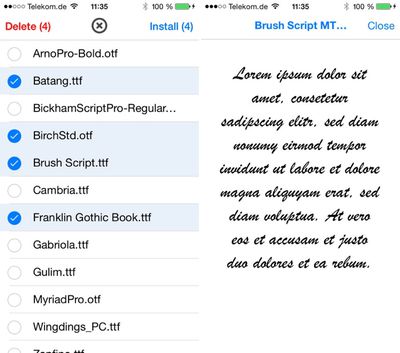
AnyFont, a recently released app from developer Florian Schimanke (via TUAW) allows iOS users to install custom TrueType and OpenType fonts to an iOS device for use in a multiple applications, such as Pages, Numbers, and Keynote.

According to the developer, the fonts are installed to an iOS device via a configuration profile after being added to an app's storage in iTunes, which is a new feature introduced with iOS 7.
anyfont

[AnyFont] takes the fonts that are added to the app's storage by the user via iTunes file sharing or the 'Open in...' dialog and creates a configuration profile from it so it can be installed on the device. AnyFont hands over the newly created profile to Safari which then takes the user to the installation process. When finished, the user is then taken back to AnyFont.

To use the app, .ttf or .otf font files must be installed to the AnyFont app using iTunes. Alternatively, fonts can be installed via Dropbox or Mail, by opening a file in those respective apps and choosing the "Open in..." option for AnyFont.

Once a font is added to the AnyFont app, a single tap will install it to a configuration profile on the device, which then allows the font to be used within other apps in the font selection menus.

While this is handy for creating documents on iOS devices with fonts that are typically unavailable on iOS devices, it is also useful for viewing documents or presentations created on a Mac or PC, as fonts can be preserved. The developer has created a tutorial that explains the entire font installation process, which is fairly easy using Dropbox:


AnyFont can be downloaded from the App Store for $1.99. [Direct Link]

Top Rated Comments

rorschach Avatar
155 months ago
You can do this for free already with the Configurator app; I guess this just makes it easier.
Score: 2 Votes (Like | Disagree)
xdxdaustin Avatar
155 months ago
Why do I feel like Apple won't let this stay too long in the App Store....
Score: 2 Votes (Like | Disagree)
dannys1 Avatar
155 months ago
Oh my. Something other than freakin helvetica on the iPad?

Apple's not going to stand for this, no sir.

Ive got

Helvetica
Helvetica Neue
Helvetica World
Helvetica Light
Helvetica Condensed
Helvetica Bold
Helvetica Ultra Light

Where can I find this "Freakin Helvetica" you talk about?
Score: 1 Votes (Like | Disagree)
japanime Avatar
155 months ago
You can do this for free already with the Configurator app; I guess this just makes it easier.

Exactly. Also, Configurator is pretty easy to use itself, can do a whole lot more than just install fonts, and is made by Apple.
Score: 1 Votes (Like | Disagree)
csixty4 Avatar
155 months ago
The programmer behind this is a user here & first mentioned it a month ago. There's been at least one upgrade approved since then. I can't see Apple cracking down on it since it's using a feature they built for things like this. I just wish more apps used the OS font APIs so they could use the installed fonts.
Score: 1 Votes (Like | Disagree)

Popular Stories

Aston Martin CarPlay Ultra Screen

Apple's CarPlay Ultra to Expand to These Vehicle Brands Later This Year

Sunday February 1, 2026 10:08 am PST by
Last year, Apple launched CarPlay Ultra, the long-awaited next-generation version of its CarPlay software system for vehicles. Nearly nine months later, CarPlay Ultra is still limited to Aston Martin's latest luxury vehicles, but that should change fairly soon. In May 2025, Apple said many other vehicle brands planned to offer CarPlay Ultra, including Hyundai, Kia, and Genesis. In his Powe...
iOS 26

iOS 26.3 and iOS 26.4 Will Add These New Features to Your iPhone

Tuesday February 3, 2026 7:47 am PST by
We are still waiting for the iOS 26.3 Release Candidate to come out, so the first iOS 26.4 beta is likely still at least a week or two away. Following beta testing, iOS 26.4 will likely be released to the general public in March or April. Below, we have recapped known or rumored iOS 26.3 and iOS 26.4 features so far. iOS 26.3 iPhone to Android Transfer Tool iOS 26.3 makes it easier...
Apple Logo Black

Apple's Next Launch is 'Imminent'

Sunday February 1, 2026 12:31 pm PST by
The calendar has turned to February, and a new report indicates that Apple's next product launch is "imminent," in the form of new MacBook Pro models. "All signs point to an imminent launch of next-generation MacBook Pros that retain the current form factor but deliver faster chips," Bloomberg's Mark Gurman said on Sunday. "I'm told the new models — code-named J714 and J716 — are slated...
Apple MacBook Pro M4 hero

New MacBook Pros Reportedly Launching Alongside macOS 26.3

Sunday February 1, 2026 5:42 am PST by
Apple is planning to launch new MacBook Pro models with M5 Pro and M5 Max chips alongside macOS 26.3, according to Bloomberg's Mark Gurman. "Apple's faster MacBook Pros are planned for the macOS 26.3 release cycle," wrote Gurman, in his Power On newsletter today. "I'm told the new models — code-named J714 and J716 — are slated for the macOS 26.3 software cycle, which runs from...
iOS 26 Home Feature

Apple Gives Final Warning to Home App Users

Tuesday February 3, 2026 8:55 am PST by
In 2022, Apple introduced a new Apple Home architecture that is "more reliable and efficient," and the deadline to upgrade and avoid issues is fast approaching. In an email this week, Apple gave customers a final reminder to upgrade their Home app by February 10, 2026. Apple says users who do not upgrade may experience issues with accessories and automations, or lose access to their smart...