

Unibox, a new Messages-style email client that was first announced in August of 2012, is now available for download as part of a public beta test.

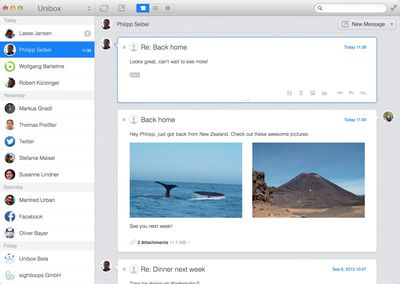
The app is designed to make email more "personal" by organizing emails into a contact-centric view. Unibox's interface is divided into two main panes, with the left side displaying contacts and the right side displaying all messages that have been received/exchanged with a particular person or website.
uniboxemail1
According to Unibox, this chat-like design significantly reduces email clutter by grouping incoming messages from contacts into a single list.

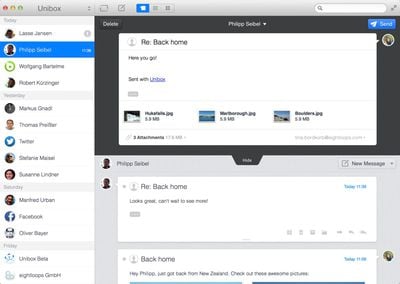
Composing emails with the app is done in a single window, which eliminates separate compose windows utilized by existing apps like Mail. All attachments sent to and received from contacts are readily available, and attached media is presented in a grid view.
unibox2
Unibox supports all IMAP accounts and works with both Mountain Lion and Mavericks. The full Mac app is expected to be released at the end of September, and ahead of release, users can sign up for the beta on the company's website. Beta will last until the Mac app debuts.


Top Rated Comments

pgiguere1 Avatar
162 months ago
Seems like a weird timing considering personnal email addresses are getting less and less used for human-to-human communication, and more and more for advertising or various automatic notifications from websites.

Of course I can't speak for everyone but it seems to me that social networks and text messages are where most human-to-human communication is done nowadays. This could have been a good concept 10 years ago.
Score: 4 Votes (Like | Disagree)
Michael Goff Avatar
162 months ago
installed and used it for 1 minute. uninstalled and got back to airmail. email shouldn't be listed by contact, but by subject. sparrow died so airmail is the new king.

Am I the only one who just uses the mail.app?

What makes airmail so much better?
Score: 3 Votes (Like | Disagree)
seamer Avatar
162 months ago
It doesn't support Exchange
Google's IMAP is detected properly

I have two accounts configured in mine, and there's no way to quickly see which mailbox I'm looking at. There's a lack of folders... And I can't drag mail from one box to another
Score: 2 Votes (Like | Disagree)
vanc Avatar
161 months ago
Does it support mail threads? Without that, we cannot really use in a business environment as emails may have multiple people involved.

Anyway, mail.app is the only email client I'm using on Mac. It works fine for me since 2007 when I started using Mac. Just the vanilla app. No plugins.
Score: 1 Votes (Like | Disagree)
curmudgeon32 Avatar
162 months ago
Seems like a weird timing considering personnal email addresses are getting less and less used for human-to-human communication, and more and more for advertising or various automatic notifications from websites.

Of course I can't speak for everyone but it seems to me that social networks and text messages are where most human-to-human communication is done nowadays. This could have been a good concept 10 years ago.

Sometimes email is the right medium, sometimes not. I have conversations with people across various media (email, texts, Facebook messages, the occasional Twitter DM).

What I'd like is a single app or system or something that can work across multiple streams so that you click on a contact and see everything from that person, regardless of how it was sent.
Score: 1 Votes (Like | Disagree)
teejaysplace Avatar
162 months ago
Looks great for those with at most ~10-20 contacts.

It groups things by day first, then by contact. So you'll see all the emails that you received from John The Boss today, then the ones you received from him yesterday, etc. I suppose if you receive 500 emails from 200 different people each day, then this isn't the organizational system for you. But for those who work on small teams, I can definitely see the upside.

When I'm working on a project, I find I'm paying closest attention to the people directly involved, while others remain in the periphery. So I enjoy knowing right off the bat that I've received 5 emails from my boss and 3 emails from the Assistant Director. It's a lot easier than trying to read back over endless threads of text.

But I also need to file emails accordingly, beyond just the sender. Like if something is a receipt, it needs to go under purchasing, regardless of the sender. After using the program this morning, I didn't see an obvious way to do that. I also found I have to right click each time I want to delete a message (pressing the Delete key won't do it.) And if it's one thing busy office workers hate, it's extra clicks.

Overall, the idea has significant upside, but the execution isn't 100% there yet.
Score: 1 Votes (Like | Disagree)

Popular Stories

Aston Martin CarPlay Ultra Screen

Apple's CarPlay Ultra to Expand to These Vehicle Brands Later This Year

Sunday February 1, 2026 10:08 am PST by
Last year, Apple launched CarPlay Ultra, the long-awaited next-generation version of its CarPlay software system for vehicles. Nearly nine months later, CarPlay Ultra is still limited to Aston Martin's latest luxury vehicles, but that should change fairly soon. In May 2025, Apple said many other vehicle brands planned to offer CarPlay Ultra, including Hyundai, Kia, and Genesis. In his Powe...
Apple Logo Black

Apple's Next Launch is 'Imminent'

Sunday February 1, 2026 12:31 pm PST by
The calendar has turned to February, and a new report indicates that Apple's next product launch is "imminent," in the form of new MacBook Pro models. "All signs point to an imminent launch of next-generation MacBook Pros that retain the current form factor but deliver faster chips," Bloomberg's Mark Gurman said on Sunday. "I'm told the new models — code-named J714 and J716 — are slated...
iOS 26

iOS 26.3 and iOS 26.4 Will Add These New Features to Your iPhone

Tuesday February 3, 2026 7:47 am PST by
We are still waiting for the iOS 26.3 Release Candidate to come out, so the first iOS 26.4 beta is likely still at least a week or two away. Following beta testing, iOS 26.4 will likely be released to the general public in March or April. Below, we have recapped known or rumored iOS 26.3 and iOS 26.4 features so far. iOS 26.3 iPhone to Android Transfer Tool iOS 26.3 makes it easier...
Apple MacBook Pro M4 hero

New MacBook Pros Reportedly Launching Alongside macOS 26.3

Sunday February 1, 2026 5:42 am PST by
Apple is planning to launch new MacBook Pro models with M5 Pro and M5 Max chips alongside macOS 26.3, according to Bloomberg's Mark Gurman. "Apple's faster MacBook Pros are planned for the macOS 26.3 release cycle," wrote Gurman, in his Power On newsletter today. "I'm told the new models — code-named J714 and J716 — are slated for the macOS 26.3 software cycle, which runs from...
iOS 26 Home Feature

Apple Gives Final Warning to Home App Users

Tuesday February 3, 2026 8:55 am PST by
In 2022, Apple introduced a new Apple Home architecture that is "more reliable and efficient," and the deadline to upgrade and avoid issues is fast approaching. In an email this week, Apple gave customers a final reminder to upgrade their Home app by February 10, 2026. Apple says users who do not upgrade may experience issues with accessories and automations, or lose access to their smart...














