Apple Seeds Golden Master of OS X Mountain Lion to Developers - MacRumorsOpen MenuShow RoundupsShow Forums menuVisit ForumsOpen Sidebar
Skip to Content

Apple Seeds Golden Master of OS X Mountain Lion to Developers
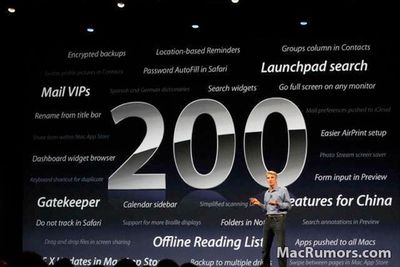
200newfeatures
"200 New Features" Mountain Lion slide shown at WWDC

Apple released the Golden Master (GM) version of OS X Mountain Lion to developers today. The "golden master" designation indicates that this version of the software is intended to be the final version released to the public, barring any last-minute issues. The Build is 12A269.

Apple first previewed Mountain Lion in February, highlighting many features already present in iOS, including Messages, Reminders, Notes, Notification Center, Game Center and more at that time. At WWDC, Apple announced additional features, including Dictation, iCloud Tabs, and 'Power Nap'.

We previously highlighted this video which shows off many of the new features found in Mountain Lion:


Mountain Lion will be priced at $19.99 and released to the Mac App Store in July.

Popular Stories

iOS 27 Next to iPhone

Here's When iOS 27 Rolls Out Today in Every Time Zone [Update: It's Out]

Sunday September 13, 2026 3:00 am PDT by
Update 10:04 a.m.: iOS 27 is rolling out now, though it may take a bit for all users to see it, so keep checking! Apple is about to release iOS 27, which will finally deliver more advanced Siri AI capabilities as well as a variety of other refinements, improvements, and new features to iPhones. It's Apple's biggest software update of the year, and Apple announced at Wednesday's iPhone event...
iOS 27 Icon iPhone

iOS 27 Available Now With These 8 New Features

Monday September 14, 2026 9:00 am PDT by
Update — 10 a.m. Pacific Time: Apple has released iOS 27. During its iPhone 18 Pro and iPhone Duo event last week, Apple announced that iOS 27 will be released widely on Monday, September 14. iOS 27 should be available around 10 a.m. Pacific Time / 1 p.m. Eastern Time today via the Settings app, under General → Software Update. Below, we have highlighted eight new features and...
Apple iCloud Plus expansion hero

iCloud+ Now Includes Apple TV, Apple Arcade, and Curated Apple Music Stations in Over 100 Countries

Tuesday September 15, 2026 1:43 am PDT by
Apple today announced a new subscription initiative that turns paid iCloud+ subscriptions into a broader services bundle in more than 100 countries. In select countries, Apple says every paid iCloud+ plan, including the cheapest 50GB tier, now includes Apple TV and Apple Arcade "at no additional cost," while family sharing extends the storage, TV and Arcade access to up to five people....

Top Rated Comments

heisenberg123 Avatar
185 months ago
Can anyone give me a download link please?

not sure whats worse
a) not knowing how to obtain things illegally on net in 2012
b) asking for help to do it on a forum thats so against it
Score: 72 Votes (Like | Disagree)
Tonewheel Avatar
185 months ago
[SIZE="4"]I'm honestly not that excited about this upgrade. Nothing exciting has really come out since Tiger or Leopard in my opinion. Most of these new features will be used for like 5 minutes by the mainstream user because they're just not that important (i.e. Reminders). And they also end up taking up more precious RAM & most importantly, battery life (on a laptop). Can someone name something that is really that ground breaking in this release? It just seems like things were reorganized & tweaked a bit.

P.S.
I've been in the Apple game since 1985, so I know a good Apple product when I see it. I'm not saying this is bad, but it's just not that amazing. Maybe OS 11 will be exciting?
[/SIZE]

Please type larger next time.
Score: 61 Votes (Like | Disagree)
thelink Avatar
185 months ago
Can anyone give me a download link please?

https://developer.apple.com/ (https://developer.apple.com/)
That's a good place to start. Have fun. :)
Score: 26 Votes (Like | Disagree)
185 months ago
Bye bye Lion

Seems like we hardly got to know each other :o
Score: 24 Votes (Like | Disagree)
185 months ago
Hooray…..

Just released, 10.8 GM build.

Downloading as I type….
Score: 22 Votes (Like | Disagree)
ScottishDuck Avatar
185 months ago
A reminder on how to make your own USB copy. Requires a 8GB+ USB drive

*Download the installer from the app store.

*Right-click installer -> "Show Package Contents"

apple seeds golden master of os x mountain lion to developers image

*Contents -> Shared Support -> InstallESD.dmg (open it/mount it)

apple seeds golden master of os x mountain lion to developers image

*Open the terminal and copy this command:

open /Volumes/Mac\ OS\ X\ Install\ ESD/BaseSystem.dmg
apple seeds golden master of os x mountain lion to developers image

*Now open Diskutility and "restore" BaseSystem.dmg to your USB drive.

***PLEASE NOTE THIS REQUIRES YOUR USB HAS A GUID PARTITION TABLE***

[Changing partition table to GUID]
apple seeds golden master of os x mountain lion to developers image

apple seeds golden master of os x mountain lion to developers image

[Restoring the DMG]
apple seeds golden master of os x mountain lion to developers image

*Now open your newly restored USB drive

apple seeds golden master of os x mountain lion to developers image

*System -> Installation

apple seeds golden master of os x mountain lion to developers image

*Delete the link called "Packages" and then create a new folder with the same name

apple seeds golden master of os x mountain lion to developers image

apple seeds golden master of os x mountain lion to developers image

*Open the terminal again and copy this to it:

open /Volumes/Mac\ OS\ X\ Install\ ESD/Packages
apple seeds golden master of os x mountain lion to developers image

*Copy everything in this folder to the "Packages" folder you created on your USB.

apple seeds golden master of os x mountain lion to developers image

apple seeds golden master of os x mountain lion to developers image

**Note this stage might take a while**

apple seeds golden master of os x mountain lion to developers image

Hurray you now have a working installer.

----------------------------------------------------------------------------------------

A note:

This guide may seem different to others you have seen but it works better:

*The standard installer will copy the installation DMG to your hard drive and then re-run the installation using that. i.e you are needlessly running the install twice. My way doesn't do that.

*This installer allows you to clean install
Score: 20 Votes (Like | Disagree)

🔗 Related Apple News & Rumors

Stay updated with the latest Apple ecosystem news and verified rumors















































