A Closer Look at the New MacBook Pro's Retina Display - MacRumorsOpen MenuShow RoundupsShow Forums menuVisit ForumsOpen Sidebar
Skip to Content

A Closer Look at the New MacBook Pro's Retina Display

AnandTech takes a closer look at the new MacBook Pro's 2880x1800 Retina display, revealing just how well the display stacks up against its predecessor and other notebook displays and delving into the details of how it handles various resolutions.

In looking at scaling, the report explains the new slider option in System Preferences that allows users to select from a spectrum of resolutions that include not only the 1440x900 resolution in Retina quality using the full 2880x1800 pixels, but also larger desktop spaces at 1920x1200 and 1680x1050.

Retina Display MBP owners now get a slider under OS X's Display Preferences that allow you to specify desktop resolutions other than 1440 x 900. At 1440 x 900 you don't get any increase in usable desktop resolution compared to a standard 15-inch MacBook Pro, but everything is ridiculously crisp. If you're like me however and opted for the 1680 x 1050 "high-res" upgrade last generation, this won't do. Thankfully Apple offers 1680 x 1050 and 1920 x 1200 scaling options that trade a bit of image quality and performance for added real estate.
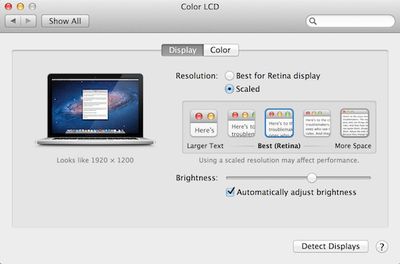
retina macbook pro display preferences
AnandTech's report also describes how Apple's display design has done away with the cover glass that in some circumstances suffers from significant glare on the standard non-Retina MacBook Pro. Phil Schiller noted during the keynote introduction that glare has been reduced 75% from the previous MacBook Pro, and AnandTech calls the Retina MacBook Pro's glare "remarkably close" to that seen on an earlier-generation matte MacBook Pro.

Comparing color and contrast, AnandTech discovered that the Retina MacBook Pro's display has remarkably improved black levels, which help compensate for slightly lower brightness. Contrast is also excellent, making for crisp and vivid content display.
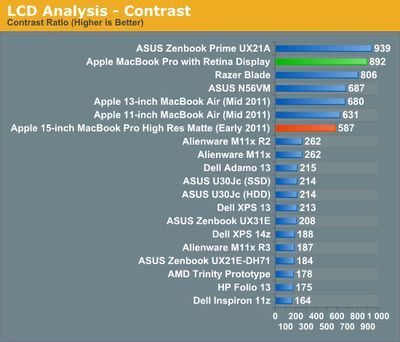
macbook pro retina contrast
As with Retina displays on iOS devices, Apple automatically scales text to display at the crisper Retina resolution, but it is dependent on apps using Apple's text rendering. AnandTech notes that Google Chrome currently uses its own text rendering engine and is thus unable to take advantage of the sharper text available in Safari.

Finally, the report takes a look at how games handle the Retina display, with Diablo III taking full advantage of the 2880x1800 display as touted by Apple during the keynote. Some games are able to see the full resolution while others are limited to the "non-Retina" resolutions topping out at 1920x1200, but it seems reasonable to believe that over time game developers will be building in support for the ultra-high resolution of the new MacBook Pro.


Related Roundup: MacBook Pro

Popular Stories

iPhone Duo Display Cracking

Apple Alerts Stores to iPhone Duo's Display Cracking Issue

Friday October 30, 2026 3:20 pm PDT by
In a memo shared with Apple Stores and Apple Authorized Service Providers this week, and later obtained by MacRumors, Apple provided technicians with guidance on how to diagnose and address the iPhone Duo's inner display cracking issue. If a customer reports the issue, Apple advised technicians to inspect the iPhone Duo and repair or replace it in accordance with their standard procedures....

iPad mini OLED feature 1

Apple Executive Comments on New iPad Mini Lacking 120Hz Display

Thursday October 29, 2026 1:47 pm PDT by
While the new iPad mini has an OLED display, the device does not support ProMotion, meaning the display's refresh rate is limited to 60Hz instead of 120Hz. ProMotion support would have allowed for the iPad mini's refresh rate to automatically adjust from 10Hz to 120Hz depending on the content being displayed, but evidently Apple has kept the feature exclusive to the iPad Pro among iPad...
Pinched iPad Mini

Apple Avoids Showing Pinched Fingers on iPad Mini Page in South Korea

Thursday October 29, 2026 11:52 am PDT by
In the U.S. and most other countries, Apple's website shows the new iPad mini being held by pinched fingers, but this is not the case in South Korea. The new iPad mini shown with pinched fingers on Apple's website in the U.S. On its South Korean website, Apple simply shows an image of the iPad mini on its own. The new iPad mini shown without pinched fingers on Apple's website in South Korea ...

Top Rated Comments

gregwyattjr Avatar
188 months ago
I'm scared to look at this beautiful new display. It'll make my 1280x800 MacBook display look like a Lite-Brite.
Score: 29 Votes (Like | Disagree)
188 months ago
The 75% reduction in glare is the most interest to me - hoping they might take this into the next iMac refresh to make it more viable for pros perhaps?
Score: 27 Votes (Like | Disagree)
KnightWRX Avatar
188 months ago
Scaled at 1680x1050:
[url=http://images.anandtech.com/galleries/2078/Screen%20Shot%202012-06-11%20at%204.35.55%20PM_thumb.png]Image (http://images.anandtech.com/galleries/2078/Screen%20Shot%202012-06-11%20at%204.35.55%20PM.png)[/URL]
(Click to enlarge)

Look at the size of the image. It's a 3,360px × 2,100px image. Basically, it's a pixel perfect rendition of a retina 1680x1050 image. That's no good to evaluate the downscaling algorithm used to display it in full screen on a 2880x1800 screen.

Sure we can use Photoshop or Gimp to downscale it, but then we have Photoshop or Gimp's downscaling algorithm coming into play. What we need to know and see is a 2880x1800 shot of the 3360x2100 shot downscaled using the same code OS X uses.

That's why I say Anand's comparison is bunk, it's not possible to see what it actually looks like on the screen.

I'll wait to see it in store. Feel free to downrank me for not "believing" blindly.
Score: 16 Votes (Like | Disagree)
188 months ago
If you were to select a resolution that wasn't exactly the native pixel density (2880x1800) or exactly half (1440x900), and were to instead pick a larger resolution like 1680x1050 or 1920x1200 (as mentioned in the article) wouldn't you experience fuzzing as the software tries to compensate for the hardware vs. software pixel boundaries?
When you pick the "more space" option, which is equivalent to 1920x1200, OSX actually renders it at double that size in both directions, or 3840x2400, using the retina quality graphics. It then smoothly downscales to 2880x1800.

It probably isn't perfect, I haven't seen one in person yet, but it should be much better than simply setting a display to a non-native resolution.

Instead of upscaling a low resolution image, it's downlscaling a high resolution one.
Score: 12 Votes (Like | Disagree)
Littleodie914 Avatar
188 months ago
If you were to select a resolution that wasn't exactly the native pixel density (2880x1800) or exactly half (1440x900), and were to instead pick a larger resolution like 1680x1050 or 1920x1200 (as mentioned in the article) wouldn't you experience fuzzing as the software tries to compensate for the hardware vs. software pixel boundaries?
Score: 9 Votes (Like | Disagree)
188 months ago
Yes. Also not much point paying for an expensive 2880 screen and running it at 1680 when a native 1680 screen would be both sharper and cheaper, if they offered it.
Anandtech specifically says that the '1680x1050' mode on the Retina Macbook Pro looks better than the old 1680x1050 display:

Even at the non-integer scaled 1680 x 1050 setting, the Retina Display looks a lot better than last year's high-res panel. It looks like Apple actually renders the screen at twice the selected resolution before scaling it to fit the 2880 x 1800 panel (in other words, at 1920 x 1200 Apple is rendering everything at 3840 x 2400 (!) before scaling - this is likely where the perf impact is seen, but I'm trying to find a way to quantify that now). Everything just looks better. I also appreciate how quick it is to switch between resolutions on OS X. When I'm doing a lot of work I prefer the 1920 x 1200 setting, but if I'm in content consumption mode I find myself happier at 1440 x 900 or 1680 x 1050.
The scaling that Apple is doing is very different than just running a display at a non-native resolution.
Score: 8 Votes (Like | Disagree)
Latest Stories
Apple Watch Ultra 4 Hits All-Time Low Price With Amazon's $99 Discount
18 hours ago
Reminder: Apple's Big Discount on Beats 360 Ear Cushions Ends Today
18 hours ago
Here's a New Tour of Apple's HomeView Software
18 hours ago
Apple Reveals New iPad Mini's Battery Capacity
19 hours ago
Top Stories: Apple's Big MacBook Pro, iPad mini and iMac Updates
21 hours ago
'Pluribus' Season 2 Reportedly Starts Production Today
1 day ago
iPhone 18 Pro Sales Surge in China, Offsetting Decline in U.S. and Japan
1 day ago
HomeView Software 27.2: Wallpapers, Control Center, and More
1 day ago
Apple Alerts Stores to iPhone Duo's Display Cracking Issue
1 day ago
iOS 27.3 Will Enable These Apple Intelligence Features in China
2 days ago
Apple Says iOS 27.3 Beta Coming Next Week
2 days ago
Apple's Flash Storage Suppliers Are Finally 'Getting Their Revenge'
2 days ago
14 New Things Your iPhone Can Do in iOS 27.2
2 days ago
iPhone Duo Review: One Week Later
2 days ago
Samsung Mocks iPhone Duo Display Cracks in New Ad Campaign
2 days ago
The MacRumors Show: OLED MacBook Pro, iPad Mini 8, and More
2 days ago
MacBook Pro With Touch Display: 15 More Details Revealed
2 days ago
Russia Places Apple on State Surveillance Registry
2 days ago
Halloween Weekend Brings Discounts on Apple Accessories and Pre-Orders
2 days ago
Apple Has Released More Than 25 New Products in the Past Two Months
2 days ago
Local Code Launches as Free, Private AI Assistant Tool for Mac
2 days ago
Apple Acquires Ascend.io
2 days ago
HomePod Mini 2 Launches Today: All the New Features
2 days ago
AirTag 2 4-Pack Drops to New Low Price of $69.99
2 days ago
Rian Johnson's iPhone Camera App Goes Viral
2 days ago
Where Did All the iPhone Duos Go? Mostly to Apple's Stores
2 days ago
Apple's Touchscreen MacBook Pro Could Ship 1.5M Units in 2027
2 days ago
New Apple TV 4K and iPad Mini: RAM Amounts Revealed
2 days ago
Apple Executive Comments on New iPad Mini Lacking 120Hz Display
3 days ago
Here's a Hands-On Look at HomePod Mini 2's New Two-Tone Colors
3 days ago

🔗 Related Apple News & Rumors

Stay updated with the latest Apple ecosystem news and verified rumors