New iPad Uses Retina Graphics When Running iPhone Apps

retina iconWhen the iPad was first introduced there weren't many iPad-specific apps yet available. As a solution, Apple allowed apps designed for the iPhone's smaller screen to run on the iPad in a form of emulation. The apps could be run as if they were on the iPhone, using only a fraction of the iPad's screen. Alternatively, those apps could also be run in a 2x mode, using a technique called pixel doubling to fill the iPad's screen. However, when in 2x mode, both artwork and text would look blocky and pixelated.

Since the original iPad's launch, both the iPhone and iPod Touch has been upgraded to high resolution Retina displays. While Apple could use the Retina graphics from apps that had been upgraded to work with the iPhone 4 and 4S's 960x640 display (nearly all iPhone apps nowadays), so far, they've chosen not to. Instead, the iPad 1 and 2 continue to just pixel double the 480x320 display from the original iPhone's screen. In fact, there is even a jailbreak app called Retinapad that enables the use of iPhone Retina graphics on the original iPad, filling this gap in functionality.

The new iPad, however, now displays the Retina graphics of apps designed for the iPhone in both 1x and 2x mode, resulting in a significantly improved visual experience, as pointed out by a user on the TouchArcade forums. The user experience issue still exists -- in 2x mode, interface elements are twice as large -- but it looks much better .

I just tested this with NBA Jam, which the iphone version looked like crap on my ipad 1, but looked great through retinapad when I had it jailbroken since it was tricked into loading the iphone 4's retina enable graphic assets. Now, on my brand spankin' new ipad third gen, it looks fantastic, without retinapad, just by enabling the 2X option at the bottom right of the screen.
thumb
Click to compare in full size to Native iPad version.

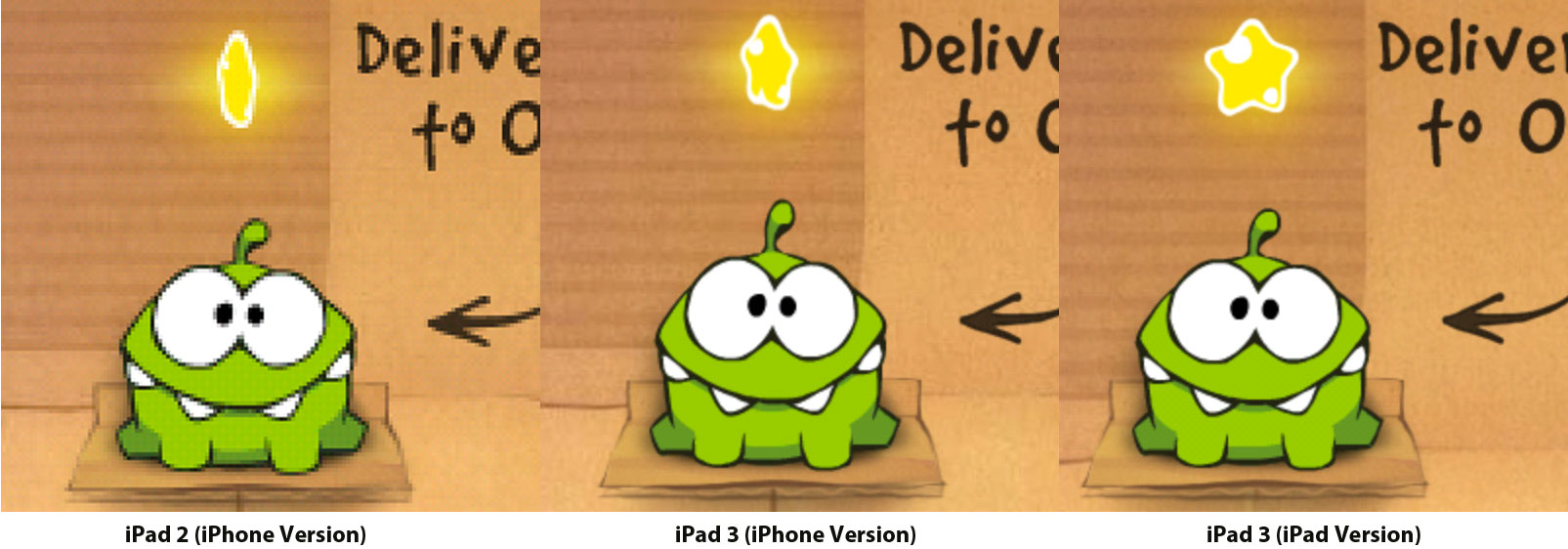
In this image above, the graphics of the iPhone version of Cut the Rope have been compared side-by-side on an iPad 2 (left) and iPad 3 (right). Note that while there is an iPad-native version of the app available, we used the iPhone version to illustrate the differences. The iPad 3 version uses the iPhone Retina graphics found in Cut the Rope for iPhone, resulting in a much sharper image.

In fact, the iPhone version now looks nearly identical to the iPad native version of the game:

ipadversion
Note that Cut the Rope HD has not yet been updated to support the iPad Retina display, so of course, native Retina iPad apps will look even better on the new iPad. In the meanwhile, iPhone apps running on the new iPad will also see a notable visual improvement, approaching previous iPad native apps.


Popular Stories

Aston Martin CarPlay Ultra Screen

Apple's CarPlay Ultra to Expand to These Vehicle Brands Later This Year

Sunday February 1, 2026 10:08 am PST by
Last year, Apple launched CarPlay Ultra, the long-awaited next-generation version of its CarPlay software system for vehicles. Nearly nine months later, CarPlay Ultra is still limited to Aston Martin's latest luxury vehicles, but that should change fairly soon. In May 2025, Apple said many other vehicle brands planned to offer CarPlay Ultra, including Hyundai, Kia, and Genesis. In his Powe...
iOS 26

iOS 26.3 and iOS 26.4 Will Add These New Features to Your iPhone

Tuesday February 3, 2026 7:47 am PST by
We are still waiting for the iOS 26.3 Release Candidate to come out, so the first iOS 26.4 beta is likely still at least a week or two away. Following beta testing, iOS 26.4 will likely be released to the general public in March or April. Below, we have recapped known or rumored iOS 26.3 and iOS 26.4 features so far. iOS 26.3 iPhone to Android Transfer Tool iOS 26.3 makes it easier...
Apple Logo Black

Apple's Next Launch is 'Imminent'

Sunday February 1, 2026 12:31 pm PST by
The calendar has turned to February, and a new report indicates that Apple's next product launch is "imminent," in the form of new MacBook Pro models. "All signs point to an imminent launch of next-generation MacBook Pros that retain the current form factor but deliver faster chips," Bloomberg's Mark Gurman said on Sunday. "I'm told the new models — code-named J714 and J716 — are slated...
Apple MacBook Pro M4 hero

New MacBook Pros Reportedly Launching Alongside macOS 26.3

Sunday February 1, 2026 5:42 am PST by
Apple is planning to launch new MacBook Pro models with M5 Pro and M5 Max chips alongside macOS 26.3, according to Bloomberg's Mark Gurman. "Apple's faster MacBook Pros are planned for the macOS 26.3 release cycle," wrote Gurman, in his Power On newsletter today. "I'm told the new models — code-named J714 and J716 — are slated for the macOS 26.3 software cycle, which runs from...
iOS 26 Home Feature

Apple Gives Final Warning to Home App Users

Tuesday February 3, 2026 8:55 am PST by
In 2022, Apple introduced a new Apple Home architecture that is "more reliable and efficient," and the deadline to upgrade and avoid issues is fast approaching. In an email this week, Apple gave customers a final reminder to upgrade their Home app by February 10, 2026. Apple says users who do not upgrade may experience issues with accessories and automations, or lose access to their smart...

Top Rated Comments

SmileyDude Avatar
181 months ago
This is a clear example of apple's stupidity. Why is this not enabled on older iPads???

There are a few reasons why the new iPad would do this and the old one doesn't. The most basic reason is that on Retina displays, apps run with Retina assets if available. Non-Retina displays never use Retina assets. In this regard, the new iPad is behaving exactly the same way as the old ones.

Second, if Apple did decide to use the Retina graphics for 2x mode on older iPads, it would introduce a few problems. One is that the original iPad is memory starved as it is. It came with 256MB and it wasn't until the iPhone 4 with it's Retina display did Apple bump up the RAM to 512MB. Second, should Apple use the Retina graphics for both the 1x and 2x modes? If they do, they are wasting CPU and battery to produce pixels that will only be scaled down. If they don't, they would need to come up with a way for apps to switch between 1x and 2x mode at runtime (they currently can't -- there is nothing in the API to even allow for that possibility). Also there is the issue of how the graphics would look when you take Retina graphics and scale them back down to 1x -- it's not nearly as nice as simply using the 1x graphics already.

One more thing to consider -- when the original iPad came out, there were no Retina display devices. All iPhone apps were 1x apps. The pixel doubling mode of the original iPad was just a way to allow iPhone apps to take up more of the screen than they would otherwise. Clearly Apple's goal was to have more iPad native/Universal apps. Spending engineering resources to make "legacy" apps run better is typically not a good use of time. Turning on Retina support on the new iPad for iPhone apps didn't require a large amount of engineering time. In fact, due to how the iOS APIs work, it may have not even required any time to get it up and running. Just the time required to verify that it did work okay.
Score: 19 Votes (Like | Disagree)
arn Avatar
181 months ago
On the old iPad, a retina display game would have to load two sets of graphics. Since the app wouldn't be designed to change resolution at run time it would have to restart the app when you switch display sizes.
true, though does anyone actually use iPhone apps in 1x mode on their iPad? They should just have a "force 2x" mode and use Retina graphics.

arn
Score: 14 Votes (Like | Disagree)
slu Avatar
181 months ago
Your comment is an example of your stupidity.

Why? It is a valid point. If older iPads can offer a better experience when using iPhone apps, it is silly to limit it. This is not something that will drive upgrades. I am going to send Apple feedback.

Next time you comment, try to post something of value instead of insults.
Score: 14 Votes (Like | Disagree)
ShiftyPig Avatar
181 months ago
So basically, Retina iPhone apps look like non-Retina iPad apps when displayed on a Retina iPad.

Aka, even tiny phone apps look as good as what people are used to on their iPad. Pretty cool.
Score: 13 Votes (Like | Disagree)
HarryPot Avatar
181 months ago
This is a clear example of apple's stupidity. Why is this not enabled on older iPads???

Such are the ways of Apple. Tho I agree, it sounds stupid they don't do it.

Anyways, I never use iPhone apps in my iPad. They feel just wrong.
Score: 12 Votes (Like | Disagree)
nagromme Avatar
181 months ago
Such are the ways of Apple. Tho I agree, it sounds stupid they don't do it.

Anyways, I never use iPhone apps in my iPad. They feel just wrong.
This decision by Apple was VITAL, and benefitted both them and we the users.

Without it, many (most?) developers would have taken the laziest approach and not created iPad-specific versions. By not giving developers a “sort of OK” easy way out, it forced them to give us REAL iPad versions or (practically) nothing.

Anyone who thinks we’d have all the same wealth of iPad-specific apps without that decision is ignoring the reality of human nature: enough developers would have taken the easy way out, and enough users would have tolerated it, to have harmed the new platform’s success and diminished its quality of apps on average.

Now it’s less important for two reasons: a) the iPad itself is now firmly established as a platform and b) there’s now one MORE reason to demand native iPad apps: iPad retina displays. Doubled iPhone retina apps are nice to have, but no longer nearly “good enough.” So Apple’s giving developers the easy way out at last. And for developers who never did bother supporting the iPad, their users have gotten a nice resolution boost. Ditto for developers who didn’t opt for Universal: users who already had the iPhone version and didn’t want to buy twice now have something a little better than they used to.


If Apple didn't enforce iPad apps, then you'll see the Android mess of nothing being optimized for tablets.
I will never get back the 3 minutes of my life I spent explaining what you explained in one sentence :p
Score: 8 Votes (Like | Disagree)