

Apple today released the long-awaited iPhone OS 3.0 (Build 7A341) for both iPhone and iPod touch via iTunes. Users should sync their devices with iTunes and check for updates in order to access the new version. iPod Touch owners will need to purchase the new firmware for $9.95 while iPhone owners will get the firmware downloaded automatically.
While many of the features of the new operating system have been detailed over the past few months, a large list of features are detailed by Apple:
- Copy and Paste: Quickly and easily cut, copy, and paste text from application to application. Select entire blocks of web text with a tap. Copy and paste images from the web, too.
- Landscape Keyboard: Want more room to type? Rotate iPhone to landscape to use a larger keyboard in Mail, Messages, Notes, and Safari.
- Spotlight Search: Find what youre looking for across your iPhone, all from one place. Spotlight searches all of your contacts, email, calendars, and notes, as well as everything in your iPod.
- Safari: Enjoy faster performance, autofill user names and passwords, and more.
- Auto Wi-Fi login: Log in to a Wi-Fi hotspot and iPhone automatically logs you in when you connect again
- Find My iPhone: Find your iPhone if you lose it and protect your privacy with Remote Wipe.
- Shake to Shuffle: Give iPhone a shake and it shuffles to a different song in your music library.
Other sites have provided detailed walkthroughs of the many new features, including some handy tips:
- Mac|Life: 16 Tips to Become an INSTANT iPhone OS 3.0 Power-User
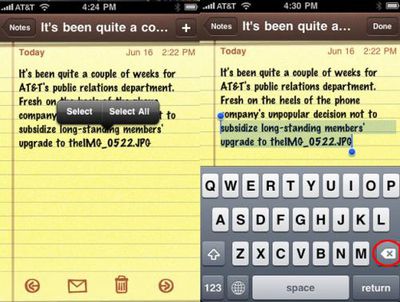
Select Text then delete it
What happens is you hold the delete button, and it starts removing offending characters -- and then it goes on to removing whole words. Next thing you know, you've deleted too many words, and you have to start over. To avoid this, use tap and hold to show the Select|Select All pop-up. Select what you need deleted, hit the delete button and -- poof! -- you've gotten rid of the offending text without trying to judge the speed of the delete button.
- Fortune: The 4 new iPhone features I use most
Safari Autofill
Any browser worth its salt ought to be smart enough to remember the name and password you use on the sites you go to most often. I dont know why this wasnt available on the iPhone from Day 1, but now that it is I find myself visiting sites I had avoided because I was either too lazy to enter the password or too absent-minded to remember it.
- iSmashPhone: How To Use The Best 40 Features of iPhone 3.0
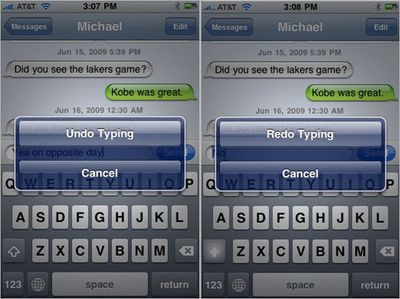
Undo
No matter what application you are using, you can undo typing by shaking your iPhone. If you want your text back, simply shake again. If you had something else written before you started writing the sentence you chose to undo, it reverts back to that. If this was the first thing you wrote, it simply erases it.
- iLounge: Apple iPhone 3.0
Snappier General Performance, with Offsets
Though its hard to quantify, iPhone OS 3.0 feels a little more responsive than its predecessors when it comes to certain tasks: snapping pictures, opening Safari pages, and loading certain apps all seemed to be a little faster, though the specific improvements were sometimes difficult to quantify. Some of the web pages we loaded over Wi-Fi on a 2.2.1 iPhone loaded just as quickly as on a 3.0 iPhone 3G; others loaded faster on the new iPhone. iPhone OS 3.0 is a little quicker at taking still images than before, and appears to be a little better at producing sharpened, higher-contrast snaps of black text on white paper. Lens differences or software, were not 100% certain, but we think its the software.


















