

Apple Depicts Advanced Multitouch Gesturing Control Panel in Mac OS X

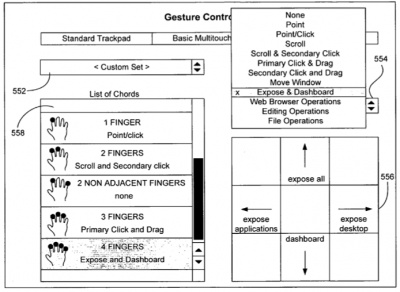
In case there were any doubts that Apple was exploring the use of advanced multitouch gestures under Mac OS X, a recent Apple patent application authored by Wayne Westerman (of Fingerworks) shows mockups of a Mac OS X gesturing control panel with options to configure standard trackpad, basic multitouch, and advanced multitouch settings:

012620 gesture5 400

Apple's notebooks already contain what we presume to be "basic multitouch" with two-finger scroll, rotate, and zoom, but "advanced multitouch" has not yet been seen in shipping products.

The patent application depicts how one could customize these advanced gestures for Expose and Dashboard, by using four finger swipes up/down/left/right:
012018 gesture2 400

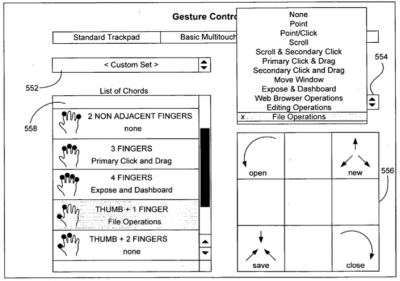
File operations, such as Open, New, Save and Close using gestures based on your Thumb and Forefinger:
012018 gesture3 400

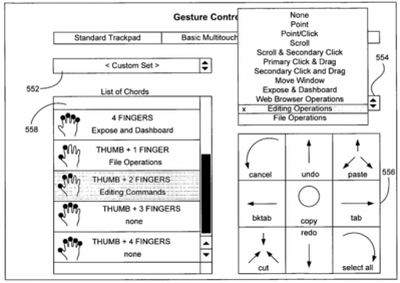
And even editing operations such as Copy, Cut, Paste, Undo, Select All, Tab, and Cancel using gestures based on your Thumb and Two Fingers:
012019 gesture4 400

They also claim to be able to distinguish between various combinations of fingers, including adjacent and non-adjacent finger presses. In particular, they point out that the pinky finger when applied sideways to the trackpad (as in the bottom of a fist) generates a unique pattern and could be used for its own customizable functionality: such as adjusting volume or putting the computer to sleep.

Over the past few years, numerous multitouch patent applications have been revealed Apple's ongoing work on gesture computing. Apple has been making small and steady steps at introducing the multitouch interface -- first in the iPhone, and now in the MacBook Air. Apple is expected to expand this basic multitouch functionality to the remainder of their notebook product line.


Popular Stories

Aston Martin CarPlay Ultra Screen

Apple's CarPlay Ultra to Expand to These Vehicle Brands Later This Year

Sunday February 1, 2026 10:08 am PST by
Last year, Apple launched CarPlay Ultra, the long-awaited next-generation version of its CarPlay software system for vehicles. Nearly nine months later, CarPlay Ultra is still limited to Aston Martin's latest luxury vehicles, but that should change fairly soon. In May 2025, Apple said many other vehicle brands planned to offer CarPlay Ultra, including Hyundai, Kia, and Genesis. In his Powe...
Apple Logo Black

Apple's Next Launch is 'Imminent'

Sunday February 1, 2026 12:31 pm PST by
The calendar has turned to February, and a new report indicates that Apple's next product launch is "imminent," in the form of new MacBook Pro models. "All signs point to an imminent launch of next-generation MacBook Pros that retain the current form factor but deliver faster chips," Bloomberg's Mark Gurman said on Sunday. "I'm told the new models — code-named J714 and J716 — are slated...
Apple MacBook Pro M4 hero

New MacBook Pros Reportedly Launching Alongside macOS 26.3

Sunday February 1, 2026 5:42 am PST by
Apple is planning to launch new MacBook Pro models with M5 Pro and M5 Max chips alongside macOS 26.3, according to Bloomberg's Mark Gurman. "Apple's faster MacBook Pros are planned for the macOS 26.3 release cycle," wrote Gurman, in his Power On newsletter today. "I'm told the new models — code-named J714 and J716 — are slated for the macOS 26.3 software cycle, which runs from...
iOS 26

iOS 26.3 and iOS 26.4 Will Add These New Features to Your iPhone

Tuesday February 3, 2026 7:47 am PST by
We are still waiting for the iOS 26.3 Release Candidate to come out, so the first iOS 26.4 beta is likely still at least a week or two away. Following beta testing, iOS 26.4 will likely be released to the general public in March or April. Below, we have recapped known or rumored iOS 26.3 and iOS 26.4 features so far. iOS 26.3 iPhone to Android Transfer Tool iOS 26.3 makes it easier...
14 inch MacBook Pro Keyboard

Apple Changes How You Order a Mac

Saturday January 31, 2026 10:51 am PST by
Apple recently updated its online store with a new ordering process for Macs, including the MacBook Air, MacBook Pro, iMac, Mac mini, Mac Studio, and Mac Pro. There used to be a handful of standard configurations available for each Mac, but now you must configure a Mac entirely from scratch on a feature-by-feature basis. In other words, ordering a new Mac now works much like ordering an...














