

Cleverboy posted instructions on our forums on how to "convert" AAC music files to ringtones in iTunes 7.4. He states that ringtones and song files are only distinguished by file extension. The file extension for Ringtones is "M4R".
Windows and Mac
1. To add a ringtone to your iPhone, using Windows Explorer or Finder just duplicate and rename any AAC file with a "M4R" extension, then double-click on it. This file will be added to your iTunes library automatically. (Some are reporting a size limit for the music file, so if you have trouble, using a smaller file may help)
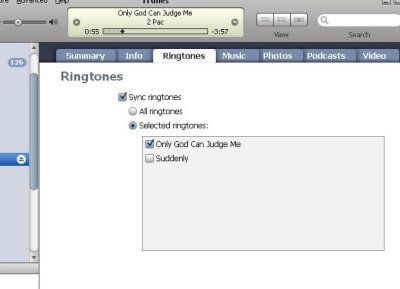
2. Now, click on your iPhone in iTunes, and go to the ringtone section. You should now see your new ringtone. If you want to be sure about the sync, feel free to click "selected ringtones" and check off the file explicitly, though this shouldn't be required.
3. Now SYNC your phone. You're Done!
Mac Notes
You have to make sure the actual extension is changed. The easiest way to make sure you are changing the extension is to use Command-I to "Get Info" on the file in Finder. Then change the extension in the "Name & Extension" field to "M4R". Finder may ask you if you are sure you want to change the extension. Once you double click, the file should show up in the Ringtone area in iTunes.
Windows Notes
Again, you need to make sure the actual extension is changed.
Opens My Computer, Then goes to Tools-Folder Options-View
UNCHECK "Hide extensions for known file types" once this is done you can simply rename the file with a new extension of M4R which then changes the Icon to say RING.
(Thanks Michael)
General Notes
- 3.1 MB in file size is the largest I can successfully transfer (so far) and have it work properly as a ringtone. - Sobe
- Some people have had trouble deleting the ringtones once they are on their iPhone.
- if you have previously installed Ringtones with iToner, iPhoneRingToneMaker etc... then you will lose those ringtones if you upgrade to iTunes 7.4. A fix for iToner is coming.
- For those having trouble, there are two more step-by-step tutorials posted here and here. Another tutorial with photos.
Update: iTunes 7.4.1 seems to break this simple technique, but Joe Maller posted another simple workaround that may work.

















































