

The Nanoleaf Skylight Smarter Kit is Nanoleaf's first hardwired, permanent light, and it's also the first light that Nanoleaf designed specifically to be installed on ceilings.
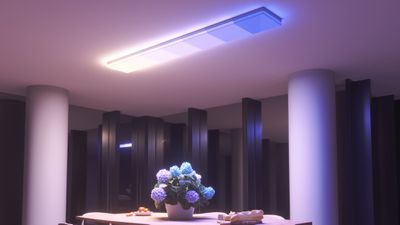
As with Nanoleaf Light Panels, the Skylight is modular. A 3-panel starter kit is priced at $250, and each add-on panel is $70. Nanoleaf sells kits with more panels at a discount, so cost can go as low as $62 per panel for a design that uses 12 panels.
Ceiling lights come in a wide range of prices and $250 is in the mid to high range, but there aren't many modular ceiling light options (as in hardwired with no visible cord), and none that I'm aware of that are both smart and offer multicolor and white lighting. Each square-shaped panel is made from a translucent white plastic that diffuses the light coming from the LEDs underneath.
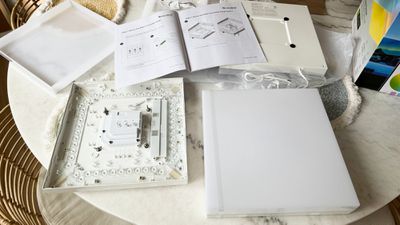
The panels are just under 12 inches on each side, and they're about two inches thick. The plastic is a shinier material than the plastic used for the regular Nanoleaf Light Panels, and it just looks like white squares on the ceiling when the lights are not turned on. I don't mind the plastic because it blends well with a white ceiling when the lights are off. Square-shaped light panels have a modern vibe both on and off, and it isn't an aesthetic that's going to fit in with all decor styles.
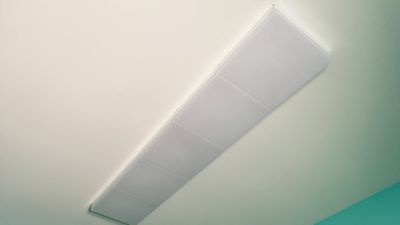
Every panel is 1400 lumens, so the three panel kit is 4200 lumens. The amount of light needed to properly light a space is going to depend on the size of the area being lit and the desired brightness, but that should be enough light for a 15x15 room with 10 foot ceilings. I was impressed with the brightness of the Skylight panels, and three installed in my laundry room was more light than I'll ever need. I ultimately included two more panels for a total of five, but that was because I was replacing a fluorescent panel with popcorn texture underneath and I didn't want to have to repair the ceiling. I think my laundry room is now the brightest room in the house, and I use the lights dimmed down.
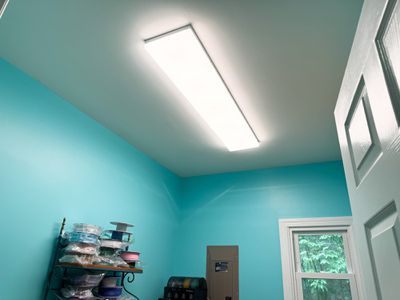
The Skylight can be installed by an electrician or as a DIY project with some basic electrical knowledge, and Nanoleaf does provide instructions and a video for completing the entire process. Creating a layout is the first step, and while the lights can be installed at angles and staggered, I did a straight line of five panels in a row. There's a ceiling plate that's screwed into the ceiling first, and the wires from the ceiling are connected to the main panel (with the breaker off of course). The panels are each two pieces, with a base that houses the LEDs and wires, and a cover.
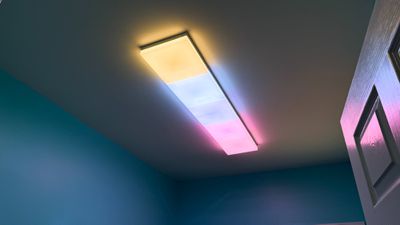
There's a single Main Controller panel that can control up to 99 additional dependent panels, and that's the one that goes up first. Nanoleaf included four screw holes on each panel that also serve as guides so you can mark on the ceiling where to drill, and drywall anchors and screws are included.
Every panel has a terminal block that's covered by a panel that has to be unscrewed to get to the wires to connect one panel to another, and each panel is secured at all four corners, plus the wires are routed through holes at the sides. It's not difficult, exactly, but there are a lot of steps to go through, and it's frustrating working from below. I do think the guide holes helped a lot ensuring everything was lined up, and it ultimately turned out well.
I think four drywall screws for every panel is a lot, especially because these panels aren't particularly heavy. In hindsight, I probably could have used two at a diagonal, and it's worth noting that there are going to be a lot of holes to repair in the ceiling if you install these panels and later want to remove them.
Once installed, the Skylight works like any other HomeKit-connected light. It's added to HomeKit with a HomeKit code, and setup is quick. Nanoleaf products only work with 2.4GHz networks, so you're going to need a setup that allows for a 2.4GHz connection. The Skylight is Wi-Fi only, but there it has Thread compatibility that can presumably be turned on if Nanoleaf decides to do so. It is not Matter-enabled.
I don't own a single smart home product that does not occasionally have a connectivity issue, including Nanoleaf devices. When I got these panels, I debated installing the panels in my living room with vaulted ceilings (note: these can be installed on angled ceilings), but I was worried about access for troubleshooting because I'd need a tall, heavy ladder, so I tested the Skylight in one of my only rooms with lower ceilings.
I'm glad I did, because about a week after the Skylight was up, it lost connectivity. No amount of turning the power off or restarting my devices helped, and I had to get out a small ladder, pull off the main panel's cover, and long press the reset button to start over. I haven't had another disconnect, and it could have been caused by trying to use a motion sensor (I could NOT get it to work reliably and I haven't wanted to try again) or by turning the light off at the switch overnight, but it can happen.
So far the Skylight doesn't seem to be less reliable than other Wi-Fi HomeKit devices or other Nanoleaf panels, but since it's on the ceiling it is decidedly more of a hassle to reset, which is something to keep in mind. I have also seen some complaints about Nanoleaf's customer service on Reddit and on Facebook, and while I haven't had a catastrophic product failure requiring help, I know some people have had issues getting support and replacements. Note that those complaints are more focused on the light panels than the Skylights, but I don't want to ignore potential customer service issues that could be a problem for some.
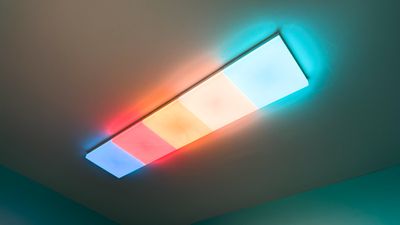
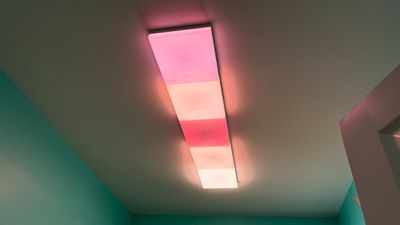
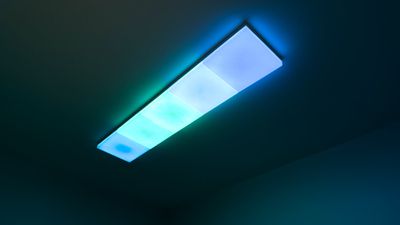
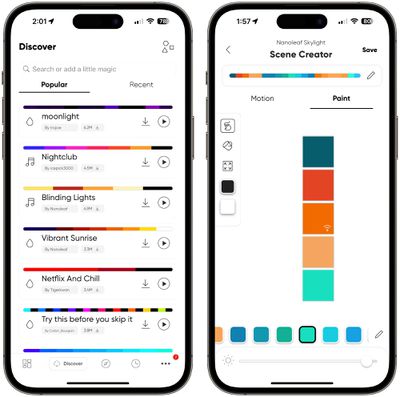
Each Skylight panel can be individually controlled with the Nanoleaf app and set to a different color or combination of colors and patterns. There are pre-designed options, plus tools for creating custom designs, and a section for downloading designs created by other Nanoleaf users.
The Skylight has some unique pre-created patterns like Sun Shower and Shooting Stars that work particularly well on the ceiling, and there are window-style scenes like Blue Skies. The LEDs support 16 million colors and shades of white ranging from blue to yellow, plus there are more than 10 lighting patterns to use to shift between colors. There's also a rhythm feature that changes the color of the lights based on music or sound, and a fun AI option that creates a scene based on a typed phrase like "ocean waves" or "pink sunset."
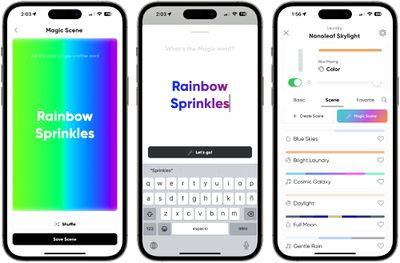
Colors on the light look best when in motion, and for some shades, there are dark and light spots that cause some unevenness. If you've used Nanoleaf's light panels on the wall, it's a similar effect, but it's something that you get used to and notice less with ceiling lights.
I think multicolored lighting works well for accent lights, but I am less sure of it for light that provides as much illumination as the Skylight does. Setting the Skylight to a color like red, for example, means the room is RED and not outfitted with a tasteful red accent light in one area. Patterns that shift quickly can be almost overwhelming, and I don't like the music feature with the Skylight for that reason. I prefer to set the Skylight to softer, more pastel hues and warm whites, but it can definitely provide the ultimate mood lighting and set ambiance for movies and video games.
There's one other thing that I want to mention before wrapping up this review, and that's control. This is a ceiling light that is connected to a light switch, and I don't have a good way to turn that light switch into a smart switch that can be used for changing colors, dimming, or even turning the light on and off. Nanoleaf doesn't have a switch, and there are a limited number of full light switch replacements for a situation like this.
I have a Lutron Caseta hub and system, but adding a Lutron smart light switch isn't a good idea because the Nanoleaf Skylight needs a constant connection and it's not an on/off situation. There are plenty of smart buttons, but nothing that seems to be designed to replace a light switch. For Hue lights, I solve this issue with the Lutron Aurora Dimmer Switches, but those are designed to work with the Hue app and not HomeKit in general. I need a physical button for the Skylight that also prevents the existing switch from being flipped, and I'm not sure how to solve that issue right now.
Nanoleaf does have Sense+ smart switches that it has been working on since 2023, but I'm not sure when these are set to come out.
Bottom Line
Nanoleaf's Skylight is expensive and not without flaws, but it's also a one-of-a-kind product. It's modular so you can tune the number of panels to fit your space, it supports white and yellow light along with any color of the rainbow, and there are endless scenes and effects to play with.
The Skylight's design isn't going to resonate with everyone, but for those who want a modern feel and who love color, it's worth checking out.
How to Buy
The Skylight was popular enough that it sold out in most places. Nanoleaf has a sign up to get a notification when it's back in stock, but it is still available from Amazon.

















































Top Rated Comments
Everything nanoleaf does seems so, so tacky.
But, thanks to corporate greed, instead of putting more money behind making efficient halogen lighting (to get to the magical green wattage) to make them even more efficient, lighting corporations (GE, Philips, et al), decided to go the cheap route and just produce ugly, dingy, and just downright depressing LED lighting.
While LEDs have come a long way from the CFL days, it's still absolute trash compared to halogen and other incandescent lighting. I personally stock-piled as many various bulbs that I currently use throughout my home, so I should be good for a while, but unless there is some sort of major advancement in LED lighting technology, we have a poorly lit future ahead of us.
I know, many people would never notice or even care about this, but for those of use who know that lighting is pretty much everything when it comes to home style, decor, vibe and atmosphere, not to mention photography, it's a big deal.