

Last month, Logitech released the CRAFT, a wireless "Advanced Keyboard" complete with a creative input dial for controlling customizable, app-specific functions. I've been testing one out over the last few weeks to see if the company's latest Mac/PC accessory can live up to its $200 price tag.
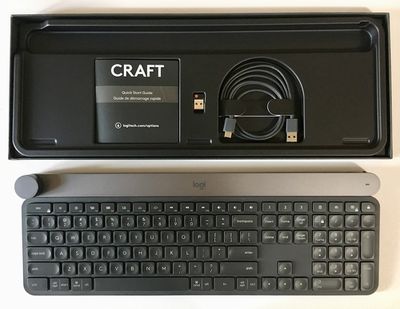
Design
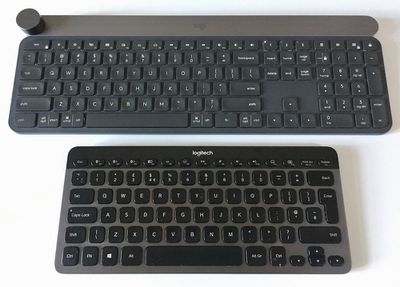
At 960 grams (2.1 pounds), the full-size CRAFT Advanced Keyboard felt heavy against my daily workhorse, Logitech's compact K810. The extra space it took up on my desk was immediately noticeable, but on the upside it instills the CRAFT with a premium feel and there's absolutely no chance of it sliding about as you type or turn the dial.
The keys aren't any wider apart than you would expect of a typical full-size keyboard, but that does take a little getting used to if you're coming to it from the K810 or a 13-inch 2015 MacBook Pro keyboard. Just something to think about.
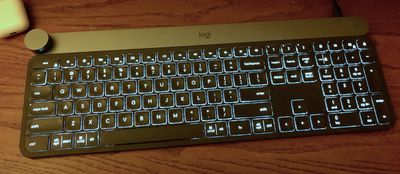
The CRAFT features smart illumination, with backlighting that detects hands and adjusts automatically based on room lighting conditions. The backlighting bleeds around the edges of the keys, which is something to note if that is likely to bother you. There are also proprietary buttons above the insert/home/page up keys that let you dynamically switch between any three connected devices.
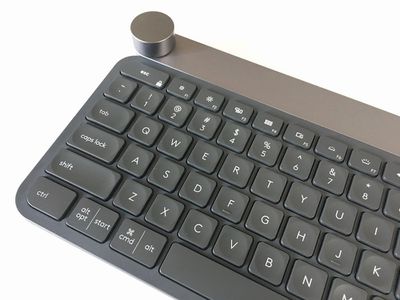
Standard Mac system controls are clearly labeled along the top row of function keys, but are numbered slightly differently due to an additional "Show Desktop" function (F5). Helpfully, the modifier keys are labeled with both Mac and Windows commands.
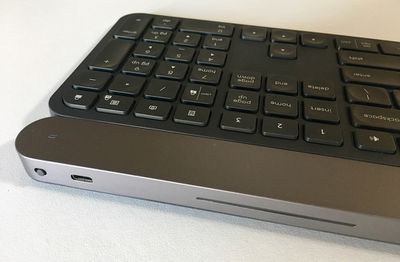
Along the right-hand side of the keyboard's rear edge is a power switch and a USB-C port for connecting the supplied USB-C to USB-A cable, which charges the integrated 1,500mAh battery. The LED on the top-right of the raised aluminum strip glows blue when it has a decent charge, and red when the battery is low.
Meanwhile, the dial or "Crown" sits on the opposite end of the aluminum strip and is touch sensitive, so you can tap or turn it to adjust particular settings depending on the application.
Included in the box is a small USB Unifying receiver that uses 2.4GHz wireless technology to provide a connection up to 33 feet (10 meters) away. It's capable of connecting up to six keyboards and mice to one computer, so from that perspective it's a useful inclusion if you have any existing wireless Logitech accessories. Otherwise it just takes up another USB port. Fortunately, you can pair over Bluetooth instead, which is what I set out to do straight out of the box.
Performance
Unfortunately, my initial attempts at pairing the CRAFT failed. The keyboard kept disappearing from the Devices list in Bluetooth preferences before I was able to input the pairing code. After replicating the behavior on several other devices, I concluded that the keyboard was faulty and resorted to using the Unifying USB receiver until Logitech could get a replacement unit sent out to me.
The second keyboard I received paired over Bluetooth without a hitch. The backlight on the first pairing key pulsated as I connected the CRAFT to my MacBook Pro. Later I added an iPad mini 4 and an iPhone X to the mix, and was able to switch seamlessly between the three of them by tapping pairing keys 1, 2, or 3.
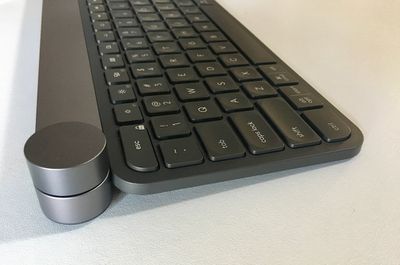
One of the first things I noticed after just a few minutes of typing on the CRAFT was the location and size of the Enter key: I can't tell you how many times my little finger has missed and accidentally hit the key directly above it ("\") .
As a UK user familiar with ISO-style keyboard layouts, my muscle memory continually expects Enter to extend vertically across two rows in an inverted L-shape, as it does on the UK versions of the K810 and the MacBook Pro, as well as on Apple's Magic Keyboards. The CRAFT is available only in an ANSI layout that will be familiar to US users, so it's something to consider if you're used to an ISO keyboard. Even now I will sometimes hit the wrong key.
The CRAFT's key travel is very reminiscent of pre-butterfly era MacBook Pro keys, which many users will undoubtedly welcome. The keycaps themselves have a shallow concave depression, which also feels nice to the touch. The keys are certainly closer together than on my MacBook Pro which takes some adjustment, but in my experience, finger fatigue isn't an issue with the CRAFT, and the angle of the keyboard feels just right for use on a computer desk. The hand proximity sensors also do a great job of illuminating the layout before you start typing, so you're never squinting in the dark for the correct key.
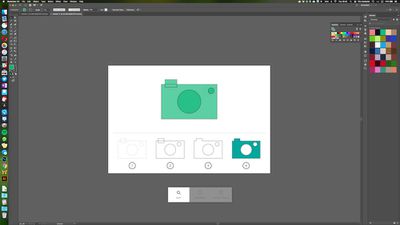
The Crown's functionality can be adjusted using the Logitech Options software utility, which has custom profiles for Adobe Photoshop CC, Adobe Illustrator CC, Adobe Premiere Pro CC, and Adobe InDesign CC. Profiles for Microsoft PowerPoint, Excel and Word currently only work on PC, according to Logitech.
Tapping the dial brings up an onscreen menu overlay offering functions specific to that app, like brush size, brightness, chart type, font size, and so on. Turning the Crown moves you through the menu, clicking it selects the appropriate tool, and turning it again adjusts the value or setting. After playing with it for a few hours, using it this way soon became second nature.
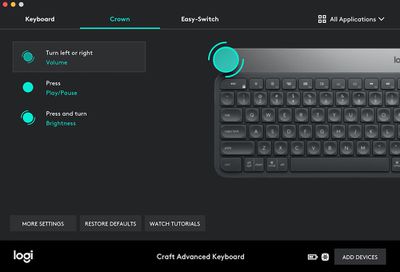
Additionally, the touch-sensitive Crown can be set up to access a variety of global Mac controls, so you can use it do things like activate screen zoom, navigate between apps, adjust brightness, or even assign to it a particular shortcut key combination.
It's also possible to assign Crown functions to each of your favorite apps, but after a bit of fiddling I found that I preferred to keep the controls global, so that turning the dial switched desktops, pressing it took the current app fullscreen, and pressing then turning changed the system volume. Using the Crown this way turned out to be a convenient method of performing these functions without having to look down at the keyboard, and made up for the fact that my MacBook Pro's trackpad is perennially out of reach on a raised stand.
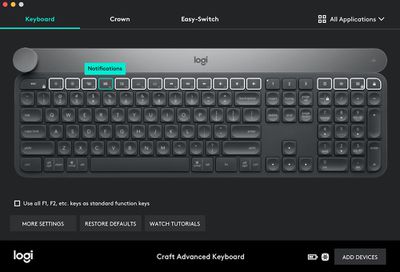
Apart from assigning Crown controls, the Logitech utility also very usefully lets you remap function keys. For example, I never use the macOS Launchpad, which can be invoked using F4, so I re-assigned the key to display the Notifications sidebar instead.
Bottom Line
I found Logitech's wireless CRAFT advanced keyboard to be a solid, well-built peripheral that is comfortable in daily use – even despite my Enter key issues. I would have liked a longer battery life – for me it averaged about 8 days – but this isn't sold as a portable keyboard and anyway, you get plenty of warning before it completely runs out of juice.
As for the Crown, I found it intuitive and easy to get to grips with, requiring little thought when used to adjust system controls and only a gentle learning curve when working within Adobe apps.
That said, if you're a professional who spends a lot of time in a more niche creative application, you may run into trouble. The CRAFT's software support is still wanting on Mac, but that's something Logitech hopes to address soon.
My only real gripe is the price. $200 – or £180 in the UK – is a lot to pay for a wireless keyboard, dial or no dial. In my opinion, $150 would have been a more reasonable ask, given the current state of the CRAFT's software compatibility.
Pros
- Customizable dial and function keys
- Comfortable to use
- Pairs with up to 3 devices
Cons
- Battery life could be better
- Lack of app support
- Expensive
How to Buy
The Logitech CRAFT Wireless Advanced Keyboard costs $199.99 and can be ordered directly from the company's website.

Note: Logitech supplied the CRAFT Keyboard to MacRumors for the purposes of this review. No other compensation was received.

















































Top Rated Comments
Then your cursor turns into a little camera icon, and you can click over any window (even those partially hidden behind others) to get a perfect screenshot of just that window, complete with transparency. :)
Also, can you use your Craft to boot you Mac into Safe Mode? Or Recovery? I can't.
And there are several other issues with it as well. Here is a list I submitted ('https://community.logitech.com/s/question/0D55A00007KWrIFSA1/logitech-craft-keyboard-issues-on-mac') to the Logitech community.
[doublepost=1533135024][/doublepost]I rather like the feel of the keyboard myself. It's heavy and firm. Keypresses feel nice, not plastic-y like say their K811 keyboard.
As for battery life, I never turn my Craft off and I always keep the backlight sensor on and I find I have to plug it in every 4 or 5 days or so to charge.
Be sure to review my list of reported issues (see previous post) before deciding to buy one. If you can live with those issues, then by all means go for it!
- Lowering the backlight intensity only lowers it for until the next time the keyboard sleeps. It then reverts back to full intensity.
- With any use of the backlight the battery dies in 10 days or less.
- Backlight likes to turn on sometimes even when you just hover your hand over your mouse next to the keyboard.
- Dial does not always work properly.
- Spacebar squeaks significantly, was enough to drive me crazy.
- Key feel/travel is awkward.
- It often mis-types by not registering key presses unless you hit the keys in a certain way leaving a string of auto-corrects in it's wake.
- Price is way out of range of it's true value.