

When watchOS 3 launched alongside iOS 10, it brought a handful of feature additions and speed improvements to the Apple Watch. One of the new social features is a way for users to share their Activity Rings with friends and family through "Activity Sharing."
Mainly focused in iOS 10's Activity app, the ability to share workout data nevertheless requires an Apple Watch updated to watchOS 3, and for you to be comfortable with certain people receiving live updates on your fitness activity. When you're ready to start sharing your Activity Rings, and you've updated to both iOS 10 and watchOS 3, follow these steps:
Activity Sharing on iPhone
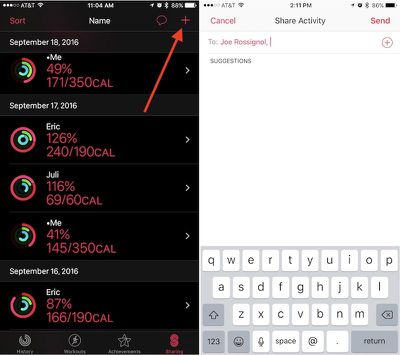
- Open "Activity" on your iPhone.
- Navigate to the "Sharing" tab on the bottom right.
- Tap the "+" icon in the top right corner to add a friend.
- The app will offer suggestions from your contacts of users who may own an Apple Watch, so you can tap one of those or type in someone specific in the text box.
- You can include multiple invitations at one time, and once you have everyone included in the "To" box, tap "Send."
From there, simply wait for your friend to accept the invitation. Afterwards, you'll begin to see one another's Calorie, Workout, and Standing rings in the same Sharing tab you sent the invite from. Once you amass a group of friends and family members, you can also sort the data in helpful partitions depending on what you'd like to see. Simply tap "Sort" in the top left corner of the Sharing tab and choose from Name, Move, Exercise, Steps, and Workouts as the primary focus.
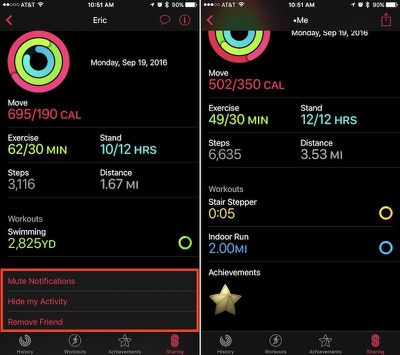
Tapping on anyone in the list will bring you into a deeper menu about that individual's Activity that day. The app will break down each ring, as well as showcase a step count, distance walked, and list any completed workouts or earned achievements. At the very bottom, there's a few options to mute a friend's notifications, hide your Activity from them, or delete them as a friend. Within your main friends list you will see your own Activity as well.
Activity Sharing on Apple Watch
Although Activity Sharing is more in-depth within Activity on iOS, most of the interactivity of the new social feature takes place on the Apple Watch. Whenever friends begin closing their Activity Rings, completing workouts, and earning achievements, you'll get push notifications about each accomplishment. From these pop-ups, you can send friendly encouragements (or sly digs) about their hard work.
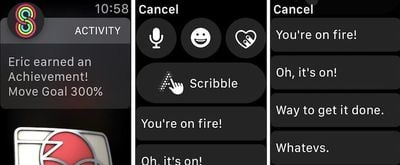
- When you receive an Activity notification from a friend on your Apple Watch, scroll down.
- Tap "Reply."
- You can choose from the traditional speech-to-text, emoji, Digital Touch, and Scribble options, or scroll more for some of Apple's stock Activity responses.
- Tap on any phrase to send it.
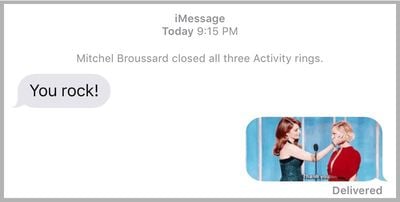
These responses are integrated directly into Messages in iOS 10, so if you sent "You're on fire!" for example, Messages would provide slight context above the message with "Mitchel completed a workout." Until they otherwise mute you for the day, or turn off your notifications completely within Activity on iPhone, each of your friends will receive a notification upon the completion of every workout and earning of every achievement.
If you visit the Activity app on Apple Watch, you can scroll down to get more detailed readouts of each Activity Ring. Swiping right-to-left shows the new Sharing tab, similar to the one on iPhone. You can scroll to see each friend, tap on them for an individualized view, and send a message through a button at the bottom of their profile.
It should be noted that Apple's stock fitness-related phrases will only appear following a Sharing notification from a friend, and then only on Apple Watch. Any other Messages-related prompt outside of a notification from a friend will simply guide you over to Messages with all of the expected features introduced in the app in iOS 10.
There are plenty of other interesting and notable features to discover in watchOS 3, so be sure to check out the MacRumors roundups for both watchOS 3 and Apple Watch Series 2 to find out more information on each.

















































Top Rated Comments
Just because you think it's useless, doesn't make it so.
- Unpair / Repair watch
- Restore Watch
Checked diagnostics on both and they were clear.
Restoring the phone and THEN repairing the watch worked.
Good Luck!
but im loving it! specially the days i beat my her LOL