In iOS 12, Apple has introduced some new features to the Photos app that aim to make it easier for you to search, share, and enjoy your photo collection. Here's how to make the most of them.
The most prominent addition in the Photos app is a new For You tab, which replaces the old Memories and Shared tabs and brings together their features – along with any iCloud Shared Albums you may have – in a single scrolling panel.
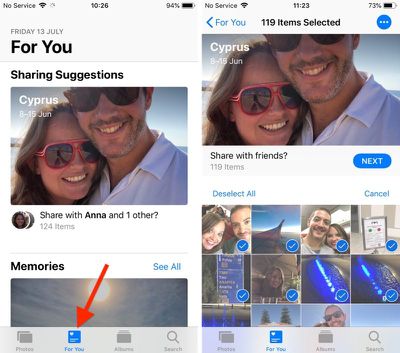
Top of the For You tab is where your latest Sharing Suggestions appear. If the app recognizes someone in the photos it will ask if you want to share the collection with them, otherwise an option to "Share with friends?" is shown.
The great thing about sharing photos this way in iOS 12 is that if your friends have any pictures that are from the same event, time, or location, they will also be prompted to send those back to you, allowing you to fill any holes in your collection.
Tap the Sharing Suggestions card and you'll be taken to a screen where you can choose the pictures you want to share. Tap Select and then tap any photos you don't want to include, or choose Deselect All and then tap the ones you want to share.
Choose Next to select people in your contacts that you want to share the pictures with. Tap Share in Messages when you're done – just note that anyone with access to the shared photo link will be able to view the photos.
For You Tab: Memories
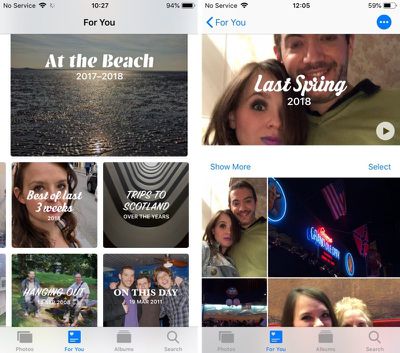
Immediately below Sharing Suggestions you'll find Memories, which curates various photos and videos you've taken in the past into specific memory collections. Without any steps required on your part, Memories gives you an automatic homemade movie from these past family gatherings or vacations.
Tap a memory and you'll see a list of all the photos and videos contained in the memory (tap Show More to see more than a summary), the geographic location the pictures were taken, nearby photos, and related memories you might be interested in.
If you press the play button to begin viewing a memory, you can also use a number of customization options to edit it. For more on editing memories in Photos, see our dedicated tutorial.
Note that tapping Select on this page and deleting a photo doesn't just remove it from the memory, but also deletes it from your iPhone and iCloud Library. The last two options at the very bottom of the screen let you favorite the memory or delete it permanently.
If your device supports 3D Touch, you can also hard press on any memory in the For You tab to get a preview of its contents, and then swipe up for options to add it to your favorite memories, delete the memory, or block it.
For You Tab: Shared Album Activity
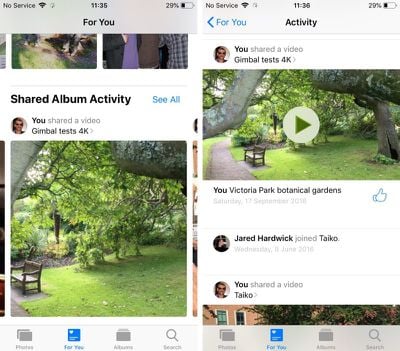
At the bottom of the For You tab is any Shared Album Activity related to your iCloud account.
This lists iCloud albums shared by you as well as albums shared with you by other users. From here you can view photos and videos, "like" them with a thumbs up, and read comments or add your own.
How to Use Enhanced Search
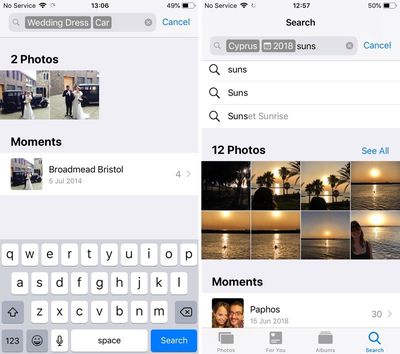
In iOS 12, the Photos search function in the Search tab is more intelligent than before, so it's easier to find the most relevant photos to you from events, people, or places.
You can also combine multiple search terms to narrow down your results. Simply start typing a person's name, a date, a place, or a word like "cat", "beach", "waistcoat", or "selfie", and the Photos app will offer up similar or identical indexed search terms that you can tap to add to the search field.
Maybe it's just me, but all I need the Photos "app" to be is a glorified folder... My app is set to the "Albums > All Photos" view, and that's it. I never navigate to anywhere else from there. The Photos app was a real mess before, and this just looks like it will make things even more of a confusing mess!
Maybe it’s just me but I’m really looking forward to the new sharing feature as that’s exactly how my family shares photos anyway. This just makes it a lot easier. I don’t want photos to just be an album. That feature already exists.
Imagine how “intelligent” it would be if you could actually TAG A PHOTO.
But nooooooo
Manually? I used to do that when we were all using iPhoto and digital cameras. Now? I take like hundreds or maybe a thousand of photos each month, I don't have time for that.
Wednesday October 21, 2026 11:36 am PDT by Juli Clover
The iPhone Duo's inner screen has an under-display front camera that's largely hidden from view. It's the first time we've seen an under-display camera on an iPhone, and it turns out there's a reason Apple hasn't used the technology before.
Apple said the camera offers 1080p video recording, but didn't mention photo quality. Gizmodo said it's a 4-megapixel camera and described the photos as...
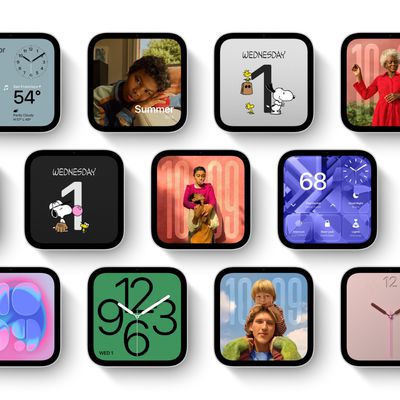
Apple's HomeView includes customizable faces for photos, animations, and smart home controls.
Faces Apple has named so far include:
Photos
Flow
Snoopy
Calendar
Weather
Home Modular
Home Camera
Other clock and widget layouts appear in Apple's promotional images, but have not yet been named. Apple says that selected faces change throughout the day, with different appearances...
Friday October 30, 2026 3:20 pm PDT by Joe Rossignol
In a memo shared with Apple Stores and Apple Authorized Service Providers this week, and later obtained by MacRumors, Apple provided technicians with guidance on how to diagnose and address the iPhone Duo's inner display cracking issue.
If a customer reports the issue, Apple advised technicians to inspect the iPhone Duo and repair or replace it in accordance with their standard procedures....


















































Top Rated Comments
But nooooooo
My app is set to the "Albums > All Photos" view, and that's it. I never navigate to anywhere else from there.
The Photos app was a real mess before, and this just looks like it will make things even more of a confusing mess!