In iOS 16.4 and later, it's possible to create an iPhone Lock Screen shortcut. Keep reading to learn what it does and how you can set it up.
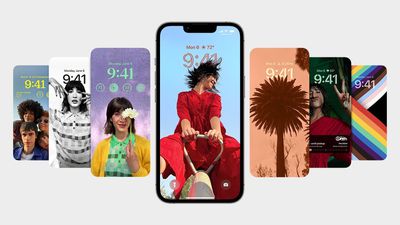
Since Apple introduced the iPhone 14 Pro with always-on display in September, the company has used updates to iOS 16 to enhance the customization options of the Lock Screen.
With iOS 16.2, for example, Apple added the ability to hide darkened wallpapers and notifications, allowing users to have a more minimalistic inactive Lock Screen that only shows the time and date.
In iOS 16.4, Apple took things further by adding new automation and shortcut options. Users can link activation of the always-on display with a Focus mode. And for the first time, it's also possible to activate the Lock Screen with a shortcut, which is what we're going to show you here.
Essentially, the new option allows you to create an automation to activate your iPhone's Lock Screen, which is normally something you would do by pressing the physical power button. If you find the latter action difficult or inconvenient for whatever reason, now you have an alternative way of achieving it. Here's how to create your Lock Screen shortcut.
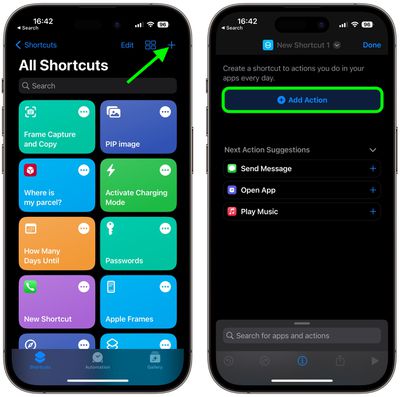
- Launch the Shortcuts app on your iPhone.
- Tap the plus (+) icon in the top-right corner of the screen.
- Tap Add Action.

- Start typing "Lock Screen" into the search bar at the top of the card, then tap the Lock Screen option that appears below.
- If you want to create a Home Screen button, tap the Share icon (the square with an arrow pointing out) at the bottom of the screen, then tap Add to Home Screen. Otherwise, tap Done to complete your new shortcut.
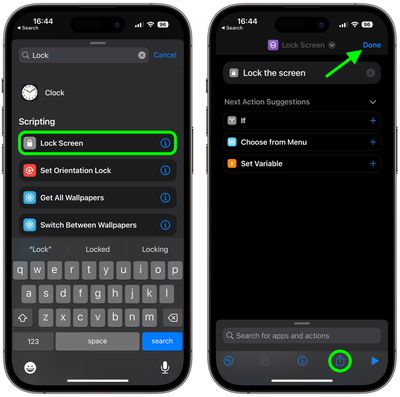
After following the above steps, you'll have a basic functional shortcut, which you can use as a tappable Home screen button to activate the Lock Screen. You can also ask Siri to run the shortcut, or add it to a custom automation.