 Following the release of iOS 13.1 and iPadOS 13.1, Apple now allows anyone with an Apple ID to use the Find My app on another person's iPhone or iPad to locate their own device if it's gone missing.
For those unfamiliar with the app, Find My replaces the Find My Friends and the Find My iPhone apps of old and brings their features together in a unified interface that allows you to find whatever it is you need.
By signing into Find My as a guest on a friend's device, you can use it to locate your lost device using the same functions that would be available to you if it was your own iPhone or iPad. Here's how it works.
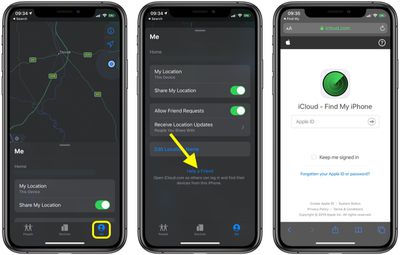
- Launch the Find My app on your friend's iOS device.
- Tap the Me tab, if it isn't already selected.

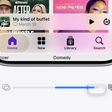
- With your finger on the pill-shaped drag handle, bring the Me tab up over the map to reveal the additional options.
- Tap Help a Friend at the bottom.
- Once the iCloud.com page has loaded, sign into your iCloud account using your Apple ID and password.
After logging in, you'll be presented with a map and a list of all the devices that are signed into your iCloud account. You can also tap the arrow icon in the top-right corner of the screen to center the map on the currently selected device.
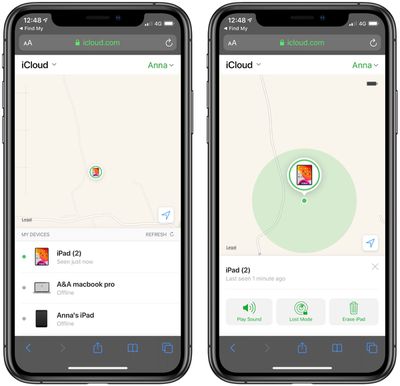
Scroll up on the devices below the map to see the full list and find the device you're looking for. Note that the line below each device tells you its last known location, while a padlock on a device's icon indicates that it's lost and has been manually locked. If you tap a device in the list, you'll gain access to additional device options.
The options available to you will depend on the type of device you're trying to locate, but you should always have the option to play a sound to locate a nearby device as long as it's powered on and within range.
If it's a Mac, iOS device or Apple Watch you're trying to locate, you can put it into Lost Mode (this ensures your passcode is required on the device before anyone can turn off Find My iPhone or erase it) or remotely erase it.
If the selected device is out of range of network coverage or powered off, you can tap Notify When Found, and Apple will email you when the device is located. Any other options you choose in the device actions menu (Erase iPad, for example) will be performed the next time the device comes back online.