How to Use Apple TV's iPhone-Based Color Balance Feature - MacRumorsOpen MenuShow RoundupsShow Forums menuVisit ForumsOpen Sidebar
Skip to Content

How to Use Apple TV's iPhone-Based Color Balance Feature

by

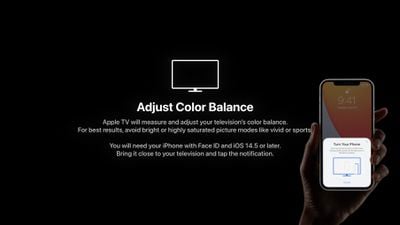
In April, Apple introduced an iPhone-based color balance feature for Apple TV that can improve the overall picture quality of your television set when you're using Apple's set-top box.
apple tv color balance 1
Using the iPhone's light sensor, the feature compares the color balance to industry-standard specifications, and automatically adjusts your ‌Apple TV‌'s video output to deliver more accurate colors and improved contrast.

Follow the steps below to try it out. For best results, Apple suggests avoiding the use of bright or highly saturated picture modes on your TV like "vivid" or "sports."

What You'll Need

  • ‌Apple TV‌ HD (2015) or later
  • iPhone with Face ID (iPhone X or later)
  • tvOS 14.5 or later
  • iOS 14.5 or later

How to Color Balance Apple TV With iPhone

  1. With your iPhone unlocked and nearby, launch the Settings app on your ‌Apple TV‌.
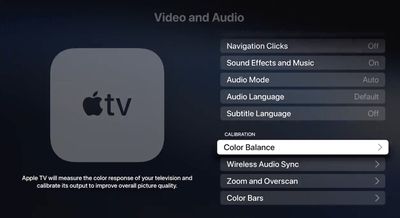
  2. Select the Video and Audio menu.
    Apple TV

  3. Under "Calibration," select Color Balance. If the option says "Not Required," your smart TV doesn't need adjusting. It also is unavailable with Dolby Vision.
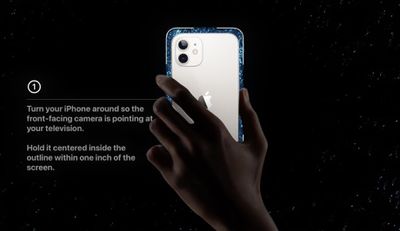
  4. When the notification appears on your iPhone, follow the onscreen instructions: Turn your iPhone around so the front-facing camera is pointing at your TV, hold it centered inside the displayed frame within one inch of the screen, and keep it there until the progress icon fills up (it should only take a few seconds).
    apple tv color balance2

  5. Select View Results to see how your TV has been adjusted.
apple tv color balance
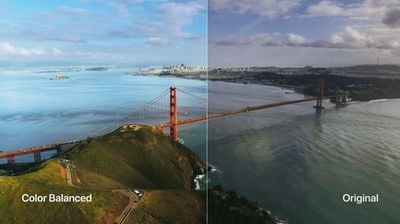
The results show you a side-by-side comparison of the original colors that your TV was displaying and the balance-adjusted colors. The calibrated version should look more natural and perhaps warmer.


Related Roundup: Apple TV
Buyer's Guide: Apple TV (Don't Buy)

Top Rated Comments

Press22 Avatar
69 months ago
Tired of seeing the professional calibrators upset about this feature. It's not for you, its for the masses who use out of the box settings.
This is cool, thanks.
Score: 26 Votes (Like | Disagree)
69 months ago

Anyone that’s serious about calibration won’t touch this.
Maybe not but most people don’t do any form of calibration, so potentially even if it’s not perfect it could be an improvement for the majority.
Score: 18 Votes (Like | Disagree)
boast Avatar
69 months ago
I personally thought this was the coolest part of the presentation. Can't wait to give it a try.
Score: 14 Votes (Like | Disagree)
69 months ago
I’ll have to see this for myself but that color balanced image does not look all that realistic to me. Ya it looks pretty but colors don’t look that perfect in real life. Most people would look at a picture where the colors are way too warm and tell you that looks the best. I hope Apple is going for accuracy here and not personal preference of the masses.
Score: 13 Votes (Like | Disagree)
Apple_Robert Avatar
69 months ago
The color balanced picture in the article looks overly saturated and unnatural.
Score: 12 Votes (Like | Disagree)
69 months ago

I tried the calibration during the normal lighting conditions of when I normally watch TV (don't know if that affects the accuracy) and while I'm certainly by no means a pro at color calibration, the "balanced" outcome looked significantly "warmer" than the original. So much so to the point that it is still jarring after 3 days. I know I can change back, but I've looked around online and of the dozen or so people that have commented on the coloration, probably like 10/12 of them have said there outcome was also "warmer" as a result.

Are "warmer" colors "more accurate" in general?
Yes, absolutely. The whole industry works off the 6500K white point, which is warmer than it is cooler.

It's how practically all media content is mastered, so if your desire is to view things how the creators have intended, you should leave it.

Give it a few days and your eyes will adjust and forget about it in due time.
Score: 11 Votes (Like | Disagree)

Popular Stories

tvOS 27 Feature

Apple Seeds tvOS 27 Beta 3 to Developers

Monday July 6, 2026 10:22 am PDT by
Apple today seeded the third beta of tvOS 27 to developers for testing purposes, with the update coming two weeks after Apple released the second beta. The beta can be downloaded and installed through the Settings app on the Apple TV. A free developer account is required. tvOS 27 has few new features compared to the other 27 software updates, but it does add a redesigned Podcasts app,...
General visionOS watchOS and tvOS Betas Feature Redux

Apple Releases Fourth watchOS 26.6, tvOS 26.6 and visionOS 26.6 Betas

Monday July 6, 2026 10:16 am PDT by
Apple today provided developers with the fourth betas of upcoming watchOS 26.6, tvOS 26.6, and visionOS 26.6 betas for testing purposes. The software comes a week after Apple seeded the third betas. The software updates are available through the Settings app on each device, and because these are developer betas, a free developer account is required. There's no word on what's in the...
New Apple TV Logo

Apple TV Earns Record 87 Emmy Nominations for 2026, Led by 'Pluribus' and 'Widow's Bay'

Wednesday July 8, 2026 10:37 am PDT by
Apple earned its highest number of Emmy nominations to date in 2026, with popular shows like Pluribus, Margo's Got Money Troubles, Widow's Bay, Shrinking, and Slow Horses earning the most nominations. New series Widow's Bay received 19 nominations, while Pluribus was second with 18 nominations. The five most highly nominated shows are up for best series in their respective categories, and...

🔗 Related Apple News & Rumors

Stay updated with the latest Apple ecosystem news and verified rumors