

If your Mac's storage has been mysteriously shrinking recently and you use Google Chrome, you may have already identified the culprit. The browser has been downloading a 4GB AI model file onto computers without explicit user consent. Here's how to reclaim the space.

The file in question is called "weights.bin," which powers Google's on-device Gemini Nano AI model – the engine behind Chrome features like scam detection, autofill suggestions, and the "Help Me Write" tool. Local models tend to be pretty big storage-wise, and this one is no different. The problem is that Google hasn't clearly signposted the fact that it's eating 4GB of your drive with training data.
The issue only recently came to light thanks to security researcher Alexander Hanff, who noticed that Chrome installs the model on any device meeting the minimum hardware requirements, only without prompting you whether you'd like it there in the first place.
How to Check if the File Is on Your Mac
The first thing to do is confirm that the model is actually taking up space on your machine. While there's no clear answer in Google's release notes, recent reports suggest that the file started appearing after updating to Chrome version 148.0.7778.97. Here's how you can find out if your computer was affected:
- Open Finder, then click Go in the menu bar.
- Hold the Option key and click Library in the dropdown menu.
- Open Application Support ➝ Google ➝ Chrome ➝ Default.
- Look for a folder named "OptGuideOnDeviceModel."
If the folder exists and contains a file called weights.bin, the model is installed. You can right-click the file and choose Get Info to confirm its size. If the folder isn't there, you can relax – Chrome hasn't downloaded the model to your Mac.
How to Remove the 4GB File for Good
Simply deleting weights.bin from Chrome's library folder isn't a long-term solution because Chrome will likely quietly re-download it the next time you launch the browser. To make the removal permanent, you need to disable Chrome's on-device AI features.
- Open Chrome.
- Click the three-dot menu in the top-right corner, then choose Settings.
- In the left sidebar, click System.
- Toggle off On-device AI.
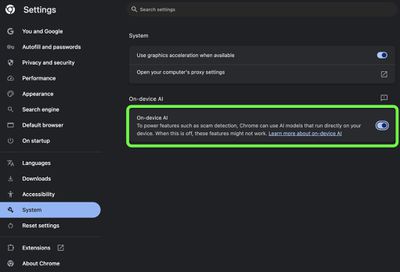
Once this setting is switched off, Chrome will remove the model and should stop downloading it in future updates. Remember that deleting the model will also disable any Chrome features that rely on it.
If you don't see the toggle in Chrome's Settings, it likely hasn't propagated to your computer yet. In that case, type chrome://flags into Chrome's address bar and disable any AI-related flags you see, then delete the weights.bin file manually in Finder. If after that you're still concerned about the lack of consent, it might be worth switching to a different browser.

















































Top Rated Comments
"Stop using Chrome Browser"