How to Set Up Your New AirPods - MacRumorsOpen MenuShow RoundupsShow Forums menuVisit ForumsOpen Sidebar
Skip to Content

How to Set Up Your New AirPods

by

AirPods, introduced last December, are Apple's completely wire-free earphones that have a W1 chip inside for simple pairing between devices.

AirPods work like magic, and while they're easy to set up, the process may not be intuitive to all users who received AirPods this Christmas, so we thought we'd share some quick, easy to digest instructions.
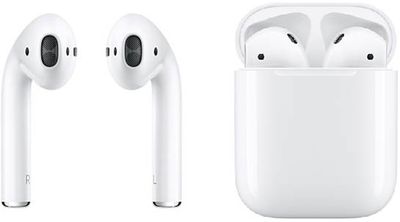
AirPods duo

  1. Remove the AirPods from the packaging.
  2. Leave the AirPods in AirPods case.
  3. Power on your iPhone or iPad, unlock it, and go to the Home screen (aka the main app screen).
  4. Open up the lid to your AirPods case.
  5. Hold the AirPods case with open lid next to your iPhone or ‌iPad‌.
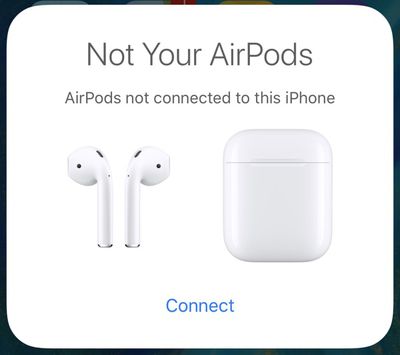
  6. Your iOS device will recognize the AirPods and you'll see a popup to connect your AirPods.airpodsnotconnected
  7. Tap "Connect."
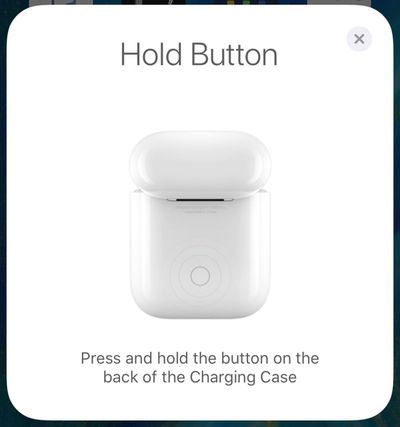
  8. You'll be instructed to press and hold on the back button of the AirPods case.airpodsholdbutton
  9. Press it for a few seconds, and the popup on your iPhone will change to "Connecting."
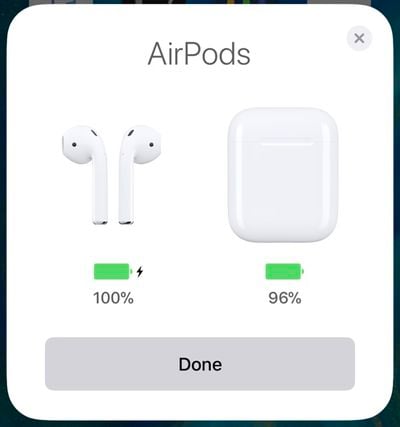
  10. When the connection is complete, the popup will display the battery life for both the AirPods and the case.airpodsconnected

That's all there is to it. Once this setup process has been completed, your AirPods will re-pair to your iOS device whenever you open up the case lid. This re-pairing process takes just a few seconds, so your AirPods are essentially ready to go whenever you pull them out.


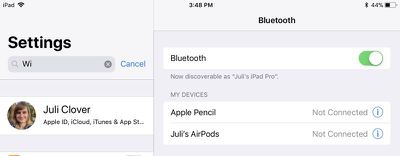
Your AirPods are linked to your iCloud account, so once you pair them with one device, your other devices know they exist. You can switch connections between your devices through the standard Bluetooth settings options, where AirPods will be listed on any device that you're signed into with your ‌iCloud‌ account.

airpodsbluetoothmenu
On iOS devices, go to Settings --> Bluetooth and tap "AirPods." On a Mac, click on the Bluetooth icon in the status bar, choose AirPods, and then select "Connect." On Apple TV, open up the Settings app, choose "Video and Audio," scroll down to "Audio," select "Audio Output" and choose AirPods.

On iOS devices, you can also use the Now Playing widget in Control Center to select AirPods, and on ‌Apple TV‌, you can hold down the Home button on the main ‌Apple TV‌ screen to bring up a shortcut to audio options.

Update: As some MacRumors forum members have pointed out, when pairing with an iOS device signed into your ‌iCloud‌ account, the step involving a button press may not be necessary. In this situation, the AirPods should be ready to pair after opening the case near an iPhone or ‌iPad‌.

Top Rated Comments

112 months ago
Do you actually need to hold the button on the AirPods case to connect them initially? I can’t remember I had to press it the first time I connected them with my iPhone. Ever since I performed a reset, I had to press it.
No, it is not needed. The button is there for connecting to non-Apple devices.
The author should read the manual for AirPods first, then write a guide.
Score: 17 Votes (Like | Disagree)
Pezboy Avatar
112 months ago
Why the hell do we need a set up guide?? This whole article should be, open airpods. Aaaaaannnnd done
Score: 12 Votes (Like | Disagree)
firewire9000 Avatar
112 months ago
I appreciate the article but the information shown here is incorrect. You don’t need to press the button. In fact, these steps are for when the AirPods are previously connected to other devices.
Score: 8 Votes (Like | Disagree)
112 months ago
.
Score: 7 Votes (Like | Disagree)
TMRJIJ Avatar
112 months ago
Eek... will not buy
Never make a purchase decision based on some random guy on a tech forum.
Score: 6 Votes (Like | Disagree)
lazyrighteye Avatar
112 months ago
Tough crowd.

Or... Thanks for spending your xmas morn posting these articles, MR. :D
Score: 5 Votes (Like | Disagree)

Popular Stories

Apple Event Logo

Apple Working on All-New Operating System

Wednesday July 29, 2026 11:39 am PDT by
Apple is developing an all-new operating system that is essentially a mix of tvOS, watchOS, and iOS, according to Bloomberg's Mark Gurman. In a report this week, he said the operating system will feature a grid of icons, widgets, and apps, along with customizable clock faces. The new software platform is intended for Apple's long-rumored smart home hub. With built-in facial recognition,...
imac video apple feature

Apple Made Its Second-Biggest Acquisition Ever This Year

Wednesday July 29, 2026 12:03 pm PDT by
Apple this year acquired Israeli startup Q.ai for close to $2 billion, according to the Financial Times. That would make this Apple's second-biggest acquisition ever, after it paid $3 billion for the popular headphone maker Beats in 2014. This is also the largest known Apple acquisition since the company purchased Intel's smartphone modem business and patents for $1 billion in 2019. Q.ai...
Dynamic Island iPhone 18 Pro Feature

iPhone 18 Pro: Twelve Changes Coming to Apple's Next Flagship

Thursday July 30, 2026 3:43 am PDT by
We're less than two months out from the launch of Apple's premium next-generation smartphone lineup, and while we're not expecting a dramatic change in terms of functionality, there are still several enhancements rumored to be coming to the iPhone 18 Pro and iPhone 18 Pro Max. One thing worth noting is that Apple is reportedly planning a major change to its iPhone release cycle this year,...

🔗 Related Apple News & Rumors

Stay updated with the latest Apple ecosystem news and verified rumors