

macOS: Share a Link That Jumps to a Specific Line on a Webpage - MacRumorsOpen MenuShow RoundupsShow Forums menuVisit ForumsOpen Sidebar
Skip to Content

macOS: Share a Link That Jumps to a Specific Line on a Webpage

by

Sometimes when you share a webpage link with someone, you just want to bring their attention to a specific passage or sentence to make your point, rather than have them read through the entire article.
safari icon blue banner
In 2020, Google added a function to its Chrome browser called Scroll to Text Fragment (STTF) that helps you achieve this. It allows URLs to link directly to any visible text on a page. You may have seen it work in Google Search, where clicking on a link in your returned results takes you to a highlighted passage of text further down the page.

Google later added the feature to the Chromium codebase, so most other popular Chromium browsers like Edge, Opera, Brave, and Vivaldi also support it. Here's how it works.

Copy Link With Highlight in Safari

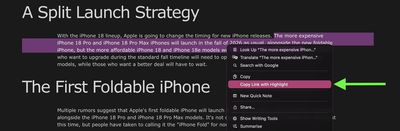
Apple added full support for text fragment links in Safari 18, and the feature is available in Safari on macOS Sequoia and later. To use the feature, visit a web page and simply highlight the text you want to create a link to, then right-click (Ctrl-click) and choose Copy Link with Highlight from the dropdown menu.
safari

The "Copy Link to Highlight" option

This will generate a special URL that includes a hash (#) symbol and "text" element, followed by a few words that bookend the selected text. All you need to do is share the link with someone, and when they click it they will be sent directly to that part of the webpage with the specific passage highlighted, as shown below.

highlighted text shared safari

The shared link as the recipient sees it

That's all there is to it. The Copy Link to Highlight option is also available in Safari on iPhone and iPad, though we have found it to be buggy and inconsistent in iOS 26.3. Hopefully Apple can fix it soon. At least on Mac, it makes it easier for you to direct the recipient of the link to the content you actually want them to focus on.

Bear in mind that the look of highlighted text can differ depending on whether the page author has styled it to look a certain way. Also, text fragment linking does not work in PDFs. Since July 2025, Copy Link to Highlight has also been introduced in Firefox.

Tag: Safari

Top Rated Comments

NightFox Avatar
10 months ago
I will mentally add this to my 'useful things that I won't be able to remember how to do when I eventually want to do them' list
Score: 9 Votes (Like | Disagree)
GtrDude Avatar
10 months ago
This was available on Microsoft IE since about when the internet was invented.

Glad to know though that we're only 6 years behind Google.
Score: 6 Votes (Like | Disagree)
DrwMDvs Avatar
10 months ago
How do we remove the highlighted text once we visit the link? It can be pretty jarring when you're trying to read through it.
Score: 5 Votes (Like | Disagree)
TuffLuffJimmy Avatar
10 months ago

This was available on Microsoft IE since about when the internet was invented.
Glad to know though that we're only 6 years behind Google.
Not the way it’s implemented here. It was possible to #link specific sections of an html document as long as the page was created with that in mind. This, however, allows one to link to a specific line even if the page was not written with this in mind.
Score: 4 Votes (Like | Disagree)
10 months ago

This was available on Microsoft IE since about when the internet was invented.
Glad to know though that we're only 6 years behind Google.
I can't find any reference to this in old IE docs, and I don't remember ever seeing it (other than by using standard HTML anchor links, which didn't highlight anything, and which all browsers did and do support). But I'll take your word for it.

Until it's a W3C standard it's a bit of a risk adding it at all, and I'm kind of surprised they have. I guess they figured it's been in the CSS4 draft spec for long enough at this point.
Score: 4 Votes (Like | Disagree)
10 months ago
I’m annoyed by this as often as I’m helped by it. Half the links from Google that I copy have this text when I don’t want it, and Apple always thinks the last part of the link is a word to check the spelling on, so it takes 5-10 taps just to remove the part of the link I don’t want.
Score: 3 Votes (Like | Disagree)

Popular Stories

Switch to Safari

Apple Explains Why Chrome Users Should 'Switch to Safari'

Tuesday October 13, 2026 5:29 am PDT by
Apple has launched a new "Switch to Safari" marketing campaign that encourages Chrome users to switch to Safari as their web browser of choice on the Mac. "Safari is a more powerful and private browser than Chrome," says Apple. Apple has a new "Switch to Safari" page on its website that outlines more than 10 reasons that Chrome users should switch to Safari, including faster performance...
safari iphone duo webkit

Apple Wants to Fix Safari's Cramped Layout on iPhone Duo

Saturday October 24, 2026 9:58 pm PDT by
Apple is considering changes to Safari on the iPhone Duo that would give websites access to more of the outer display, although the company has yet to settle on an approach. The challenge is allowing pages to occupy the area beneath Safari's side-mounted controls without making parts of a website inaccessible. In an Friday, October 23 WebKit post, Apple's Jen Simmons explained that an...
Switch to Safari

Apple Addresses Web Security Threat, Working on macOS Update With Additional Fix

Sunday October 25, 2026 4:07 pm PDT by
Earlier this month, a security researcher discovered that private cryptographic keys associated with eight of Indian company eMudhra's intermediate certificate authority (CA) certificates were weak. The compromised keys could have allowed attackers to impersonate legitimate websites, potentially putting users' sensitive information at risk. However, there is currently no evidence that the keys...
Latest Stories
Nearly Every M5 MacBook Air Now $200 Off on Amazon
6 hours ago
Apple's HomeView Ships With Six-Month-Old Software
8 hours ago
Three New iPads Rumored to Launch in First Half of 2027
8 hours ago
Apple Offers Steps to Fix Daylight Saving Time Bug on Apple Watch
12 hours ago
Apple Watch Ultra 4 Hits All-Time Low Price With Amazon's $99 Discount
1 day ago
Reminder: Apple's Big Discount on Beats 360 Ear Cushions Ends Today
1 day ago
Here's a New Tour of Apple's HomeView Software
1 day ago
Apple Reveals New iPad Mini's Battery Capacity
1 day ago
Top Stories: Apple's Big MacBook Pro, iPad mini and iMac Updates
1 day ago
'Pluribus' Season 2 Reportedly Starts Production Today
2 days ago
iPhone 18 Pro Sales Surge in China, Offsetting Decline in U.S. and Japan
2 days ago
HomeView Software 27.2: Wallpapers, Control Center, and More
2 days ago
Apple Alerts Stores to iPhone Duo's Display Cracking Issue
2 days ago
iOS 27.3 Will Enable These Apple Intelligence Features in China
2 days ago
Apple Says iOS 27.3 Beta Coming Next Week
2 days ago
Apple's Flash Storage Suppliers Are Finally 'Getting Their Revenge'
2 days ago
14 New Things Your iPhone Can Do in iOS 27.2
2 days ago
iPhone Duo Review: One Week Later
2 days ago
Samsung Mocks iPhone Duo Display Cracks in New Ad Campaign
2 days ago
The MacRumors Show: OLED MacBook Pro, iPad Mini 8, and More
2 days ago
MacBook Pro With Touch Display: 15 More Details Revealed
2 days ago
Russia Places Apple on State Surveillance Registry
2 days ago
Halloween Weekend Brings Discounts on Apple Accessories and Pre-Orders
2 days ago
Apple Has Released More Than 25 New Products in the Past Two Months
2 days ago
Local Code Launches as Free, Private AI Assistant Tool for Mac
2 days ago
Apple Acquires Ascend.io
2 days ago
HomePod Mini 2 Launches Today: All the New Features
2 days ago
AirTag 2 4-Pack Drops to New Low Price of $69.99
2 days ago
Rian Johnson's iPhone Camera App Goes Viral
2 days ago
Where Did All the iPhone Duos Go? Mostly to Apple's Stores
3 days ago

🔗 Related Apple News & Rumors

Stay updated with the latest Apple ecosystem news and verified rumors









































