How to Lock WhatsApp on iPhone With Face ID or Touch ID - MacRumorsOpen MenuShow RoundupsShow Forums menuVisit ForumsOpen Sidebar
Skip to Content

How to Lock WhatsApp on iPhone With Face ID or Touch ID

by

whatsappiconcleanedWhatsApp on iPhone includes an option to lock the app with your device's Face ID or Touch ID authentication. This article explains how to enable the feature.

Locking WhatsApp is a neat way of doubling the security and privacy of your messages, and especially useful if your iPhone isn't set up to automatically lock after a few minutes of idle time, because even you leave your iPhone unlocked, your WhatsApp chats will remain safely hidden from sight.

Follow the steps below to require ‌Face ID‌ or ‌Touch ID‌ to unlock WhatsApp on your iPhone.

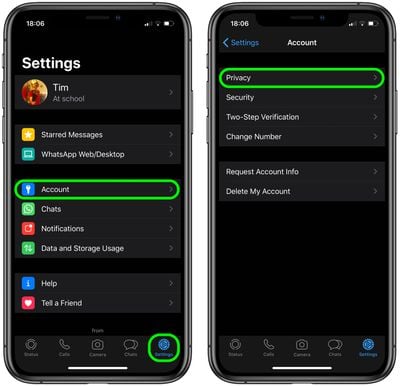
  1. Launch WhatsApp on your iPhone.
  2. If you're viewing a chat thread, back out of it, then tap Settings in the bottom-right corner of the screen.
  3. Tap Account.
  4. Tap Privacy.whatsapp

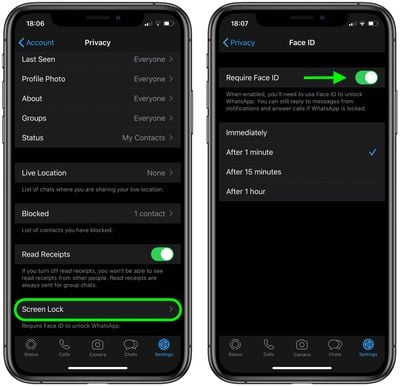
  5. Tap Screen Lock.
  6. Toggle on Require Face ID / Require Touch ID.

  7. Select a time delay if desired, or allow it to lock Immediately.
    whatsapp

Note that you'll still be able to reply to messages from notifications and answer calls when WhatsApp is locked.

Popular Stories

Whatsapp Feature

WhatsApp Beta Adds Green Dot to Show Who's Online

Monday July 6, 2026 3:56 am PDT by
WhatsApp appears to be introducing a new visual indicator that shows when a contact is online, according to WaBetaInfo. The feature adds a small green circle to a contact's profile photo when they're active in the app, and which disappears the moment they leave, all updated in real time. The indicator is now being tested for the WhatsApp iPhone app in TestFlight after it debuted on Android...


Whatsapp Feature

WhatsApp Beta Reveals iCloud Backup Alternative for iPhone

Tuesday July 14, 2026 3:06 am PDT by
WhatsApp is developing a first-party cloud storage option for chat backups on iPhone, providing users with an alternative to iCloud for the first time, according to app tinkerer WABetaInfo. Code found in the WhatsApp beta for iOS (version 26.28.10.16), available through TestFlight, suggests that users will eventually be able to pick their preferred backup destination directly from the app's...


Whatsapp Feature

WhatsApp Begins Rolling Out New Username Feature

Friday July 17, 2026 5:32 am PDT by
WhatsApp has started rolling out its new username feature, reports WABetaInfo. Some users who reserved their username have started receiving a notification that their username is active, and that they can now use it to send and receive messages to other users without revealing their phone number. When someone creates a username, WhatsApp will notify people who already have an active chat with...

🔗 Related Apple News & Rumors

Stay updated with the latest Apple ecosystem news and verified rumors