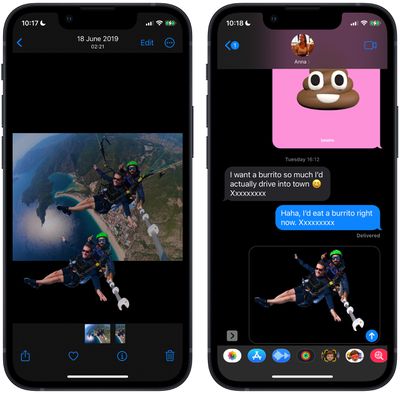
On iPhone and iPad, Apple's Visual Look Up feature for photos makes it possible to isolate the subject of a picture from its background so that you can copy it to the clipboard for use elsewhere or share it in another app.
Apple says the feature relies on advanced machine learning, and its ability to recognize and isolate subjects from a variety of photos is pretty impressive.
In fact it's so easy to use that performing painstaking subject isolation actions in image editing apps could soon become a thing of the past. Here's how it works.
Launch Photos and select an image from your library containing a well-defined subject.
Press and hold on the subject until it ripples and a white glow flows around its outline.
In the popup menu that appears, tap Copy to send the isolated subject to the clipboard for pasting elsewhere, or tap Share... to access the standard sharing options in the Action menu and send it on its way.
Alternatively, press and hold the subject to lift it from the background. Now, without taking your finger off the screen, use another finger to exit the Photos app and launch Messages, Mail, Notes, or another app that accepts images.
Now drag and let go of the subject to place it where you want in the input field.
That's all there is to it. You can even use it in paused frames in videos. The feature works not just in Photos, but also in screenshots and the Quick Look feature in the Files app.
As mentioned, the feature uses advanced machine learning and image analysis, therefore it is only available on phones with the A12 Bionic or newer chip. The A12 Bionic processor debuted in 2018 in the iPhone XS, iPhone XS Max, and the iPhone XR, so you need to be using one of these iPhones or a later model for it to work.
Apple's long-rumored smart home hub will have an iMac G4-style design and a host of unique features, Bloomberg's Mark Gurman reports.
The smart home hub is said to feature a square 6-inch display, with variants that can be placed on a countertop or mounted on a wall. It features a single FaceTime camera on the front, with microphones and speakers in its connected base. Gurman described the...
Apple plans to introduce a series of new smart home products on Tuesday, October 13, according to Bloomberg's Mark Gurman.
Apple reportedly plans to debut its long-awaited smart home hub device, a new HomePod mini, and a new Apple TV on the date. The new HomePod mini and Apple TV are set to retain their existing designs, but tout faster chips to support Siri AI. The new HomePod mini will...
Friday September 25, 2026 8:16 am PDT by Joe Rossignol
MacRumors contributor Aaron Perris has uncovered an image file from Apple for an unreleased Apple TV 4K, suggesting that a new model will finally be released soon. The image is specifically for an "Apple TV 4K (4th generation)" model.
Apple TV 4K (4th generation) image (on a gradient)
The image reveals that the Apple TV will have the same external design as the current model, with all of its...
Apple's first foldable iPhone, with a book-style design featuring a 5.4-inch outer display and a 7.6-inch inner display with a minimal crease down the middle.