

iOS 26: Set a Custom iPhone Ringtone in Seconds - MacRumorsOpen MenuShow RoundupsShow Forums menuVisit ForumsOpen Sidebar
Skip to Content

iOS 26: Set a Custom iPhone Ringtone in Seconds

by

Setting custom ringtones on your iPhone is dramatically easier in iOS 26. Apple has eliminated the need for the cumbersome process of exporting a track from the GarageBand app, and now provides a simple four-step process that works directly from the Files app.
iOS 18
The new streamlined approach means you can transform any MP3 or M4A audio file that's less than 30 seconds into a personalized ringtone in a just a few taps. Whether it's a favorite song snippet, a voice memo, or a sound effect you've downloaded, the process is now as straightforward as sharing a photo. Here's how to set up your custom ringtone without opening an additional app in iOS 26 (currently in beta).

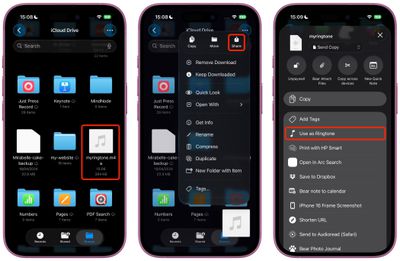
  1. Open the Files app on your iPhone.
  2. Long press an MP3 or M4A audio file that's less than 30 seconds long.
  3. Tap Share in the pop-up menu.
  4. Scroll down to the actions menu and choose Use as Ringtone.
ios use as ringtone

The change will be made immediately. You'll be sent to Settings ➝ Sounds & Haptics ➝ Ringtone, where you'll see the custom ringtone selected. From here, you can delete the ringtone (swipe left, then tap Delete) or choose another one in the default ringtones that's more to your liking.

Note that the Use as Ringtone option also appears for audio files in select other apps, including Voice Memos. Unfortunately, it's not possible to set Apple Music songs as custom ringtones for free, even with a subscription. Apple still sells 30-second song ringtones for $1.29 each through the iTunes Store app.


Popular Stories

iOS 27 Next to iPhone

Here's When iOS 27 Rolls Out Today in Every Time Zone [Update: It's Out]

Sunday September 13, 2026 3:00 am PDT by
Update 10:04 a.m.: iOS 27 is rolling out now, though it may take a bit for all users to see it, so keep checking! Apple is about to release iOS 27, which will finally deliver more advanced Siri AI capabilities as well as a variety of other refinements, improvements, and new features to iPhones. It's Apple's biggest software update of the year, and Apple announced at Wednesday's iPhone event...

iOS 27 Icon iPhone

iOS 27 Available Now With These 8 New Features

Monday September 14, 2026 9:00 am PDT by
Update — 10 a.m. Pacific Time: Apple has released iOS 27. During its iPhone 18 Pro and iPhone Duo event last week, Apple announced that iOS 27 will be released widely on Monday, September 14. iOS 27 should be available around 10 a.m. Pacific Time / 1 p.m. Eastern Time today via the Settings app, under General → Software Update. Below, we have highlighted eight new features and...
Apple iCloud Plus expansion hero

iCloud+ Now Includes Apple TV, Apple Arcade, and Curated Apple Music Stations in Over 100 Countries

Tuesday September 15, 2026 1:43 am PDT by
Apple today announced a new subscription initiative that turns paid iCloud+ subscriptions into a broader services bundle in more than 100 countries. In select countries, Apple says every paid iCloud+ plan, including the cheapest 50GB tier, now includes Apple TV and Apple Arcade "at no additional cost," while family sharing extends the storage, TV and Arcade access to up to five people....

🔗 Related Apple News & Rumors

Stay updated with the latest Apple ecosystem news and verified rumors










































