

iOS 18: How to Customize and Reorder the Photos App - MacRumorsOpen MenuShow RoundupsShow Forums menuVisit ForumsOpen Sidebar
Skip to Content

iOS 18: How to Customize and Reorder the Photos App

by

Apple's iOS 18 brings a significant redesign to the Photos app, introducing a unified Library View that consolidates all sections into a single, scrollable interface. While this new layout aims to streamline navigation, you may want to tailor it to your preferences. Here's how you can customize and reorder collections in the new Photos app.
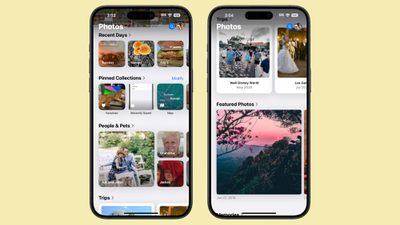
ios 18 photos app collections

Understanding Collections in Photos

In iOS 18, everything outside the main photo grid in the Photos app is considered a "Collection." These include:

  • Recent Days: Chronological view of your latest photos, similar to the previous iOS 17 Days view. Tap to see your entire library sorted by date.
  • Albums: Access all your created albums, including those shared with others.
  • People and Pets: AI-organized albums of individuals and animals. New Group feature automatically clusters frequent companions, with manual creation option.
  • Memories: Auto-generated slideshows, now featuring Apple Intelligence Memory Maker for enhanced presentations.
  • Trips: Location-based photo collections. View your travels organized by year.
  • Shared Albums: Collaborative photo collections shared between users.
  • Pinned Collections: Quick access to your most important albums or collections.
  • Featured Photos: AI-curated showcase of your best shots, updated regularly.
  • Media Types: Filter photos by capture mode (e.g., Live Photos, Portrait, Panoramas) or file type (e.g., Screenshots, Screen Recordings).
  • Utilities: Smart filters for practical image types like handwritten notes or receipts.
  • Wallpaper Suggestions: AI-selected images optimized for device wallpapers, with customizable visual elements.

Each collection offers different ways to view and organize your photos, from auto-generated slideshows to filters for specific types of images.
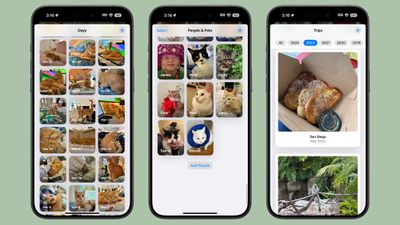
ios 18 collections

How to Customize and Reorder Collections

You can easily change the order of collections and choose which ones to display. By customizing your collections, you can prioritize the features you use most often, making your photo browsing experience more tailored to your needs. To do so, simply follow these steps:

  1. Open the Photos app.
  2. Scroll all the way down to the bottom of the main view.
  3. Tap the Customize and Reorder option.
  4. In the customization menu, you can deselect the checkmark next to a collection to remove it from view, and tap and hold the three bars next to a collection, then drag to rearrange its position.
  5. Once you're satisfied with your changes, tap the "X" in the top right corner to exit and return to the main Photos view.
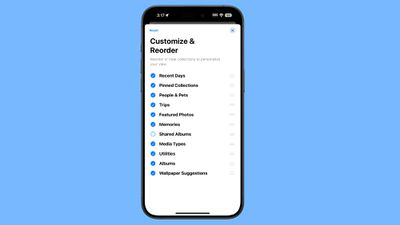
ios 18 collections reorder

Remember, you can always return to this menu to make further adjustments as your preferences change. As you explore the redesigned Photos app, take some time to experiment with different collection arrangements. You might discover new ways to interact with your photo library that enhance the overall experience.

Top Rated Comments

DMG35 Avatar
28 months ago
The photos app is a mess. Whatever intern that was allowed to design this atrocity needs to go back to the mail room.
Score: 50 Votes (Like | Disagree)
28 months ago
Photos seems to still be something that even Apple has been unable to reduce the complexity of. It's way more confusing and annoying than the previous design.
Score: 20 Votes (Like | Disagree)
28 months ago
I like the customisation options for the albums etc, I just wish they’d left the main library in a separate tab.
Score: 14 Votes (Like | Disagree)
Mac Fly (film) Avatar
28 months ago
Turned them all off. Better, but still, now have this 👇 in the way. Photos in iOS 17 was nicer with a good implementation for communicating total photo and video count. Bottom tab bar should have stayed with "Recents" album renamed as "Library" and set as default view and leftmost menu item. With the other two tab bar buttons as "Albums" and "Search". The buttons could be draggable/editable with a long press to enter edit mode. Users could have up to five items on the bar with the leftmost changing default view—personalised app with a clean result.




Attachment Image
Score: 14 Votes (Like | Disagree)
28 months ago
I agree that it’s a mess now more than ever, the fact that you have to swipe down twice to get your roll rolling is infuriating.

Yet basic functionality is in decline for years now.
Score: 13 Votes (Like | Disagree)
CaféPicasso Avatar
28 months ago
Turned them all off, too. When I open the app, I hate to see this huge "Customise & Reorder"-Button with all this white space around it instead of my photos. That's really bad design.
Score: 12 Votes (Like | Disagree)

Popular Stories

iphone duo facetime

iPhone Duo's Hidden FaceTime Camera Takes 'Trash' Photos

Wednesday October 21, 2026 11:36 am PDT by
The iPhone Duo's inner screen has an under-display front camera that's largely hidden from view. It's the first time we've seen an under-display camera on an iPhone, and it turns out there's a reason Apple hasn't used the technology before. Apple said the camera offers 1080p video recording, but didn't mention photo quality. Gizmodo said it's a 4-megapixel camera and described the photos as...
homeview faces

HomeView's Faces Include Snoopy, Photos, and Interactive Artwork

Wednesday October 14, 2026 4:00 am PDT by
Apple's HomeView includes customizable faces for photos, animations, and smart home controls. Faces Apple has named so far include: Photos Flow Snoopy Calendar Weather Home Modular Home Camera Other clock and widget layouts appear in Apple's promotional images, but have not yet been named. Apple says that selected faces change throughout the day, with different appearances...
iPhone Duo Display Cracking

Apple Alerts Stores to iPhone Duo's Display Cracking Issue

Friday October 30, 2026 3:20 pm PDT by
In a memo shared with Apple Stores and Apple Authorized Service Providers this week, and later obtained by MacRumors, Apple provided technicians with guidance on how to diagnose and address the iPhone Duo's inner display cracking issue. If a customer reports the issue, Apple advised technicians to inspect the iPhone Duo and repair or replace it in accordance with their standard procedures....
Latest Stories
Nearly Every M5 MacBook Air Now $200 Off on Amazon
6 hours ago
Apple's HomeView Ships With Six-Month-Old Software
8 hours ago
Three New iPads Rumored to Launch in First Half of 2027
8 hours ago
Apple Offers Steps to Fix Daylight Saving Time Bug on Apple Watch
12 hours ago
Apple Watch Ultra 4 Hits All-Time Low Price With Amazon's $99 Discount
1 day ago
Reminder: Apple's Big Discount on Beats 360 Ear Cushions Ends Today
1 day ago
Here's a New Tour of Apple's HomeView Software
1 day ago
Apple Reveals New iPad Mini's Battery Capacity
1 day ago
Top Stories: Apple's Big MacBook Pro, iPad mini and iMac Updates
1 day ago
'Pluribus' Season 2 Reportedly Starts Production Today
2 days ago
iPhone 18 Pro Sales Surge in China, Offsetting Decline in U.S. and Japan
2 days ago
HomeView Software 27.2: Wallpapers, Control Center, and More
2 days ago
Apple Alerts Stores to iPhone Duo's Display Cracking Issue
2 days ago
iOS 27.3 Will Enable These Apple Intelligence Features in China
2 days ago
Apple Says iOS 27.3 Beta Coming Next Week
2 days ago
Apple's Flash Storage Suppliers Are Finally 'Getting Their Revenge'
2 days ago
14 New Things Your iPhone Can Do in iOS 27.2
2 days ago
iPhone Duo Review: One Week Later
2 days ago
Samsung Mocks iPhone Duo Display Cracks in New Ad Campaign
2 days ago
The MacRumors Show: OLED MacBook Pro, iPad Mini 8, and More
2 days ago
MacBook Pro With Touch Display: 15 More Details Revealed
2 days ago
Russia Places Apple on State Surveillance Registry
2 days ago
Halloween Weekend Brings Discounts on Apple Accessories and Pre-Orders
2 days ago
Apple Has Released More Than 25 New Products in the Past Two Months
2 days ago
Local Code Launches as Free, Private AI Assistant Tool for Mac
2 days ago
Apple Acquires Ascend.io
2 days ago
HomePod Mini 2 Launches Today: All the New Features
2 days ago
AirTag 2 4-Pack Drops to New Low Price of $69.99
2 days ago
Rian Johnson's iPhone Camera App Goes Viral
2 days ago
Where Did All the iPhone Duos Go? Mostly to Apple's Stores
3 days ago

🔗 Related Apple News & Rumors

Stay updated with the latest Apple ecosystem news and verified rumors









































