

How to Manage File Associations in macOS - MacRumorsOpen MenuShow RoundupsShow Forums menuVisit ForumsOpen Sidebar
Skip to Content

How to Manage File Associations in macOS

by

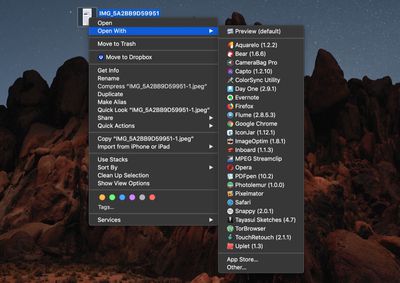
In macOS, the Open With contextual menu that appears when you right-click (or Ctrl-click) on a file provides links to all the applications installed on your Mac that are associated with that file type.
how to manage file associations on your mac
At the top of the list is the default app that macOS launches whenever you double-click on files that share the same suffix or extension, with other apps associated with the file type below that, and an Other... option at the bottom which lets you choose an alternative app in case the one you want to use isn't listed.
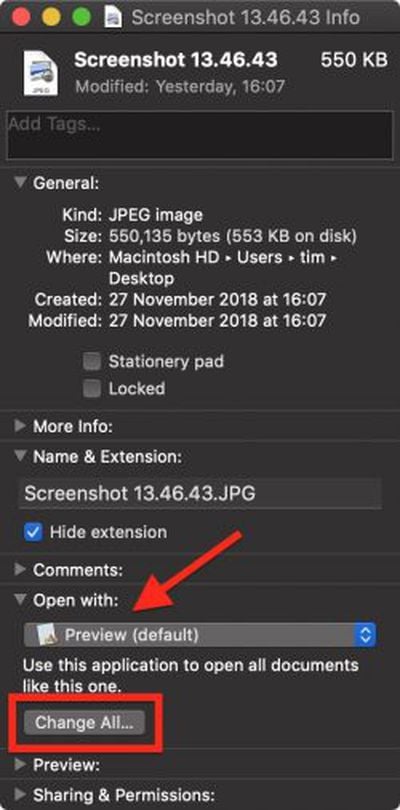
how to manage file associations on your mac 1You can easily change the default app associated with a particular file to something else. To do so, click Get Info in the contextual menu and select another app from the Open With: dropdown list in the file's Info pane. To use that app to open all files sharing the same extension, click the Change All... button and select Continue.

Clearing the Open With Menu

If you've installed a lot of applications on your Mac through the years, you may find that some apps appear in the Open With menu that really have no business being there given the kind of file you've selected.

As well as unrelated apps, you may even see references to "ghost" apps that you removed from your Mac long ago. All of which results in a long and cluttered list of launch service links you won't use.

Unfortunately the list isn't directly editable, but there are a couple of ways that you can clear the cruft from it. One option is to grab Titanium Software's free Onyx system utility and run a task to rebuild the Launch Services database.
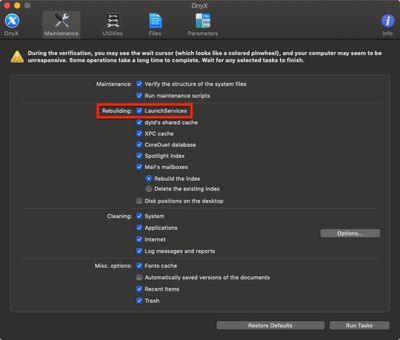
how to manage file associations on your mac 3
Alternatively, if you're comfortable with a command prompt you can open a Terminal window and run the following command, which does the same thing:

/System/Library/Frameworks/CoreServices.framework/Frameworks/
LaunchServices.framework/Support/lsregister -kill -r -domain local -domain system -domain user

how to manage file associations on your mac 4
Leave the command to run for a few minutes while the LaunchServices database rebuilds, and when the prompt reappears type killall Finder and press Enter to see the changes take effect.


Top Rated Comments

forzagaribaldi Avatar
98 months ago
I see a lot of the guides but i cant find them after few days :(. Is there a section on the website where all guides are located???
They seem to all be listed here: https://www.macrumors.com/how-to/
Score: 2 Votes (Like | Disagree)
Doctor Q Avatar
98 months ago
I sometimes just take apps I want to keep around but "inactive" and I compress them into a ZIP archive. Would that work for Photoshop CS5?
Presumably it would. Thanks for suggesting this.
Score: 1 Votes (Like | Disagree)
blackxacto Avatar
98 months ago
I liked storing PDFs in IBooks before Books. Once Mojave came, they’re outside here on.
Score: 1 Votes (Like | Disagree)
Doctor Q Avatar
98 months ago
I use Adobe Photoshop CC (subscription software) but I also keep a copy of Adobe Photoshop CS5 installed, in case my CC service is ever interrupted. I've associated Photoshop CC with my psd files, but sometimes double-clicking a psd file opens Photoshop CS5 instead, even if I associated psd files with Photoshop CC using that very psd file. I've never figured out why this happens.

Maybe Apple should bring back Type codes and Creator codes!
Score: 1 Votes (Like | Disagree)

Popular Stories

HomePod mini and Apple TV Sage

New Apple TV and HomePod Mini Are 'Nearly Ready' to Launch, New Siri Remote Also Rumored

Sunday May 31, 2026 8:47 am PDT by
New models of the Apple TV 4K and HomePod mini are "nearly ready to go," according to the latest word from Bloomberg's Mark Gurman. Subscribe to the MacRumors YouTube channel for more videos. Both devices have been ready "for months," but Apple is holding off on launching them until the more personalized version of Siri is available, he said. "I am told the hardware for the next Apple TV...
iphone 17 pro black feature

iPhone 18 Pro's Camera Upgrade Will Cost Apple 50% More

Friday May 29, 2026 3:44 am PDT by
The iPhone 18 Pro and iPhone 18 Pro Max's all-new variable aperture lens will cost Apple 50% more than the camera unit used in current models, according to supply chain analyst Ming-Chi Kuo. Variable aperture has been one of the most persistent iPhone camera rumors of the past few years. Kuo first flagged the feature in late 2024, and it has since been corroborated by multiple reports and...
iphone 18 pro color dummies

First Look at iPhone 18 Pro Color Options Revealed by Dummy Models

Friday May 29, 2026 4:50 am PDT by
Leaker Sonny Dickson today shared images of iPhone 18 Pro dummy models in the device's four rumored colors, offering the first real-world look at what to expect from the lineup visually. Corroborating previous rumors, the dummies show the iPhone 18 Pro Max in Light Blue, Black, Silver, and Dark Cherry. Dickson said "Cherry will probably be the next hit, orange did very well." Cosmic Orange...

🔗 Related Apple News & Rumors

Stay updated with the latest Apple ecosystem news and verified rumors















