

How to Hide Like and View Counts on Instagram Posts - MacRumorsOpen MenuShow RoundupsShow Forums menuVisit ForumsOpen Sidebar
Skip to Content

How to Hide Like and View Counts on Instagram Posts

by

Instagram includes several options on the platform that allow users to hide the number of like and view counts on posts. This article explains where to find them and adjust them to your preferences.
Instagram Feature 2
The new options were originally introduced a few years ago to "depressurize people's experience" on the platform, the Meta-owned social media company said at the time.

Instagram said its testing had found that removing likes had little impact on users' behavior and wellbeing, despite use of the platform being linked to anxiety and poor mental health. The following steps outline where you can find the new options in the Instagram mobile app.

How to Hide Like and View Counts on New Posts

By enabling this feature, you will see the username of a follower who has liked your post, followed by "and others," instead of a number indicating the number of likes.

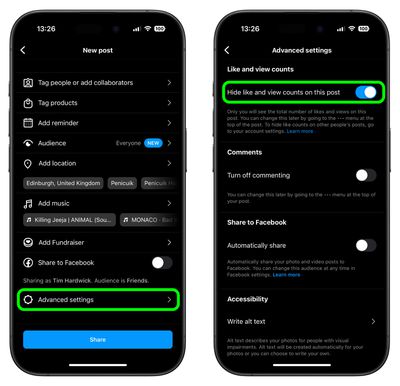
  1. Start a new Instagram post as usual until you get to the last menu before posting.
  2. Tap Advanced Settings at the bottom of the menu.
  3. Tap the switch next to Hide like and view counts on this post to toggle the option on and off.
instagram

Note that even if a user has Like Counts enabled, they will not be able to see the number of likes on accounts or posts that have hidden them.

How to Hide Like Counts on Your Existing Posts

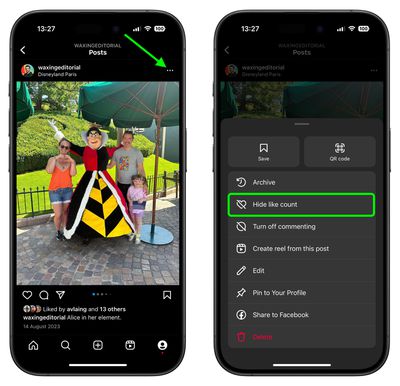
  1. Find one of your own shared posts.
  2. Tap the ellipsis icon (three dots) in the top-right corner of the post.
  3. Select Hide Like Count from the pop-up menu.
instagram

How to Hide Like and Share Counts on Other Users' Posts

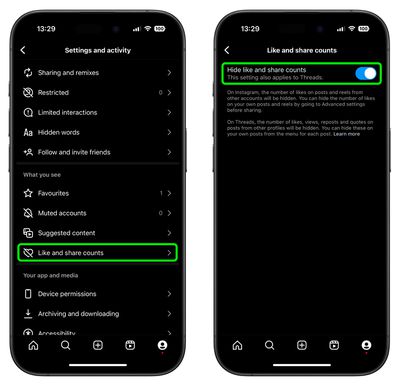
  1. Tap the Profile icon in the bottom-right corner of the Instagram interface, then tap the More (three-line) icon in the top-right corner.
  2. Scroll down to the "What you see" section, then tap Like and share counts.
  3. Tap the switch next to Hide like and share counts to toggle the option on or off.
instagram

Sometimes, for whatever reason, you might not want someone – or indeed anyone – to know when you were last active on Instagram. Fortunately, there is a way to hide your activity status in the app. Check our dedicated how-to article to learn how it's done.

Top Rated Comments

dannyyankou Avatar
71 months ago

The new options have been introduced to "depressurize people's experience" on the platform, the Facebook-owned social media company said.
A great way to do that is to deactivate your Instagram and Facebook account :)
Score: 30 Votes (Like | Disagree)
LiE_ Avatar
71 months ago
Step 1: long press app on Home Screen to enter jiggle mode.

Step 2: delete app

Now you have depressurised yourself from Instagram.

Score: 27 Votes (Like | Disagree)
Blackstick Avatar
71 months ago
I thought the entire point of Insta was the tiny dopamine hit from lots of people loving your dog or sunset photo with the perfect hashtags 🙄.
Score: 13 Votes (Like | Disagree)
71 months ago

A great way to do that is to deactivate your Instagram and Facebook account :)
A great decision for your mental health too I've found. At least for me it was.
Score: 8 Votes (Like | Disagree)
71 months ago
These are nice additions and options available. I’m sure most people will say to delete these apps, but the simple fact is that just isn’t going to happen for most and isn’t even solving anything really.

I don’t understand people’s unwillingness to learn and adapt to new things and the only “cure” is to delete and pretend it doesn’t exist at all. This applies to much more than just apps.
Score: 8 Votes (Like | Disagree)
GeoStructural Avatar
71 months ago

These are nice additions and options available. I’m sure most people will say to delete these apps, but the simple fact is that just isn’t going to happen for most and isn’t even solving anything really.

I don’t understand people’s unwillingness to learn and adapt to new things and the only “cure” is to delete and pretend it doesn’t exist at all. This applies to much more than just apps.
Man really good points. Many people will continue using social media, period. Some for business, quick news briefing and others for fun. And those are all valid choices.

And regarding the option I am glad it exists, it won’t have a personal impact on me but I have young people in my family that seem to be concerned about how much their content is liked or not, so I welcome it.
Score: 5 Votes (Like | Disagree)

Popular Stories

Instagram Feature 1

Instagram Launches Apple TV App With Reels and More

Saturday October 24, 2026 9:27 pm PDT by
Instagram is now available on the Apple TV, bringing Reels, longer videos, and live shows via the platform to Apple's streaming device for the first time. The Instagram app for Apple TV lets users watch content from their favorite creators, discover videos, and resume watching across devices. Instagram describes the app as a way to watch together with friends and family, extending its video...
iPhone Duo Display Cracking

Apple Alerts Stores to iPhone Duo's Display Cracking Issue

Friday October 30, 2026 3:20 pm PDT by
In a memo shared with Apple Stores and Apple Authorized Service Providers this week, and later obtained by MacRumors, Apple provided technicians with guidance on how to diagnose and address the iPhone Duo's inner display cracking issue. If a customer reports the issue, Apple advised technicians to inspect the iPhone Duo and repair or replace it in accordance with their standard procedures....
iPad mini OLED feature 1

Apple Executive Comments on New iPad Mini Lacking 120Hz Display

Thursday October 29, 2026 1:47 pm PDT by
While the new iPad mini has an OLED display, the device does not support ProMotion, meaning the display's refresh rate is limited to 60Hz instead of 120Hz. ProMotion support would have allowed for the iPad mini's refresh rate to automatically adjust from 10Hz to 120Hz depending on the content being displayed, but evidently Apple has kept the feature exclusive to the iPad Pro among iPad...
Latest Stories
Nearly Every M5 MacBook Air Now $200 Off on Amazon
2 hours ago
Apple's HomeView Ships With Six-Month-Old Software
4 hours ago
Three New iPads Rumored to Launch in First Half of 2027
5 hours ago
Apple Offers Steps to Fix Daylight Saving Time Bug on Apple Watch
8 hours ago
Apple Watch Ultra 4 Hits All-Time Low Price With Amazon's $99 Discount
1 day ago
Reminder: Apple's Big Discount on Beats 360 Ear Cushions Ends Today
1 day ago
Here's a New Tour of Apple's HomeView Software
1 day ago
Apple Reveals New iPad Mini's Battery Capacity
1 day ago
Top Stories: Apple's Big MacBook Pro, iPad mini and iMac Updates
1 day ago
'Pluribus' Season 2 Reportedly Starts Production Today
2 days ago
iPhone 18 Pro Sales Surge in China, Offsetting Decline in U.S. and Japan
2 days ago
HomeView Software 27.2: Wallpapers, Control Center, and More
2 days ago
Apple Alerts Stores to iPhone Duo's Display Cracking Issue
2 days ago
iOS 27.3 Will Enable These Apple Intelligence Features in China
2 days ago
Apple Says iOS 27.3 Beta Coming Next Week
2 days ago
Apple's Flash Storage Suppliers Are Finally 'Getting Their Revenge'
2 days ago
14 New Things Your iPhone Can Do in iOS 27.2
2 days ago
iPhone Duo Review: One Week Later
2 days ago
Samsung Mocks iPhone Duo Display Cracks in New Ad Campaign
2 days ago
The MacRumors Show: OLED MacBook Pro, iPad Mini 8, and More
2 days ago
MacBook Pro With Touch Display: 15 More Details Revealed
2 days ago
Russia Places Apple on State Surveillance Registry
2 days ago
Halloween Weekend Brings Discounts on Apple Accessories and Pre-Orders
2 days ago
Apple Has Released More Than 25 New Products in the Past Two Months
2 days ago
Local Code Launches as Free, Private AI Assistant Tool for Mac
2 days ago
Apple Acquires Ascend.io
2 days ago
HomePod Mini 2 Launches Today: All the New Features
2 days ago
AirTag 2 4-Pack Drops to New Low Price of $69.99
2 days ago
Rian Johnson's iPhone Camera App Goes Viral
2 days ago
Where Did All the iPhone Duos Go? Mostly to Apple's Stores
2 days ago

🔗 Related Apple News & Rumors

Stay updated with the latest Apple ecosystem news and verified rumors









































