

iOS 17: How to Get Siri to Read Web Articles to You - MacRumorsOpen MenuShow RoundupsShow Forums menuVisit ForumsOpen Sidebar
Skip to Content

iOS 17: How to Get Siri to Read Web Articles to You

by

In iOS 17 and iPadOS 17, Apple has added a new Siri ability that means you can get the virtual assistant to read web articles aloud to you just like an audiobook, even if your device is locked. Keep reading to learn how it's done on iPhone and iPad.
iOS 17 Siri Feature
If you tend to be put off by the thought of reading long-form articles on the web on a small screen, we have good news for you. In iOS 17, Siri can read them out loud for you, meaning all you have to do is listen.

How It Works

There are a few things to keep in mind when you want Siri to read web content out loud for you. First, you need to be using Apple's Safari when browsing webpages, otherwise it won't work. As it stands, Siri won't respond to read requests in third-party browsers.

Second, the webpage you want read to you needs to be compatible with Reader View. Almost all news articles on modern websites are compatible with Safari's Reader View, which strips away images, ads, and any other extraneous webpage content, leaving you looking at a clean page of legible text.
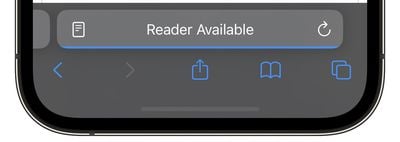
reader available
You can tell which pages support Reader View by looking for the words "Reader Available" and the document icon that briefly appears in the address bar when a webpage is loading. If you tap the aA icon that eventually replaces it, the Show Reader option will also be available (i.e. not grayed out) to indicate compatibility.

The last thing to be aware of is that if the article you want read to you is just one of many articles in a feed, such as on the MacRumors.com front page, you need to tap through to the individual article in question. Then you can do one of two things.

Method 1:

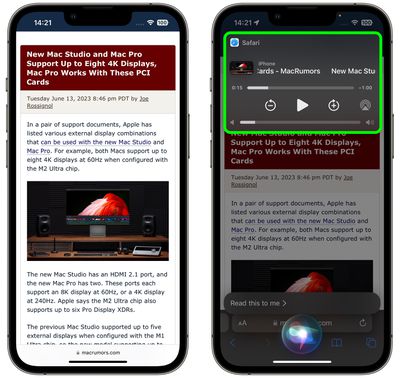
One way to get Siri to read the selected article to you is to hold your iPhone's side button (or top button on iPad) which will activate Siri. Then say "Read this to me." Alternatively, simply say "Siri, read this to me," hands-free. (In iOS 17, you don't even have to prefix a command with "Hey" to invoke Siri any more.)
siri
Siri will then begin reading the article to you out loud, and a media player panel will appear in the upper section of the screen, allowing you to rewind, fast-forward, adjust the volume, and even AirPlay the spoken audio to another device.

Method 2:

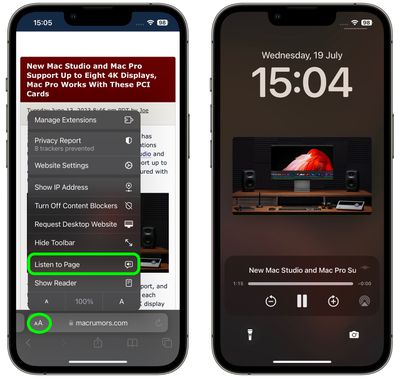
Another way to get Siri talking is to tap the Aa icon in the address bar, then choose the Listen to Page option in the pop-up menu. Siri will immediately begin reading the page to you.
safari
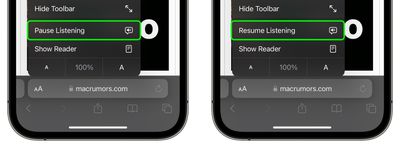
The only difference with this method is that, unless you lock your device while Siri is reading, you won't see a media control panel on the screen. If the article is still open in Safari, you can stop Siri reading it by tapping the Pause Listening option that replaces the "Listen to Page" option in the Aa pop-up menu.
listen to page safari
If you pause Siri, it will be replaced by a Resume Listening option, and the option will remain even if you navigate away from the page and return to it later.

So there you have it. With iOS 17, now almost any article on the web can be read to you via Siri while you're doing something else, even if your iPhone is locked and tucked away in your purse or pocket.


Related Forums: iOS 17, iPadOS 17

Top Rated Comments

macsplusmacs Avatar
43 months ago

Just curious -- what use case do people find for this? I would vastly prefer to read an article in 5-10 minutes instead of spending 30 minutes listening to it being read (especially by an AI voice). I guess this is useful for driving?

For me, background listing while I work of articles that I would like to read, but are not super essential or detailed so to save time I might as well listen to them.

For more important pages or stories I will definitely read them though.
Score: 4 Votes (Like | Disagree)
macsplusmacs Avatar
43 months ago
Going to use this a LOT!
Score: 4 Votes (Like | Disagree)
43 months ago
Funny: If the content isn’t in your Siri language, this feature isn’t available.

If you translate the page, it becomes available, but Siri will still read the original (with an accent) instead of the translation.
Score: 3 Votes (Like | Disagree)
klasma Avatar
43 months ago

Very cool! I’ve been waiting a long time for this feature. Previously, I’ve had to laboriously select text from a page to have it read. This will be very nice.
You could already (since iOS 12 I believe) use the Speak Screen two-finger swipe down to have a complete web page be read in Safari (https://support.apple.com/en-us/guide/iphone/iph96b214f0/).

Speak Screen works regardless of Reader mode support, and you even get controls to skip paragraphs forth and back, and (limited) control over reading speed. It also continues speaking when the iPhone is turned off.

So I’m not sure why Apple is now introducing a separate feature with different trade-offs, instead of integrating/expanding the existing one.
Score: 3 Votes (Like | Disagree)
Lcgiv Avatar
43 months ago
Probably not something I will use unless something happens to my vision, but definitely a useful feature for many
Score: 3 Votes (Like | Disagree)
mrr Avatar
43 months ago
Very cool! I’ve been waiting a long time for this feature. Previously, I’ve had to laboriously select text from a page to have it read. This will be very nice.
Score: 3 Votes (Like | Disagree)

Popular Stories

iPhone Duo Display Cracking

Apple Alerts Stores to iPhone Duo's Display Cracking Issue

Friday October 30, 2026 3:20 pm PDT by
In a memo shared with Apple Stores and Apple Authorized Service Providers this week, and later obtained by MacRumors, Apple provided technicians with guidance on how to diagnose and address the iPhone Duo's inner display cracking issue. If a customer reports the issue, Apple advised technicians to inspect the iPhone Duo and repair or replace it in accordance with their standard procedures....
iPad mini OLED feature 1

Apple Executive Comments on New iPad Mini Lacking 120Hz Display

Thursday October 29, 2026 1:47 pm PDT by
While the new iPad mini has an OLED display, the device does not support ProMotion, meaning the display's refresh rate is limited to 60Hz instead of 120Hz. ProMotion support would have allowed for the iPad mini's refresh rate to automatically adjust from 10Hz to 120Hz depending on the content being displayed, but evidently Apple has kept the feature exclusive to the iPad Pro among iPad...
Pinched iPad Mini

Apple Avoids Showing Pinched Fingers on iPad Mini Page in South Korea

Thursday October 29, 2026 11:52 am PDT by
In the U.S. and most other countries, Apple's website shows the new iPad mini being held by pinched fingers, but this is not the case in South Korea. The new iPad mini shown with pinched fingers on Apple's website in the U.S. On its South Korean website, Apple simply shows an image of the iPad mini on its own. The new iPad mini shown without pinched fingers on Apple's website in South Korea ...
Latest Stories
Apple Watch Ultra 4 Hits All-Time Low Price With Amazon's $99 Discount
12 hours ago
Reminder: Apple's Big Discount on Beats 360 Ear Cushions Ends Today
12 hours ago
Here's a New Tour of Apple's HomeView Software
12 hours ago
Apple Reveals New iPad Mini's Battery Capacity
13 hours ago
Top Stories: Apple's Big MacBook Pro, iPad mini and iMac Updates
15 hours ago
'Pluribus' Season 2 Reportedly Starts Production Today
21 hours ago
iPhone 18 Pro Sales Surge in China, Offsetting Decline in U.S. and Japan
22 hours ago
HomeView Software 27.2: Wallpapers, Control Center, and More
1 day ago
Apple Alerts Stores to iPhone Duo's Display Cracking Issue
1 day ago
iOS 27.3 Will Enable These Apple Intelligence Features in China
1 day ago
Apple Says iOS 27.3 Beta Coming Next Week
1 day ago
Apple's Flash Storage Suppliers Are Finally 'Getting Their Revenge'
1 day ago
14 New Things Your iPhone Can Do in iOS 27.2
1 day ago
iPhone Duo Review: One Week Later
1 day ago
Samsung Mocks iPhone Duo Display Cracks in New Ad Campaign
1 day ago
The MacRumors Show: OLED MacBook Pro, iPad Mini 8, and More
1 day ago
MacBook Pro With Touch Display: 15 More Details Revealed
1 day ago
Russia Places Apple on State Surveillance Registry
2 days ago
Halloween Weekend Brings Discounts on Apple Accessories and Pre-Orders
2 days ago
Apple Has Released More Than 25 New Products in the Past Two Months
2 days ago
Local Code Launches as Free, Private AI Assistant Tool for Mac
2 days ago
Apple Acquires Ascend.io
2 days ago
HomePod Mini 2 Launches Today: All the New Features
2 days ago
AirTag 2 4-Pack Drops to New Low Price of $69.99
2 days ago
Rian Johnson's iPhone Camera App Goes Viral
2 days ago
Where Did All the iPhone Duos Go? Mostly to Apple's Stores
2 days ago
Apple's Touchscreen MacBook Pro Could Ship 1.5M Units in 2027
2 days ago
New Apple TV 4K and iPad Mini: RAM Amounts Revealed
2 days ago
Apple Executive Comments on New iPad Mini Lacking 120Hz Display
2 days ago
Here's a Hands-On Look at HomePod Mini 2's New Two-Tone Colors
2 days ago

🔗 Related Apple News & Rumors

Stay updated with the latest Apple ecosystem news and verified rumors










































