How to View All Events as a List in Your Mac's Calendar App - MacRumorsOpen MenuShow RoundupsShow Forums menuVisit ForumsOpen Sidebar
Skip to Content

How to View All Events as a List in Your Mac's Calendar App

by

Some third-party calendar apps (Fantastical, for example) allow you to view all your upcoming events as a vertical list. Many users find this sort of viewing mode beats staring at the regular calendar interface, since it provides a quick at-a-glance summary of their entire schedule over the coming days and months.
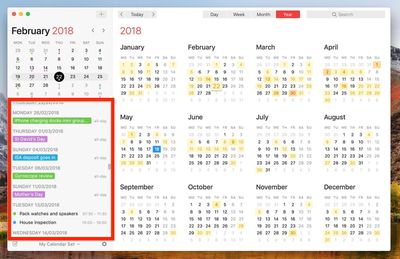
fantastical mac list view


On the face of it, Apple's Calendar for macOS lacks an equivalent feature. However, there is one way to force a list view that includes all your events, which we've detailed below. The trick even works with iCal going back at least to OS X Mountain Lion, which makes us wonder why Apple doesn't make the option a bit more obvious.

How to View All Events as a List in Calendar

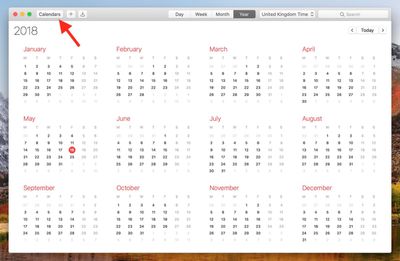
  1. Launch the Calendar app on your Mac.

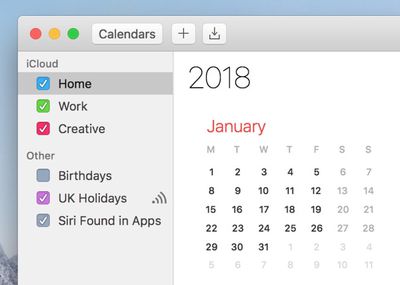
  2. Click the Calendar button.
    1 basic calendar view macos

  3. Select which calendars you want to include in the list view using the checkboxes.
    2 select calendars macos

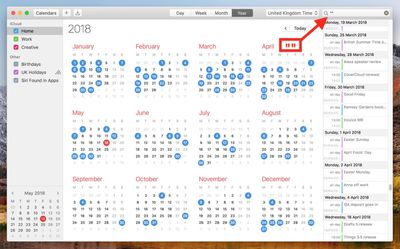
  4. Click the Search field in the upper right corner of the Calendar window and type two double quotes ("") to generate a list of all upcoming events.
    3 list view calendar macos

We find the list view makes it easier to copy multiple events and paste them into other apps in chronological order. For example, to copy several contiguous events, hold the Shift key, click the two outlying events bordering a given period, right-click (or Ctrl-click) an event in the selection, and select Copy from the contextual dropdown menu. You can then paste the events (including their details) straight into a document in date order.
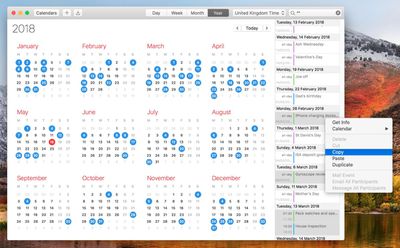
copy events in list view macos calendar
To copy non-contiguous events in your calendar, simply perform the same action but hold down the Command key instead of Shift. (Note that you can also open multiple event info boxes using the same method - just select Get Info from the contextual dropdown menu.)
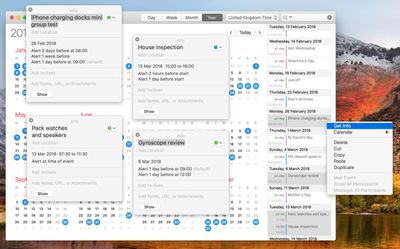

get info list view macos calendar

Top Rated Comments

oxfordrunner Avatar
109 months ago
I’ve been trying Fantastical 2 on the Mac App Store (21 day free demo). I am an airline pilot so scheduling events spanning multiple time zones is my life.

I want a calendar app that supports all Mac and iOS platforms with the SAME features such as UTC (GMT) time zones, floating time zone input, and events scheduled down to the minute (not rounded to the nearest 5), or events scheduled in different departure and arrival time zones (my personal preference, I could always just enter events in UTC and let the calendar app convert the times but sometimes that takes longer to input).

In short, neither Apple’s app or Fantastical 2 provide all of these features on ALL platforms and I can’t figure out why. Also, why do I have to know a specific city in a selected time zone to get that to populate the time zone field? I don’t want to have to use a “nearby” city that may or may not be in the correct time zone, I want the program to be smart enough to figure that out.

Going to try BusyCal next but I think some of the missing features are due to Apple’s calendar APIs used by developers. For example, you can’t do floating events on iOS; iOS rounds the times to the nearest 5, Mac OS will not let you choose a different time zone for the start and end of an event like iOS will.

Maybe I’m a lone wolf on wanting some of these features but I feel like the coding aspects aren’t too hard to fix, they just haven’t been done.
Score: 7 Votes (Like | Disagree)
109 months ago
Good tip and looks nice but why isn’t this just a standard view option. Looks silly having “” in the search bar and also, what if you want to use the search bar for, hmm... I don’t know, searching for something!?
Score: 3 Votes (Like | Disagree)
109 months ago
Sooooo intuitive ...
Score: 3 Votes (Like | Disagree)
109 months ago
I wish I could turn off autocomplete suggests for events in the Calendar app. I type one letter and out come 35 effing recommendations, not of which are remotely close to the event I’m trying to create. Super annoying.
Score: 3 Votes (Like | Disagree)
nnoble Avatar
109 months ago
These articles disclose superb little gems. This one I tried and can start putting it to good use instantly. Thanks.
Score: 2 Votes (Like | Disagree)
Mac Fly (film) Avatar
109 months ago
This method is not working on Sierra. I can bring up the list but Copying an event from it isn’t possible, let alone copying several events.
Score: 2 Votes (Like | Disagree)

Popular Stories

iOS 27 Next to iPhone

Here's When iOS 27 Rolls Out Today in Every Time Zone [Update: It's Out]

Sunday September 13, 2026 3:00 am PDT by
Update 10:04 a.m.: iOS 27 is rolling out now, though it may take a bit for all users to see it, so keep checking! Apple is about to release iOS 27, which will finally deliver more advanced Siri AI capabilities as well as a variety of other refinements, improvements, and new features to iPhones. It's Apple's biggest software update of the year, and Apple announced at Wednesday's iPhone event...
iOS 27 Icon iPhone

iOS 27 Available Now With These 8 New Features

Monday September 14, 2026 9:00 am PDT by
Update — 10 a.m. Pacific Time: Apple has released iOS 27. During its iPhone 18 Pro and iPhone Duo event last week, Apple announced that iOS 27 will be released widely on Monday, September 14. iOS 27 should be available around 10 a.m. Pacific Time / 1 p.m. Eastern Time today via the Settings app, under General → Software Update. Below, we have highlighted eight new features and...
Apple iCloud Plus expansion hero

iCloud+ Now Includes Apple TV, Apple Arcade, and Curated Apple Music Stations in Over 100 Countries

Tuesday September 15, 2026 1:43 am PDT by
Apple today announced a new subscription initiative that turns paid iCloud+ subscriptions into a broader services bundle in more than 100 countries. In select countries, Apple says every paid iCloud+ plan, including the cheapest 50GB tier, now includes Apple TV and Apple Arcade "at no additional cost," while family sharing extends the storage, TV and Arcade access to up to five people....

🔗 Related Apple News & Rumors

Stay updated with the latest Apple ecosystem news and verified rumors