

Threads, Meta's alternative to Twitter, has officially launched. If you joined up to Threads amid the initial wave of excitement and have already decided it's not for you, here's what you can do to remove yourself from the social media network.
Threads is still in its early days, so drawing conclusions about the utility of the social network is arguably jumping the gun. However, if you simply signed up to Threads to check it out and are already sure it's not your bag, unfortunately it isn't as simple as deleting your account.
That's because once you create a Threads profile, the only way to delete it is to also delete your Instagram account. "You may deactivate your Threads profile at any time, but your Threads profile can only be deleted by deleting your Instagram account," reads Threads' privacy policy.
In other words, Meta essentially holds your Instagram account hostage to encourage you to keep your Threads profile. If you're not prepared to delete your Instagram account just yet, the only other alternative is to deactivate your Threads profile. The steps below show you how.
Before continuing, just note that when you deactivate your profile, your posts and interactions with others' posts won't be visible until you reactivate it. However, those posts will remain on Threads' servers unless you manually delete them one by one. If you do delete your Instagram account, your Threads data will still stay on Meta's servers for up to 90 days.
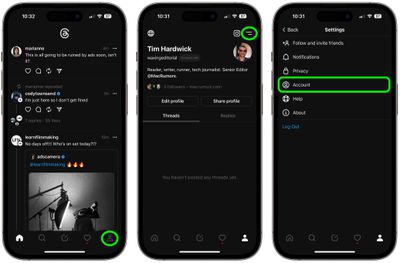
- In the Threads app, tap the profile icon in the bottom right corner of the screen.
- Tap the two-line menu icon in the top right of your profile.
- Tap the Account icon.

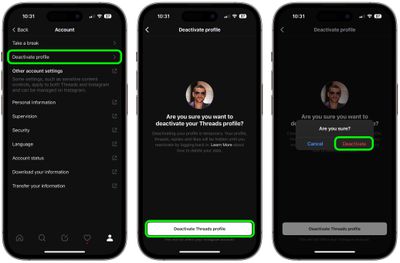
- Tap Deactivate profile.
- Tap Deactivate Threads profile.
- Confirm your choice to Deactivate at the prompt.
If you change your mind after deactivation, you can re-activate your Threads profile. Just bear in mind that you can only deactivate your profile once a week.
















































