

How to Customize the Monogram on Your Apple Watch - MacRumorsOpen MenuShow RoundupsShow Forums menuVisit ForumsOpen Sidebar
Skip to Content

How to Customize the Monogram on Your Apple Watch

by

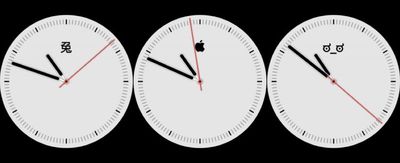
The monogram complication on Apple Watch is designed to let you choose up to four letters to appear on your watch's display. Previously it was only available on the Color watch face, but if you're a Series 4 owner, you can also use it on the new Infograph watch face.
customize monograph apple watch
The idea behind the monogram is to let you add your initials to your watch display, but there's nothing stopping you from adding other characters. Emoji aren't supported, but most unicode characters are, including of course the Apple  symbol.

You can find all manner of unicode characters on the web – try searching for "unicode faces" for some fun combinations. You could also download a unicode iPhone app like UniChar for a more complete selection. Just remember that you can only combine up to four characters in your monogram.

How to Add a Monogram to Your Apple Watch

  1. Copy the unicode character(s) you want to use in your monogram to your iPhone's clipboard. To copy from a web page, highlight the symbol(s) with a long press and then tap Copy from the popup menu.
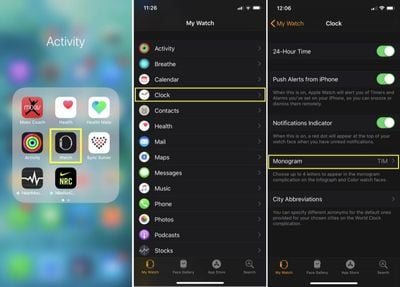
  2. Next, launch the stock Watch app on your iPhone.
    customize monograph apple watch01

  3. Tap the My Watch tab if it's not already selected.
  4. Tap Clock.
  5. Tap Monogram.
  6. Paste the character(s) into the Monogram field.
    customize monograph apple watch02

  7. Now, return to the main menu in the My Watch tab, and a select a Color or Infograph watch face from My Faces. (If you're not yet using one, you can choose one from the Face Gallery.)
  8. If you're using an Infograph face, tap Sub-dial Top and choose Monogram. If you're using a Color face, make sure the Monograph toggle is on.
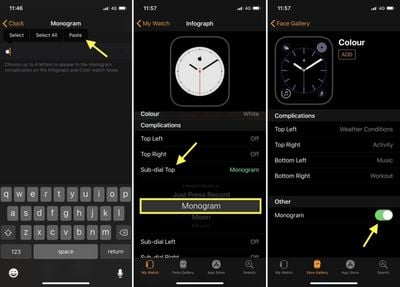
Once that's done, your monogram should show up the next time you switch to the Color or Infograph watch face on your Apple Watch.


Related Roundup: Apple Watch 12
Buyer's Guide: Apple Watch (Buy Now)
Related Forum: Apple Watch

Top Rated Comments

timmyh Avatar
104 months ago
This doesn't seem to work on the Series 3. As in, I can't paste unicode characters into the monogram field, not that the Infogram watchface isn't working (because it's not available on Series 3, lol).

That's weird. I got it to work fine on my Series 3.

¯\_(ツ)_/¯


Attachment Image
Score: 5 Votes (Like | Disagree)
Falhófnir Avatar
104 months ago
Love the look of disapproval (ಠ_ಠ) very apt for someone always running late :D
Score: 4 Votes (Like | Disagree)
Mac 128 Avatar
104 months ago
It's interesting to me that this watch face design, and some others, seem to be going back to a skueomorphic graphic. It's subtle to be sure, but it's definitely emulating a real physical watch, made of metal and mechanical parts.

customize the monogram on your apple watch image
Score: 2 Votes (Like | Disagree)
BC2009 Avatar
104 months ago
I wish the monogram could automatically show the current day of week and day of month like this :

TH27

Preferably with the day of month and day of week in different colors or background colors

Then I wouldn’t have to use up one of the larger complications to get that info
Score: 2 Votes (Like | Disagree)
OllyW Avatar
104 months ago
This doesn't seem to work on the Series 3. As in, I can't paste unicode characters into the monogram field, not that the Infogram watchface isn't working (because it's not available on Series 3, lol).
Works on mine.


Attachment Image
Score: 2 Votes (Like | Disagree)
saxofunk Avatar
104 months ago
https://www.copypastecharacter.com/all-characters

is a great place to grab all kinds of characters that aren't in the emoji set.
⇛ I use it all the time to grab people's attention. ⇚
Score: 1 Votes (Like | Disagree)

Popular Stories

Surprise and Shine Live Coverage Article

Apple Event Live Blog: iPhone Duo, iPhone 18 Pro, and More

Wednesday September 9, 2026 9:10 am PDT by
Apple's "Surprise and Shine" event kicks off today at 10:00 a.m. Pacific Time, where we're expecting to see the foldable iPhone Duo, the iPhone 18 Pro and Pro Max, Apple Watch Series 12 and Ultra 4 models, new AirPods 5 earphones, and perhaps some other announcements. Apple is providing a live video stream on its website, on YouTube, and in the company's TV app across various platforms. We...
Apple Watch Ultra 2 Black Titanium

New Apple Watch Series 12 and Apple Watch Ultra 4 Features Revealed

Sunday August 30, 2026 7:54 am PDT by
Bloomberg's Mark Gurman today further outlined what to expect from the Apple Watch Series 12 and Apple Watch Ultra 4 set to be unveiled on September 9. While it was initially rumored that Touch ID may be coming to the Apple Watch this year, Gurman reiterated that he does not expect the Series 12 or Ultra 4 to have any major design changes compared to the current Series 11 and Ultra 3 models. ...
apple surprise and shine event

Apple Event Today: iPhone 18 Pro and iPhone Duo Cheat Sheet

Tuesday September 8, 2026 10:24 am PDT by
Apple's biggest event of the year is almost here, and all eyes are on Cupertino. With the first foldable iPhone expected to headline Apple's "Surprise and Shine" event on Wednesday, September 9, at 10:00 a.m. Pacific Time, the rumor mill has been running full throttle, fuelled by the biggest single design change in the life of the iPhone. To get you up to speed, here's a quick reference...

🔗 Related Apple News & Rumors

Stay updated with the latest Apple ecosystem news and verified rumors










































