

Are you done with Netflix? This article explains how to cancel the streaming service on iPhone and iPad as well as on desktop.

With living costs on the rise, more and more people are looking for ways to cut costs, and one of the main reasons people have been turning away from Netflix is that the service has increased its prices.
In January 2022, Netflix increased the prices for all of its plans: The basic standard definition plan went from $8.99 to $9.99, the Standard HD plan went from $13.99 to $15.49, and the 4K Ultra plan went from $17.99 to $19.99.
Recently, Netflix also said that it is working to monetize the 100 million+ households that are "currently enjoying, but not directly paying for, Netflix." In other words, password sharing between households could soon become a thing of the past.
Whatever your reason for quitting the service, you're not alone. Netflix in the second quarter of 2022 lost 1.3 million subscribers in the United States and Canada. Keep in mind that Netflix is working on a lower-priced ad-supported tier which is set to launch in early 2023, but until then, here are the ways you can cancel the service if you've had enough.
How to Cancel Netflix on iPhone and iPad
If you signed up to Netflix using your Apple ID through your iPhone or iPad when it was still possible to do so, that's how you'll have to cancel the subscription.
- Launch the Settings app on your iPhone or iPad.
- Tap your Apple ID banner profile at the top of the menu.
- Tap Subscriptions.
- Select Netflix in the list that appears.
- Choose Cancel Subscription, then confirm at the dialog prompt. Note that the cancellation becomes effective at the end of your current billing period.

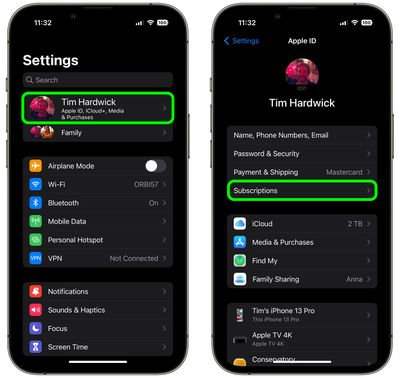
Note that your membership might renew if you don't cancel your subscription more than 24 hours before your renewal date, as per Apple's policy.
How to Cancel Netflix on the Web
- In Safari or another browser, head to Netflix's website on your iOS device or a desktop computer.
- Sign in, then tap the three-line menu icon in the top-right corner of the webpage and select Account.
- Scroll down if necessary and select Cancel Membership. If you're on iPad or a desktop browser, the option will appear near the upper left of the browser window.
- Note when the cancelation will take effect from, then select Finish Cancelation.
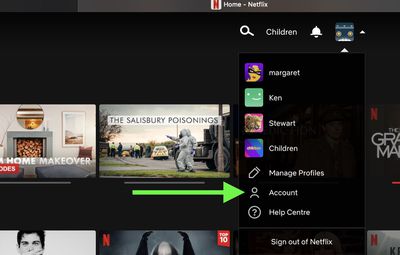
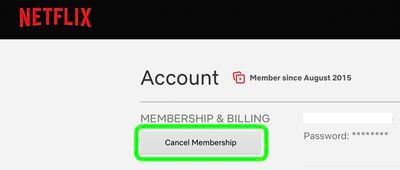
Netflix says that if a customer chooses to resubscribe within 10 months of quitting the service, their profiles, favorites, preferences, and account details will still be recoverable.
















































