How to Set Up Your New iPhone or iPad Using Automatic Setup
If you got a new iPhone or iPad for Christmas and you already have at least one iOS device that's running iOS 11, setting up the new device is simple and quick with Automatic Setup.
Introduced in iOS 11, Automatic Setup streamlines the setup process for new iPhones and iPads, transferring over Apple ID info, your WiFi network credentials, your preferred settings, and your iCloud Keychain.
Automatic Setup is meant to be used in tandem with a restore from an iCloud backup, because while it transfers many settings, it does not offer full device-to-device content transfer. When you buy a new device, Automatic Setup will pop up automatically, but there are some steps to follow to get everything transferred over:
- Power on your new device, which will open up to a menu asking you to pick a language.
- After choosing a language, you'll see a "Set Up Your iPhone (or iPad)" prompt.
- When this appears, place your existing iOS device near the new device to initiate Automatic Setup.
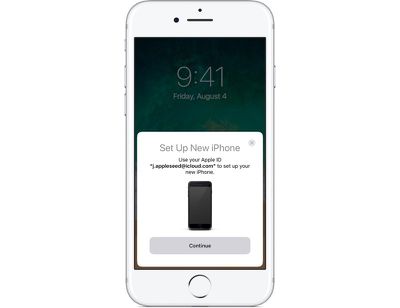
- Your existing device will show a pop up letting you know you can use Automatic Setup. Tap "Continue" to start.
- An Apple Watch-style pairing image will appear on the new device, and you'll be instructed to scan it with the camera on your existing device.
- In an area with decent lighting, hold the existing device's camera over the image on the new device to pair the two together.
- Enter the passcode from your existing device on the new device.
- From there, all of your data will start transferring from the old device to the new device.
When the first few Automatic Setup steps are complete, your iPhone or iPad will walk you through setting up Touch ID/Face ID, Siri, and Apple Pay, which are separate steps.
An additional "Express Settings" feature following Automatic Setup is designed to speed up new device activation even further. Express Setup automatically enables Find My iPhone, location services, and analytics, so if you don't want these features on, make sure to tap "Customize Settings" to change them.
Once you've transferred all of your settings with Automatic Setup, you can restore from an iCloud backup to get all of your apps transferred over. If you want to set up a device as new without downloading all of your old content, though, you're finished once Automatic Setup is completed.
If you don't have an iOS device running iOS 11, you'll need to go through a more traditional setup process. The steps are a lot like Automatic Setup, but instead of choosing an existing device after setting a language, you'll need to manually enter data like your Apple ID and your WiFi password.



















































Top Rated Comments
tl;dr
Upgrade and then backup old phone and Apple Watch BEFORE starting express update.
NOTE your paid content WILLNOT be copied over via express update.
First things first.
If you have a phone and a watch they MUST both be running the very latest revs of software. Remember always Apple never gives you anything for free - you have to upgrade first. After that you can use express setup to move your basic configs over AND still save your Apple Watch content. Follow another path and you prob loose all your existing Apple Watch data, even if you use Apple cloud or encrypted local backup.
That’s right. Any other path and your one or two years of Apple Watch Data is gone.
It won’t move your music or other content. Not even if it’s backed up in Apple cloud in your latest backup. And not even if you bought it on iTunes - though you can download it again after you are all setup. More on that later.
Remember second. Macrumors should never assume it’s readers are running the latest revs. iPhone6 and 6s battery slow down issue anyone? We have lots of reasons not to chase Apple down it’s rabit hole of “progression”. We have found time and again that we are not best served if we own a device more than a year old.
Third. Although your iCloud based backup, that you pay Apple for every month, contains all of your music. They will NOT move your music or other content to the new device. You still need to use iTunes for that. So why bother downloading from iTunes Store again, since you already have it in your library and will need to reload all that music from your computer anyway.
Watch were the ball is headed. Apple wants you to subscribe to services, not use your already owned music. If you are fine with that and always own the latest devices with the latest revs of code - then express setup could be for you.
Macrumors needs to learn how to be critical. Not just a smoke factory.
Before folks point out. Sure it’s my first post. Nope, I’m not anti apple. Yet. I’ve got shares (held for a long time). Had macs (also for a long time, though only intel based so not that long). iPads (normal and pro and pencil). Obv I have an older iPhone (4,5 and latest 6 plus). Have a Apple Watch (gen 0). Yup use their cloud too.
Nope express setup is an extremely poor way for Apple to “help” move an existing user from one device to another. They are experimenting on their use base. And they force you to use it if you want to continue using your original Apple Watch with your new iPhone X.
They can do better laying out the upgrade process. And macrumors can do better being critical of Apple. We all could be getting better service.
Connecting to WiFi is automatic and after about 10 mins, my phone is just how I like it. I do wish I could keep Apple Watch and health info in iCloud and move to new devices but I like the local storage for privacy implications.
Re:etgg
It’s MacRumors, not the New York Times. It’s not going to be critical. And this is an informational article to get readership from people with new devices.
Use iCloud music library all of the music just shows up again. And purchases can be re-downloaded.
MacRumors is a smoke factory, that’s the reason it’s called MacRumors.
I used it twice for migration. It was a pain both times.
At some point the process askes if a backup should be restored.
The iOS in the box was always older than the iOS on the old device.
Therefore iTunes couldn’t restore the backup onto the new device.