

Did you ever think the day would come when we could call someone right from our wrists? It still seems like the stuff that science fiction is made of, but you can, in fact, make and receive phone calls on Apple Watch. On Apple Watch, calls are routed through the iPhone, but you can answer even with your iPhone in another room or tucked away in a pocket, carrying on an entire conversation right from your watch.
Answering a Call
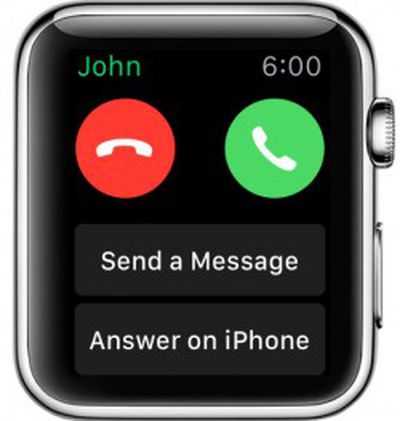 Answering a phone call is self-explanatory. When the call comes in, all you have to do is tap the green answer button. If you don't want to answer it, you can tap the red decline button and send the call to voicemail instead.
You can also choose to answer the call on your iPhone or send a text message. When the call comes in, turn the Digital Crown or swipe upwards to access these options.
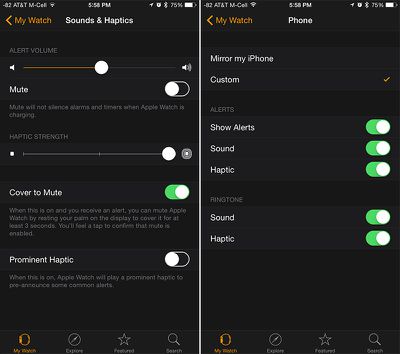
If you are in a meeting or otherwise engaged and forget to silence your Apple Watch ahead of time, you can quickly mute the sound of the incoming call by covering the Apple Watch's display with the palm of your hand for three seconds. Then tap to confirm that mute is enabled.
To Turn on the Cover to Mute feature:
- Open the Apple Watch app on your iPhone.
- Select Sounds and Haptics from the menu.
- Toggle the Cover to Mute switch to the On position.
Turning off Sound or Haptic Alerts:
You can't set special ringtones on the Apple Watch like you can on the iPhone, but you can toggle the sound or the haptic ringtones and alerts on and off. By default, the Apple Watch is set to mirror the iPhone, but you can change alert and ringtone options using the Apple Watch app on the iPhone.
- Open the Apple Watch app on the iPhone
- Scroll down to the app section and find "Phone"
- To toggle off sound or haptic notifications for an incoming call, use the Ringtone toggles
- To control alerts (for incoming and missed calls), tap "Custom" and then choose which alerts to receive.
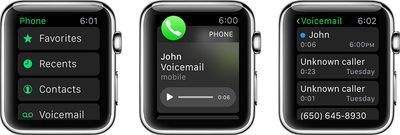
If you silence a call and the caller leaves you a voice message, you will receive a notification on Apple Watch. You can tap the voice mail notification to listen to it, or open the Phone app on Apple Watch and tap Voicemail.
If you answer the call on Apple Watch and decide you want to switch to your iPhone, use the Handoff feature on the iPhone's lock screen (swipe up from the phone icon in the bottom left corner). If your iPhone is already unlocked, tap the green bar at the top of the screen.

Making a Call
You can make phone calls to people on your Favorites list by pushing the Side button below the Digital Crown. Then, turn the Digital Crown or tap a person's initials to select. Then, tap the call icon in the bottom left corner of the screen.
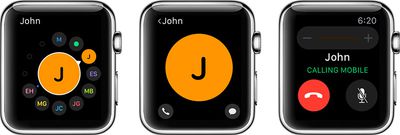
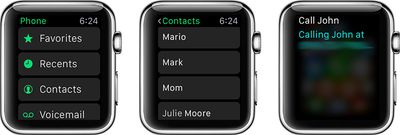
If you want to call someone who is not on your Favorites list, tap the Phone app on Apple Watch and turn the Digital Crown or swipe to the contact you wish to call. You can also ask Siri to make a phone call for you by saying "Call" and naming someone in your list of contacts. Siri will place the phone call for you.
Talking on Apple Watch feels a bit strange at first, and you might want to avoid it in public just because it can be difficult to hear someone from the Apple Watch speaker when there's ambient noise. Taking a call on the Apple Watch is, however, incredibly convenient if you want to talk to someone and your iPhone is not nearby. Plus, you can answer the call on Apple Watch, take your time getting to your iPhone, and simply switch over when you are ready. No more missed calls.

















































Top Rated Comments
If you feel upset about people posting their views, please feel free not to exercise your freedom of speech about it. We've already heard. Oh, hang on...
Yes. But I didn't think we'd need a lengthy article to explain how to do it.
Oh the irony of your statement. "Allow me to complain about your impending complaining" lol