

There are several reasons why you should consider using a passcode on your Apple Watch. Without one, you won't be able to use Apple Pay to make contactless transactions using the device, nor will you be able to use it to automatically unlock your Mac.
But apart from losing out on functionality, not using a passcode on your watch means that anyone who got hold of it could potentially gain access to your Health and other app data, and possibly more besides.

Using a passcode on your Apple Watch isn't like having one on your iPhone or iPad, because you don't have to enter it every time you use your watch. You'll only be prompted for it if you remove your Apple Watch from your wrist or if the watch is restarted. Also unlike iOS devices, if you ever forget your Apple Watch passcode, there are steps you can take to regain access.
With those benefits in mind, here's how to set up your Apple Watch passcode.
How to Add a Passcode to Your Apple Watch
- Launch the Settings app on your Apple Watch.
- Scroll down the list and tap Passcode.
- Tap Turn Passcode On.
- Enter the four-digit passcode you want to use to lock and unlock the watch.
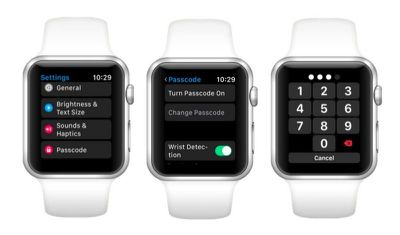
You can also add a passcode to your Apple Watch through the Watch app on your iPhone. You can find the relevant setting in the My Watch tab under Passcode -> Turn Passcode On.
For an added layer of security, consider using a six-digit passcode on your Apple Watch. Six-digit passcodes offer 1 million possible combinations instead of 10,000, making the passcode harder to crack. To enable a six-digit code from within the iOS Watch app, tap My Watch -> Passcode, and toggle off Simple Passcode. You'll then be prompted to enter the new six-digit code on your Apple Watch.
Lastly, if you tend to take your watch off during the day, there's a setting in the Watch app's Passcode menu that will unlock your Apple Watch whenever you unlock your iPhone, which should make things somewhat more convenient. Toggle on the switch next to Unlock with iPhone to enable it.
What to Do if You Forget Your Passcode
If you forget your Apple Watch passcode, you'll need to erase the device and then restore from a backup. You can perform this action by launching the Watch app on your paired iPhone: tap the My Watch tab if it's not already selected, tap General -> Reset, then select Erase Apple Watch Content and Settings.
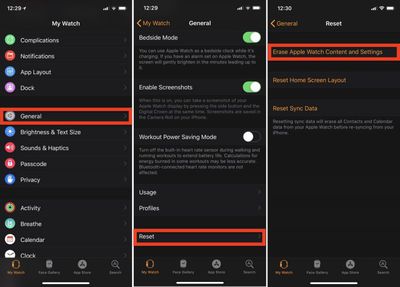
Alternatively, you can start the erase and restore process on your Apple Watch by connecting the device to its charger and following these steps.
- Press and hold the side button until you see the Power Off screen.
- Hard press the Power Off slider and then let go.
- Tap Erase all content and settings.
- You'll be asked to set up your Apple Watch again when the process ends. When you do, be sure to restore from a backup.

















































Top Rated Comments