iOS 17.1 Beta: All the New Features So Far - MacRumorsOpen MenuShow RoundupsShow Forums menuVisit ForumsOpen Sidebar
Skip to Content

iOS 17.1 Beta: All the New Features So Far

Apple is currently testing iOS 17.1, the first major update to the iOS 17 operating system that came out in September. Apple plans to release iOS 17.1 later in October, so we still have several betas to go before the software sees a public debut.
iOS 17
In this guide, we've rounded up all of the feature additions and changes in the iOS 17.1 beta, and we'll be updating it throughout the testing period.

Apple Music Favorites

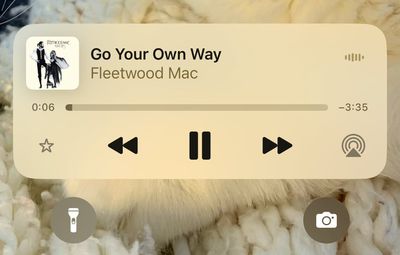
You can favorite songs, albums, playlists, and artists in the iOS 17.1 Music app. Favorited music is added to the Library and improves recommendations. Favoriting replaces the prior "Love" system and favoriting can be done from the Lock Screen's Now Playing widget.
apple music favorite
A star next to a track in an album means that it's a favorite, while a dot is next to the most played track. With the favorites system, the Music app is suggesting songs to add to playlists.
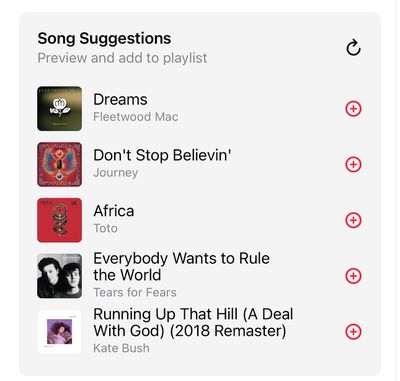
apple music song suggestions
Eventually, Apple plans to provide a Favorite Songs playlist and offer collaborative playlists, but these features do not appear to be implemented as of yet.

Apple Music Playlists

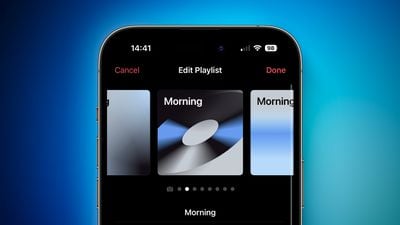
iOS 17.1 provides color-matched playlist artwork options that can be selected as a new customization option for your playlists. There are eight artwork styles that feature geometric shapes and gradients, with the colors featured pulled from the album artwork of the first song in the playlist.
iOS 17 Playlist Artwork Feature 1

AirDrop Over Internet

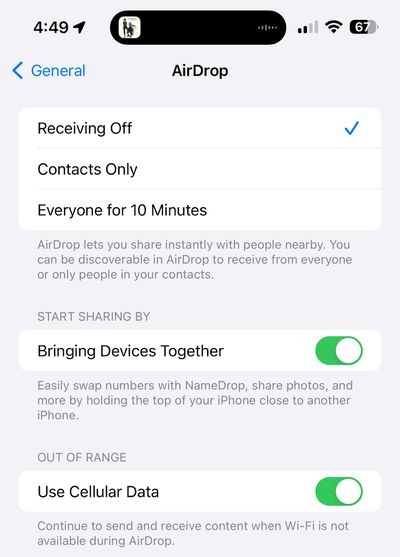
AirDrop transfers can now be completed over a cellular connection or Wi-Fi if you walk out of the range of the person you're sharing with. That means you will not have to stay close to someone if you are transferring a large number of files.
ios 17 1 airdrop
There is a new "Out of Range" toggle in the AirDrop section of the Settings menu that you can toggle to allow or disallow transfers over cellular.

Play Favorite Songs Quick Action

If you long press on the Apple Music icon on the Home Screen, you can now choose a "Play Favorite Songs" option.

Double Tap on Apple Watch

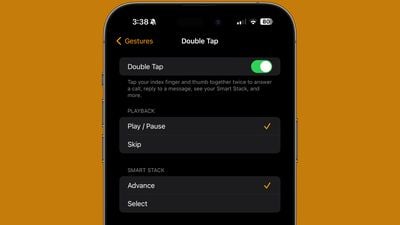
Double Tap is enabled in the watchOS 10.1 update that is also in beta testing, and the settings for it can be managed using the Apple Watch app.
watchos 10 1 double tap

Double Tap allows Apple Watch Series 9 and Apple Watch Ultra 2 owners to tap their thumb and index fingers together to control the Apple Watch with one hand. The gesture can be used for opening up the Smart Stack, answering/ending calls, playing/pausing music, stopping alarms and timers, and more.

StandBy Display Options

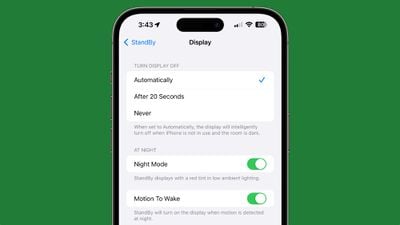
Apple added a new "Display" section to the StandBy section of the Settings app, which houses some new customization options. The display can be set to turn off automatically, after 20 seconds, or never.
standby display settings ios 17 1
The existing Night Mode function that adds a red tint and dims the screen has been relocated to this section, as has the Motion to Wake toggle. The Display section also replaces the prior Always On toggle that limited the display to turning off intelligently.

UK Bank Balances in the Wallet App

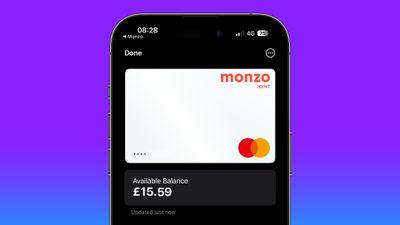
UK users can add their UK bank accounts to the Wallet app in iOS 17.1, allowing them to see their account balances, payments, purchases, and deposits.
uk bank account apple wallet 2

Wallet App and Discover Cards

U.S. Discover users who add their credit cards to Apple Wallet can see their total card balance and transaction history right on the iPhone with iOS 17.1.

Books App

The "Reading Now" section in the Apple Books app has been renamed to "Read Now."

Dynamic Island Flashlight Indicator

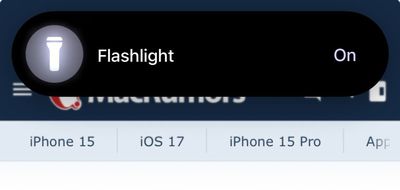
When the flashlight is activated on an iPhone 14 Pro, iPhone 14 Pro Max, iPhone 15, or iPhone 15 Plus, there is now a flashlight icon in the Dynamic Island that lets you know that It is on. The flashlight icon for the ‌Dynamic Island‌ was previously limited to the iPhone 15 Pro and iPhone 15 Pro Max.
dynamic island flashlight

Controller Support

iOS 17.1 includes support for the Nintendo Switch N64 Controller.

Extend Wallpaper

When you are setting up a new wallpaper, Apple has added an "Extend" option that can be used if the image does not fit the display.

Photo Shuffle

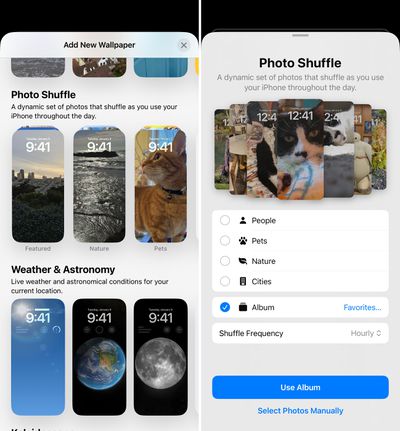
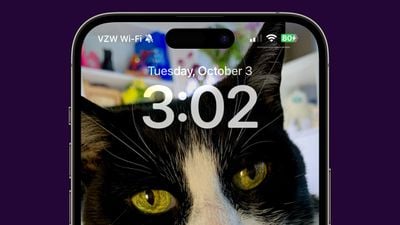
When you add a Photo Shuffle Lock Screen in iOS 17.1, you can select a specific album of photos that will be shown on the Lock Screen rather than having to rely on Apple's pre-selected options like People, Pets, or Nature.

When selecting any of the main Photo Shuffle images, you're brought into a customization screen where you can choose your Favorites album or opt for any other album you have created, giving you complete control over the images that show up on the Lock Screen. There was previously a tool for manually selecting photos, but being able to choose an entire album is quicker.
ios 17 1 photo shuffle
Photo Shuffle frequency remains the same at on tap, on lock, hourly, or daily.

Reachability

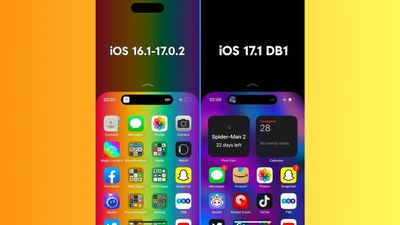
On iPhones with a ‌Dynamic Island‌, you'll now see a black background when you use the Reachability feature. In prior versions of iOS 17, a blurred version of the device's wallpaper was shown. The change to a black background prevents the ‌Dynamic Island‌ from being displayed twice when Reachability is used.
ios 17 1 reachability

Journal App

There is no sign of the promised Journal app in iOS 17.1, but there are mentions of Journaling Suggestions in the code, which indicates that it could be coming before too long.

80% Charging Limit Fix

With the iPhone 15 models, Apple added a toggle that prevents the devices from charging past 80 percent in order to keep the battery healthy for a longer period of time. In iOS 17, the iPhone could ignore this setting and charge past 80 percent, but that no longer happens following the second beta update.
ios 17 1 80 percent charge

Messages Bug Fix

iOS 17.1 addresses an issue with the search function in the Messages app in iOS 17. Some iPhone 15 users have been able to search for older messages after transferring their data over from an older iPhone. The Messages search feature only works for recent messages, but the update fixes the issue.

Action Button Update

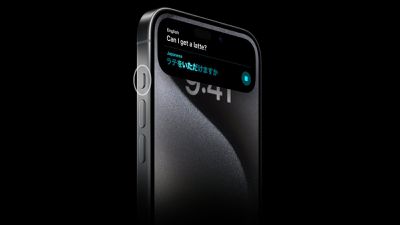
In iOS 17.1, Apple changed the functionality of the Action Button to prevent certain actions from being triggered while the iPhone is in a pocket or a bag. The Camera, Flashlight, Voice Memo, Focus, and Magnifier functions will no longer activate when the Action Button is pressed if the ‌iPhone‌ is tucked away in a pocket.

iPhone 15 Pro Action Button Translate
Actions that make sense to trigger in a pocket like the mute function and a shortcut can still be activated while the ‌iPhone‌ is inside of a pocket by long pressing on the Action Button, but other features are disabled.

More iOS 17.1 Beta Features

Know of a feature that we've missed on this list? Let us know in the comments below.

Related Forums: iOS 17, iPadOS 17

Popular Stories

iPhone Duo Display Cracking

Apple Alerts Stores to iPhone Duo's Display Cracking Issue

Friday October 30, 2026 3:20 pm PDT by
In a memo shared with Apple Stores and Apple Authorized Service Providers this week, and later obtained by MacRumors, Apple provided technicians with guidance on how to diagnose and address the iPhone Duo's inner display cracking issue. If a customer reports the issue, Apple advised technicians to inspect the iPhone Duo and repair or replace it in accordance with their standard procedures....

iPad mini OLED feature 1

Apple Executive Comments on New iPad Mini Lacking 120Hz Display

Thursday October 29, 2026 1:47 pm PDT by
While the new iPad mini has an OLED display, the device does not support ProMotion, meaning the display's refresh rate is limited to 60Hz instead of 120Hz. ProMotion support would have allowed for the iPad mini's refresh rate to automatically adjust from 10Hz to 120Hz depending on the content being displayed, but evidently Apple has kept the feature exclusive to the iPad Pro among iPad...
Pinched iPad Mini

Apple Avoids Showing Pinched Fingers on iPad Mini Page in South Korea

Thursday October 29, 2026 11:52 am PDT by
In the U.S. and most other countries, Apple's website shows the new iPad mini being held by pinched fingers, but this is not the case in South Korea. The new iPad mini shown with pinched fingers on Apple's website in the U.S. On its South Korean website, Apple simply shows an image of the iPad mini on its own. The new iPad mini shown without pinched fingers on Apple's website in South Korea ...

Top Rated Comments

Joosst Avatar
40 months ago
There's ONE SUPER ANNOYING BUG since iOS 17 that wasn't there in iOS 16.
It takes some words to explain, but it's SO STUPID and I hope EVERYONE will report it using Feedback Assistant:

Here's how to replicate it:

Write a few lines of text (in the notes app or wherever) and try to move the cursor around using a long press on the space bar. That goes pretty well if you want to move the cursor upwards, but downwards is a lot harder in iOS 17 beta.

It is specifically noticeable when the cursor is somewhere on top / on the first line of your text.

In iOS 16 you could:
1. hold space bar
2. move your finger upwards on the keyboard (the cursor would stay on the first line because it can’t go any higher)
3. move your finger down (the cursor would follow immediately, so you could reach the second or third line of text)

In iOS 17 though, the cursor stays on top when moving your finger down. Only when you reach the initial position (the bottom of the screen, where the space bar is) the cursor follows your movement again. But obviously you can’t move further down now because you’re already at the edge of the screen…

This is an obvious mistake, and I can't believe it made it through the betas.

It’s really a UI rule that when indirectly controlling something (like a cursor with a mouse), whenever you hit the edge of a screen and you keep moving your input device in the same direction, AS SOON as you move it back the slightest bit, the cursor comes along.

Imagine using a mouse and having this mistake: A cursor is at the right edge of a screen, you move your mouse (physically, in the real world) an arm length to the right. Then when you’re moving your arm back to the left the cursor doesn’t move! It stays on the right, only to start moving when your arm is physically back in the starting position.

That would be crazy. And it would drive anyone crazy. Because it feels like you’re out of control. That's what this is.
Ok I might be exaggerating but I do find it really annoying and stupid.
Score: 15 Votes (Like | Disagree)
Joosst Avatar
40 months ago
OH and there's another bug I hope EVERYONE will report:

In iOS 16, a new great feature was introduced: anywhere on the native full screen video player interface (that pops up in safari), you could start swiping left or right to navigate the video. Now in iOS 17 when you try that, the whole video moves left and right. Why would anyone want that?

I understand swiping down on the video has a function: it throws the video back into the smaller size within the webpage. But swiping left and right does nothing now except annoyingly moving the entire video.

That used to be a skim / search gesture and that was GREAT.
It’s annoying having to first tap the screen and then exactly finding the playhead. Just swiping any random place on the screen felt so good and easy.

So, this update feels like a downgrade in many of those day to day uses and I'm surprised they got through the betas.
I thought Apple was about quality control.
Score: 13 Votes (Like | Disagree)
40 months ago
i wish apple music was better. I gave it my best try but spotify is a superior experience hands down for music discovery.
Score: 11 Votes (Like | Disagree)
JGIGS Avatar
40 months ago

i wish apple music was better. I gave it my best try but spotify is a superior experience hands down for music discovery.
AM apparently has 20 million more songs and I have found lots of good ways to discover new music with it. I usually add at least 25% of the songs they present to me on my weekly new music playlist to my library every week.
Score: 6 Votes (Like | Disagree)
40 months ago
The Photo Shuffle wallpaper feature is a great touch!
Score: 6 Votes (Like | Disagree)
dannys1 Avatar
40 months ago

i wish apple music was better. I gave it my best try but spotify is a superior experience hands down for music discovery.
I kept Spotify around for years because of this, but Apple Music got better and better to the point where I dropped Spotify altogether about 18 months ago.

The thing AM does that Spotify can't touch is library management across all my devices. Spotify feels like renting access to a few playlists, Apple Music feels like my acutal carefully curated music library - I uploaded stuff that isn't on any streaming services and it sits there side by side indistinguishable from Apple music tracks or bought stuff.

If you're a casual music listener and everything you're interested in can be just found on a streaming server Spotify is fine, but if you're a music nerd AM can't be touched. Probably 40% of my library which is uploaded and synced across multiple devices isn't on Apple Music streaming or Spotify.
Score: 5 Votes (Like | Disagree)
Latest Stories
Nearly Every M5 MacBook Air Now $200 Off on Amazon
6 hours ago
Apple's HomeView Ships With Six-Month-Old Software
8 hours ago
Three New iPads Rumored to Launch in First Half of 2027
8 hours ago
Apple Offers Steps to Fix Daylight Saving Time Bug on Apple Watch
12 hours ago
Apple Watch Ultra 4 Hits All-Time Low Price With Amazon's $99 Discount
1 day ago
Reminder: Apple's Big Discount on Beats 360 Ear Cushions Ends Today
1 day ago
Here's a New Tour of Apple's HomeView Software
1 day ago
Apple Reveals New iPad Mini's Battery Capacity
1 day ago
Top Stories: Apple's Big MacBook Pro, iPad mini and iMac Updates
1 day ago
'Pluribus' Season 2 Reportedly Starts Production Today
2 days ago
iPhone 18 Pro Sales Surge in China, Offsetting Decline in U.S. and Japan
2 days ago
HomeView Software 27.2: Wallpapers, Control Center, and More
2 days ago
Apple Alerts Stores to iPhone Duo's Display Cracking Issue
2 days ago
iOS 27.3 Will Enable These Apple Intelligence Features in China
2 days ago
Apple Says iOS 27.3 Beta Coming Next Week
2 days ago
Apple's Flash Storage Suppliers Are Finally 'Getting Their Revenge'
2 days ago
14 New Things Your iPhone Can Do in iOS 27.2
2 days ago
iPhone Duo Review: One Week Later
2 days ago
Samsung Mocks iPhone Duo Display Cracks in New Ad Campaign
2 days ago
The MacRumors Show: OLED MacBook Pro, iPad Mini 8, and More
2 days ago
MacBook Pro With Touch Display: 15 More Details Revealed
2 days ago
Russia Places Apple on State Surveillance Registry
2 days ago
Halloween Weekend Brings Discounts on Apple Accessories and Pre-Orders
2 days ago
Apple Has Released More Than 25 New Products in the Past Two Months
2 days ago
Local Code Launches as Free, Private AI Assistant Tool for Mac
2 days ago
Apple Acquires Ascend.io
2 days ago
HomePod Mini 2 Launches Today: All the New Features
2 days ago
AirTag 2 4-Pack Drops to New Low Price of $69.99
2 days ago
Rian Johnson's iPhone Camera App Goes Viral
2 days ago
Where Did All the iPhone Duos Go? Mostly to Apple's Stores
3 days ago

🔗 Related Apple News & Rumors

Stay updated with the latest Apple ecosystem news and verified rumors