

macOS Big Sur Features: Everything New in Today's Release - MacRumorsOpen MenuShow RoundupsShow Forums menuVisit ForumsOpen Sidebar
Skip to Content

macOS Big Sur Features: Everything New in Today's Release

Apple is set to release macOS Big Sur in a few hours based on past macOS release timelines, and it's a major update with a whole slew of new features. Ahead of the launch, we've highlighted the biggest changes so you can get a quick overview of what to expect when downloading it later today.

macos big sur roundup header

Redesign

macOS Big Sur brings a significant redesign to the Mac operating system, debuting the first design refinements that we've seen to macOS in years. It overhauls the entire look of the software, from the curvature of window corners to the dock icons to the iconic system sounds. Everything in the update feels fresh but familiar, with Apple aiming for a lighter and more modern appearance.

Control Center and Notification Center

A new Control Center that mirrors the Control Center on iOS puts key system controls right at your fingertips, and there's a revamped Notification Center.
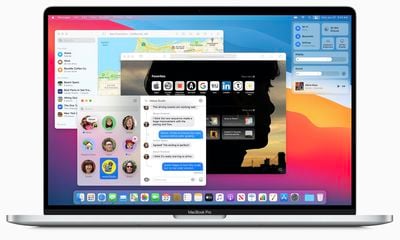
big sur macbook pro
The Notification Center features iOS-style widgets that are available in multiple sizes, along with interactive notifications that are grouped up by app to make it easier to see all of your incoming notifications at a glance.
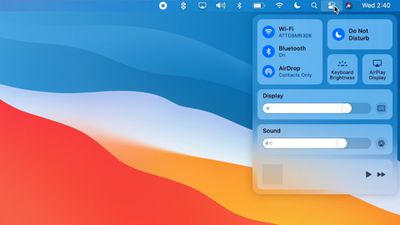
macosbigsurcontrolcenter

Safari Changes

Safari is faster and more battery efficient, and Apple has added a new start page that can be customized with wallpapers and various sections such as Reading List and iCloud Tabs for a Safari that's more tailored to your individual usage needs.
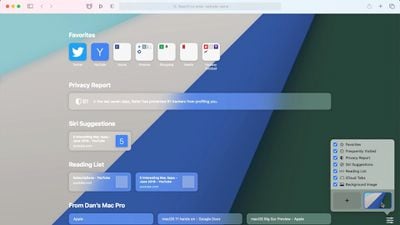
macosbigsursafari
Tabs have been redesigned with a new preview option so you can see what you've got open at a glance, and there's a new built-in translation feature for automatic language translation. Chrome and Firefox extensions can be ported to Safari for the first time, and there's an option to choose which sites an extension can access for improved privacy.

YouTube now supports 4K video playback through Safari, and Apple added a new Privacy Report feature to let users know which trackers Safari is blocking when visiting websites. Mac users may already be familiar with these features as they were introduced in the Safari 14 update provided to macOS Catalina and macOS Mojave users.
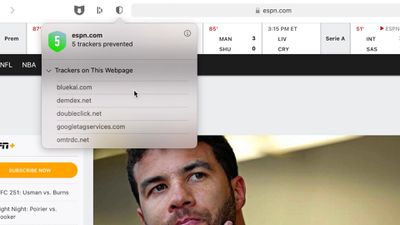
macosbigsursafariprivacy

Messages Updates

Messages is more similar to the Messages app on iOS with support for pinned conversations, mentions, inline replies, and Memoji creation, and the built-in search feature has been overhauled to make it a lot easier to find links, photos, and conversations within the app.
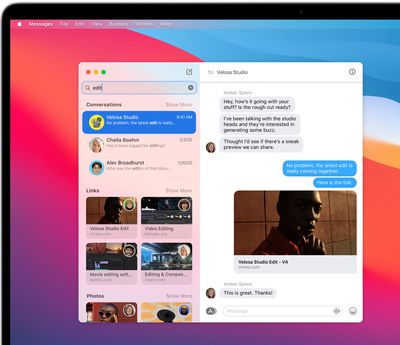
messagesearchbigsur

Overhauled Maps App

The Maps app for macOS has been redesigned with support for Look Around, indoor maps, and guides, which are lists of notable attractions and restaurants created by trusted sources, plus Maps can be used to generate directions for cycling routes and electric vehicle trips that can be sent to iPhone. Shared ETA updates are also now viewable on the Mac.
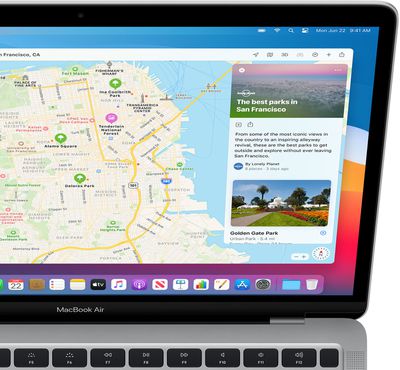
bigsurmapsguides

Photos Update

Photos includes a better Retouch tool, the Apple Music For You section has been replaced with a Listen Now section, HomeKit Secure Video cameras support Face Recognition and Activity zones, and Siri can answer a wider range of questions than before.

Battery Monitoring

There's a new Battery section in System Preferences for keeping an eye on battery, and the macOS App Store in the future will help users better understand privacy practices with clear info on the information that an app collects. After installing macOS Big Sur, future macOS updates will begin in the background and then finish much more quickly, which will make it easier to keep your Mac up to date.
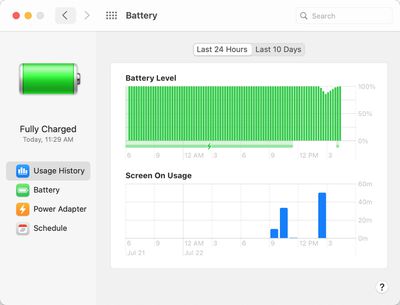
batteryhealthbigsur

Read More

There are tons of other new features that are coming in macOS Big Sur, so make sure to check out our macOS Big Sur roundup for a more complete list of everything that's new.


Related Forum: macOS Big Sur

Popular Stories

iPhone Duo Display Cracking

Apple Alerts Stores to iPhone Duo's Display Cracking Issue

Friday October 30, 2026 3:20 pm PDT by
In a memo shared with Apple Stores and Apple Authorized Service Providers this week, and later obtained by MacRumors, Apple provided technicians with guidance on how to diagnose and address the iPhone Duo's inner display cracking issue. If a customer reports the issue, Apple advised technicians to inspect the iPhone Duo and repair or replace it in accordance with their standard procedures....

iPad mini OLED feature 1

Apple Executive Comments on New iPad Mini Lacking 120Hz Display

Thursday October 29, 2026 1:47 pm PDT by
While the new iPad mini has an OLED display, the device does not support ProMotion, meaning the display's refresh rate is limited to 60Hz instead of 120Hz. ProMotion support would have allowed for the iPad mini's refresh rate to automatically adjust from 10Hz to 120Hz depending on the content being displayed, but evidently Apple has kept the feature exclusive to the iPad Pro among iPad...
Pinched iPad Mini

Apple Avoids Showing Pinched Fingers on iPad Mini Page in South Korea

Thursday October 29, 2026 11:52 am PDT by
In the U.S. and most other countries, Apple's website shows the new iPad mini being held by pinched fingers, but this is not the case in South Korea. The new iPad mini shown with pinched fingers on Apple's website in the U.S. On its South Korean website, Apple simply shows an image of the iPad mini on its own. The new iPad mini shown without pinched fingers on Apple's website in South Korea ...

Top Rated Comments

78 months ago
I love how you show the 5 trackers that were on the ESPN page instead of the 35 trackers safari blocked on macrumors.com
Score: 73 Votes (Like | Disagree)
CJ Dorschel Avatar
78 months ago
In roughly 20 years using Mac’s I’ve always updated to the latest OS. Catalina was the first time I never updated my Mac Pro’s. Being a developer I needed to run Big Sur on my MacBook Pro.

I loathe it. The UI is terrible. No matter how much I adjusted the contrast and brightness of my displays it always looked washed out and more difficult to navigate. I know Apple wants more unification between the operating systems of their devices yet this is a desktop OS and iOS/iPadOS UI elements just don’t work for me. Add in further extending security measures that make access to root difficult for third-party apps such as TotalSpaces (a great utility I’ve used since Apple ditched ”Spaces” but requires root access - normally I always disable SIP and GateKeeper yet I take other precautions and average consumers should not do so unless they are aware of the risks, etc), Catalina and Big Sur are just headaches.

I may roll back my Mac Pro’s to Mojave as it seems Apple has even dropped “Time Machine” features that have been around since day one such as retrieving individually deleted emails and contacts. When I updated to Catalina I noticed I could not open Mail and Contacts and retrieve lost items. I spent weeks reading forums and working with Apple engineers and it seems this is a feature, not a bug. Apple only allows recovering lost items in their core apps by fully restoring an entire Mail or Contacts backup point which defeats a big advantage to “Time Machine” and you lose any current data.

During Big Sur development I filed bug reports on “Time Machine” and none of them were addressed. Many of us did. I’ve used .Mac/MobileMe/iCloud and Time Machine together for years yet Apple claims iCloud syncing and local Time Machine backups of iCloud services won’t be working moving forward. Meaning restoring individual emails, contacts, etc from Time Machine backups won’t work anymore.

I found a work around for Contacts.

- Open Contacts on your Mac
- Export them in a VCF file
- Disable iCloud Contacts syncing
- Import the VCF file into Contacts
- On My Mac should show in Contacts
- Turn Contacts back on in iCloud

Now you’ll have iCloud and local contacts. I had to select each contact and link it to the other as two of each will show as doubles. If I delete a contact by mistake or I lose my iCloud contacts I can restore the local one on my Mac simply by dragging it to the iCloud group. If I delete both iCloud and local contacts I can also open up Contacts then click on “Time Machine” and restore it as before.

This decision and the others above and more have made Big Sur a Big Mess.

Apple should return to 2 year OS release cycles as they did before making OS X a free annual release. OS X 10.4 - 10.6 when Bertrand Serlet was the head of engineering were by far the best OS’s Apple released. We had to wipe down our drives every two weeks when a new beta was released to ensure third party apps and plugins weren’t causing problems with debugging the core OS and it allowed developers to better update their apps. Now it’s a rushed release cycle to match iOS and iPadOS development only meant to entice more into macOS and increase mac App Store revenue while producing lackluster and much buggier releases. I’d rather pay $129 for a solid OS every 2-3 years than a free OS that is a shadow of former versions.
Score: 47 Votes (Like | Disagree)
78 months ago
Like if you're installing on day 1!
Score: 24 Votes (Like | Disagree)
fromsixtozero Avatar
78 months ago
that battery icon is still ugly af
Score: 13 Votes (Like | Disagree)
xgman Avatar
78 months ago
I'm not sure I care about any of these "new features". :confused:
Score: 12 Votes (Like | Disagree)
RFolk Avatar
78 months ago
Everything looks awesome, just be aware, if you are in the music recording/producing arena, don't update. Most of the plugins will not work. In my case Universal Audio, FAbFilter, iZotope have not released any updates to their software. Same for video , I think...
Score: 12 Votes (Like | Disagree)
Latest Stories
Apple's HomeView Ships With Six-Month-Old Software
1 hour ago
Three New iPads Rumored to Launch in First Half of 2027
1 hour ago
Apple Offers Steps to Fix Daylight Saving Time Bug on Apple Watch
5 hours ago
Apple Watch Ultra 4 Hits All-Time Low Price With Amazon's $99 Discount
1 day ago
Reminder: Apple's Big Discount on Beats 360 Ear Cushions Ends Today
1 day ago
Here's a New Tour of Apple's HomeView Software
1 day ago
Apple Reveals New iPad Mini's Battery Capacity
1 day ago
Top Stories: Apple's Big MacBook Pro, iPad mini and iMac Updates
1 day ago
'Pluribus' Season 2 Reportedly Starts Production Today
1 day ago
iPhone 18 Pro Sales Surge in China, Offsetting Decline in U.S. and Japan
1 day ago
HomeView Software 27.2: Wallpapers, Control Center, and More
2 days ago
Apple Alerts Stores to iPhone Duo's Display Cracking Issue
2 days ago
iOS 27.3 Will Enable These Apple Intelligence Features in China
2 days ago
Apple Says iOS 27.3 Beta Coming Next Week
2 days ago
Apple's Flash Storage Suppliers Are Finally 'Getting Their Revenge'
2 days ago
14 New Things Your iPhone Can Do in iOS 27.2
2 days ago
iPhone Duo Review: One Week Later
2 days ago
Samsung Mocks iPhone Duo Display Cracks in New Ad Campaign
2 days ago
The MacRumors Show: OLED MacBook Pro, iPad Mini 8, and More
2 days ago
MacBook Pro With Touch Display: 15 More Details Revealed
2 days ago
Russia Places Apple on State Surveillance Registry
2 days ago
Halloween Weekend Brings Discounts on Apple Accessories and Pre-Orders
2 days ago
Apple Has Released More Than 25 New Products in the Past Two Months
2 days ago
Local Code Launches as Free, Private AI Assistant Tool for Mac
2 days ago
Apple Acquires Ascend.io
2 days ago
HomePod Mini 2 Launches Today: All the New Features
2 days ago
AirTag 2 4-Pack Drops to New Low Price of $69.99
2 days ago
Rian Johnson's iPhone Camera App Goes Viral
2 days ago
Where Did All the iPhone Duos Go? Mostly to Apple's Stores
2 days ago
Apple's Touchscreen MacBook Pro Could Ship 1.5M Units in 2027
2 days ago

🔗 Related Apple News & Rumors

Stay updated with the latest Apple ecosystem news and verified rumors










































