8 Things You Never Knew Your Mac Can Do - MacRumorsOpen MenuShow RoundupsShow Forums menuVisit ForumsOpen Sidebar
Skip to Content

8 Things You Never Knew Your Mac Can Do

Apple doesn't exactly telegraph older Mac software features, but there are several useful time-saving tricks hidden in your Mac's operating system that you may not be aware of. Here are eight quick tips that could be key to turbo-charging your productivity.

macOS Sonoma Macs
This article assumes you're using a Mac running macOS Sonoma, but most of these tips also work in earlier versions of Apple's Mac operating system.

1. Copy and Paste Text Excluding Formatting

When you select some text on a Mac, pressing Command-C copies it to the clipboard, and pressing Command-V pastes it along with any formatting.

no formatting
If you'd rather paste the copied text elsewhere as purely plain text, use the key combination Command-Option-Shift-V and it will be stripped of any formatting.

2. View All Calendar Events as a List

Some calendar apps allow you to view all your upcoming events as a vertical list. Many users find this sort of viewing mode beats staring at the regular calendar interface, since it provides a quick at-a-glance summary of their entire schedule over the coming days and months.

calendar
You may think Apple's Calendar app for macOS lacks an equivalent feature. However, there is one way to force a list view that includes all your events. Click the Search field in the upper right corner of the Calendar window and enter double quotes (") to generate a list of all upcoming events. This makes it easier to copy multiple events and paste them into other apps in chronological order.

3. Open a Copy of a File by Default

Stationery Pad is a handy way to nix a step in your workflow if you regularly use document templates on your Mac. The long-standing Finder feature essentially tells a file's parent application to open a copy of it by default, ensuring that the original file remains unedited. Almost any file type can be defined as a template with Stationery Pad – it could be used to streamline common Photoshop jobs, create skeleton HTML/CSS files, or help with Word document invoicing.
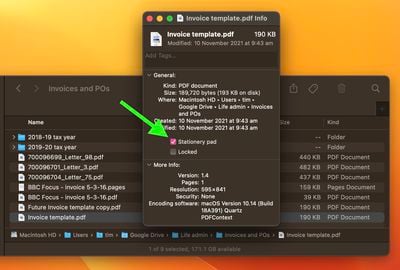
stationery pad
To take advantage of it, right-click (Ctrl-click) the file that you want to use as a template, select Get Info, then check the Stationery Pad checkbox under the General section. Lastly, click the red traffic light button to close the Get Info window. Next time you double-click the template file, Finder will automatically create and open a copy of it, leaving the original untouched.

Stationery Pad doesn't get much attention these days, but it's a neat alternative to repeatedly editing templates and using the "Save As..." command, which can lead to overwriting the original file if you're not too careful.

4. Access More Preview File Format Options

When you come to save or export a file in Preview, Option-click the Format dropdown to get access to several additional file types.
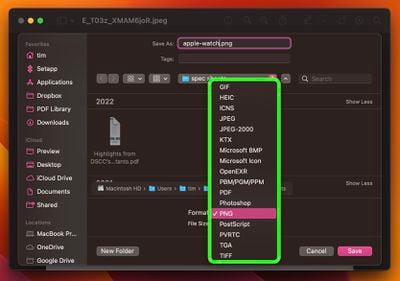
preview

5. Add App/File/Folder Shortcuts to Finder

Here's how to add convenient app, file, and folder shortcuts to the toolbar of Finder windows: Simply begin to drag the item within the Finder window, then hold down the Command (⌘) key and drop it onto an available space in the toolbar.
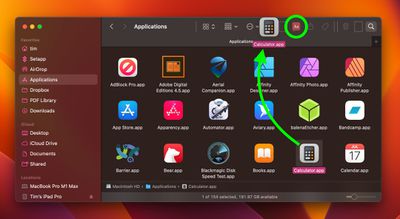
finder

6. Open Files From the App Switcher

Most long-time macOS users will be aware of the Application Switcher. It's invoked using the Command-Tab keyboard shortcut, and lists all of the apps currently running on your Mac, enabling you to quickly switch between them.
app switcher
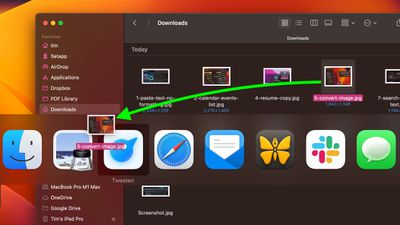
An oft-overlooked function of the App Switcher is its ability to open files. Simply begin to drag a file from a Finder window, then invoke the App Switcher and drag the file onto the relevant app icon in the overlay. Let go of the file and it should open in the selected app.

Bonus tip: To quit an open app with the App Switcher, highlight the app and tap Q. To quickly quit multiple apps, try cycling through the overlay with the Tab key, tapping Q as you go.

7. Search and Replace Text in Filenames

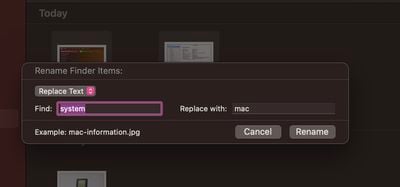
When you highlight several files in Finder, you can use the Rename... option in the Ctrl-click menu to rename all of them. The Rename dialog also allows you to rename only specific files in a selection whose names include a certain piece of identifying text. This is really handy if you have tens or hundreds of files in a folder with different names and you only want to change those files that contain a particular word.
rename
Select all the files in a folder (make sure they're all of the same kind, or this won't work), then Ctrl-click and select Rename.... Select Replace Text in the first dropdown. Now simply type the identifying text you want to replace into the "Find" field, and enter the text you want to replace it with in the "Replace With" field, then click Rename.

8. Use Text Clippings

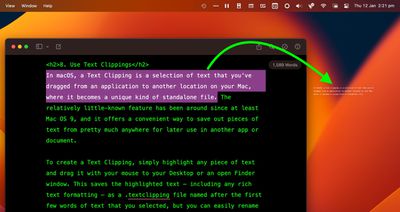
In macOS, a Text Clipping is a selection of text that you've dragged from an application to another location on your Mac, where it becomes a unique kind of standalone file. The relatively little-known feature has been around since at least Mac OS 9, and it offers a convenient way to save out pieces of text from pretty much anywhere for later use in another app or document.
clipping
To create a Text Clipping, simply highlight any piece of text and drag it with your mouse to your Desktop or an open Finder window. This saves the highlighted text – including any rich text formatting – as a .textclipping file named after the first few words of text that you selected, but you can easily rename it to make it more identifiable.
clipping
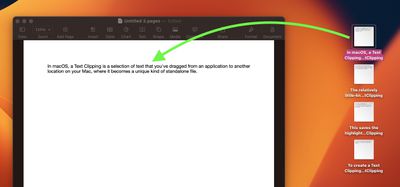
To use the selected text in another file like a Pages document, drag the Text Clipping into the open document and the text will be automatically pasted wherever the cursor is located. You can paste the clipping in the same way into all sorts of open files and apps, including browser search engines, Mail compose windows, Xcode projects, and more.


Popular Stories

apple pro tell logo

Apple Launches Two Products Today

Friday November 13, 2026 2:37 am PST by
Apple is releasing two new products today, Friday, November 13: the all-new Apple HomeView and the fourth-generation Apple TV 4K, both of which have been available to pre-order since mid-October. Apple HomeView: Apple's new smart home display, powered by Apple Intelligence with Siri AI, for entertainment and managing the home. Available in tabletop and wall-mounted models, it can recognize up...


johny srouji

Apple's Johny Srouji Eyed to Replace Nvidia CEO Jensen Huang

Thursday November 12, 2026 4:29 am PST by
Apple's chief hardware officer Johny Srouji is being considered as a potential successor to Nvidia CEO Jensen Huang as the chipmaker's board prepares to remove its co-founder, according to Semafor. Citing a person familiar with the matter, the publication identified Srouji as one of the people under consideration for Nvidia's top job. It is unclear if Srouji has yet been approached or...
iPhone Duo Outer Display Hand

Apple Aiming to Upgrade the iPhone Duo in Four Ways

Sunday November 15, 2026 8:42 am PST by
Bloomberg's Mark Gurman today said Apple has four goals for future iPhone Duo models: Face ID, an Action button, a telephoto camera, and a thinner-and-lighter design. Gurman said Apple has already developed iPhone Duo 2 prototypes with Face ID on the outer display, but it is "running out of time" to finalize the feature for that model, so it might not arrive until the iPhone Duo...
Latest Stories
Early Apple Watch Black Friday Deals Arrive With Series 12 Hitting New Record Lows
5 hours ago
Apple's Smart Glasses Strategy Hinges on Siri and iPhone Apps
5 hours ago
AirPods Pro 3 Discounted to $179.99 in Early Black Friday Sale
6 hours ago
Apple Aiming to Upgrade the iPhone Duo in Four Ways
7 hours ago
Apple Black Friday Starts Early: Save on Apple Watch, MacBook Air, and More
5 hours ago
Top Stories: Apple's New Software Approach, iPhone Duo-Optimized Apps, and More
1 day ago
HomeView Tidbits: Mirror, Sleep Timer, and Other Details
2 days ago
Siri AI Still Not Enabled on HomePod Mini 2 With Latest Software Update
2 days ago
Apple Releases tvOS 27.2.1 With Siri AI for Older Apple TVs
2 days ago
Microsoft 365 Outage Resolving After Nearly 24 Hours
2 days ago
iPhone Duo Survives 450,000 Folds, but Hinge is Weakening
2 days ago
Apple TV 4K Launch Day Deal Arrives at Amazon
2 days ago
The MacRumors Show: HomeView and Apple TV 4K First Impressions
2 days ago
YouTube App Not Working on Your New Apple TV? Here's the Fix
2 days ago
Apple Meets Thai Officials Over iPhone Spyware Warnings
2 days ago
Apple Shares HomeView 27.2 Release Notes With List of Features
2 days ago
HomeView in Québec: Apple Says Canadian French Support to Arrive in Software Update
2 days ago
Apple Watch Ultra 3 Gets Big $250 Discounts Ahead of Black Friday
2 days ago
Apple Says HomeView Sets New Record in Design-Focused Interview
2 days ago
Best Apple Deals of the Week: AirTag 2 Hits Record Low Price, Plus Early Black Friday Sales
2 days ago
iPhone 18 and 18e Coming in Spring 2027 With A20 Chip
2 days ago
King Charles to Join Elton John's Apple Music Radio Show
2 days ago
Select 'Apple Home Collection' Accessories Now Available to Order
2 days ago
Major Microsoft 365 Outage Continues
2 days ago
Apple Launches Two Products Today
3 days ago
Hands-On With the New Apple TV 4K and Siri AI
3 days ago
Siri AI Coming to Older Apple TV 4K Models in tvOS 27.2.1
3 days ago
HomeView Launch Kicks Off as First Orders Reach Customers
3 days ago
Apple Continues to Move Up iPhone Duo Delivery Dates
3 days ago
Apple Explains How HomeView Keeps Camera Data Private
3 days ago

🔗 Related Apple News & Rumors

Stay updated with the latest Apple ecosystem news and verified rumors