

The MacBook Pro is available in 14-inch and 16-inch sizes, with three distinct models starting at $1,599, $1,999, and $2,499, so which should you choose?
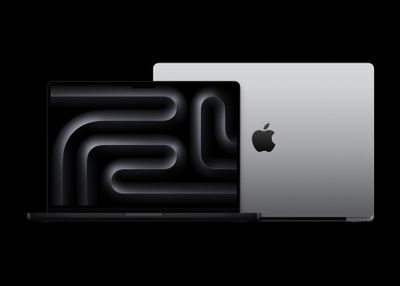
With a range of three similar models in the lineup to choose from, our guide helps to answer the question of how to decide which of these MacBook Pros is best for you. The three models are as follows:
- 14-Inch MacBook Pro with M4: An entry-level model for users who need a machine that is more powerful and versatile than the MacBook Air.
- 14-Inch MacBook Pro with M4 Pro or M4 Max: A more powerful, high-end model with a choice of performance-focused chips. It comes with higher memory bandwidth, larger quantities of memory, support for additional external displays, and an 8TB storage option, but loses two hours of battery life.
- 16-Inch MacBook Pro with M4 Pro or M4 Max: A model with identical specifications to the 14-inch model with the M4 Pro or M4 Max chips, but with a significantly larger display and up to two extra hours of battery life. It also gains High Power Mode to boost performance.
Each MacBook Pro is configurable to add more a more powerful processor and larger quantities of memory and storage. Read on for a detailed break down of all of the differences between the three MacBook Pro models.
| 14-Inch MacBook Pro (With M4) |
14-Inch MacBook Pro (With M4 Pro and M4 Max) |
16-Inch MacBook Pro |
|---|---|---|
| 14.2-inch display | 14.2-inch display | 16.2-inch display |
| 0.61 inches thick (1.55 cm) | 0.61 inches thick (1.55 cm) | 0.66 inches thick (1.68 cm) |
| Weighs 3.4 pounds (1.55 kg) | M4 Pro: Weighs 3.5 pounds (1.61 kg) M4 Max: Weighs 3.6 pounds (1.62 kg) |
M4 Pro: Weighs 4.7 pounds (2.14 kg) M4 Max: Weighs 4.8 pounds (2.16 kg) |
| Configurations start with M4 with 10-core CPU and 10-core GPU | Configurations start with M4 Pro with 12-core CPU and 16-core GPU | Configurations start with M4 Pro with 14-core CPU and 20-core GPU |
| High Power Mode to boost M4 Max performance | High Power Mode to boost M4 Max performance | |
| 120GB/s memory bandwidth | M4 Pro: 273GB/s memory bandwidth M4 Max: 546GB/s memory bandwidth |
M4 Pro: 273GB/s memory bandwidth M4 Max: 546GB/s memory bandwidth |
| 16GB, 24GB, or 32GB unified memory | M4 Pro: 24GB or 48GB unified memory M4 Max: 36GB, 48GB, 64GB, or 128GB unified memory |
M4 Pro: 24GB or 48GB unified memory M4 Max: 36GB, 48GB, 64GB, or 128GB unified memory |
| Support for two external displays | M4 Pro: Support for two external displays M4 Max: Support for up to four external displays |
M4 Pro: Support for two external displays M4 Max: Support for up to four external displays |
| Three Thunderbolt 4 (USB-C) ports | Three Thunderbolt 5 (USB-C) ports | Three Thunderbolt 5 (USB-C) ports |
| Fast charging over MagSafe 3 or USB-C port | Fast charging over MagSafe 3 or USB-C port | Fast charging over MagSafe 3 or USB-C port (with 240W cable only) |
| Up to 24-hour battery life | M4 Pro: Up to 22-hour battery life M4 Max: Up to 18-hour battery life |
M4 Pro: Up to 24-hour battery life M4 Max: Up to 21-hour battery life |
| Integrated 72.4-watt-hour lithium-polymer battery | Integrated 72.4-watt-hour lithium-polymer battery | Integrated 100-watt-hour lithium-polymer battery |
| 70W USB-C Power Adapter | 70W USB-C Power Adapter (with M4 Pro with 12-core CPU) or 96W USB-C Power Adapter (with M4 Pro with 14-core CPU or M4 Max, configurable with M4 Pro with 12-core CPU) | 140W USB-C Power Adapter |
| 512GB, 1TB, or 2TB storage | 512GB, 1TB, 2TB, 4TB, or 8TB storage | 512GB, 1TB, 2TB, 4TB, or 8TB storage |
| Starts at $1,599 | Starts at $1,999 | Starts at $2,499 |
Display Size
The MacBook Pro is offered in 14.2-inch and 16.2-inch display sizes. The 16.2-inch display is a better replacement for a desktop machine and provides much more screen space to arrange multiple windows and use professional applications that benefit from the additional display area. The 14.2-inch display is still larger than the 13.6-inch MacBook Air, and will likely be the best overall balance of needs for most users.
Design
The 16-inch model is, of course, physically larger than the 14-inch model, with a markedly bigger overall footprint. It is also worth noting that the 16-inch model is also 0.13 cm thicker and up to 1.4 pounds (0.64 kg) heavier.
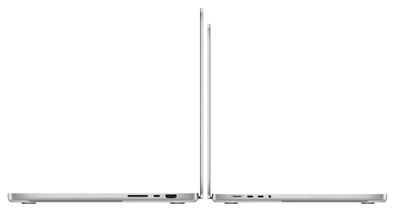
The 14-inch MacBook Pro is decidedly more portable and comfortable than the 16-inch model to carry around on a daily basis. Though the 16-inch MacBook Pro can still fit in larger bags and is an acceptable size for travel, it is a much bigger, heavier machine. If you are considering the 16-inch MacBook Pro, you should make sure you are comfortable with its size and weight—especially if you plan to use it on the go.
Chip Configurations
Both the 14-inch and 16-inch models are equally upgradeable to the M4 Max chip with a 16-core CPU and 40-core GPU, but if you are looking to spend as little as possible or do not need a high level of performance for intense workflows the 14-inch MacBook Pro is also available with the standard M4 chip. The M4 offers a more balanced processor with more of a focus on efficiency to prolong battery life, which will be more appropriate for users with less demanding requirements. Buyers should be aware that the M4 chip is limited to 120GB/s memory bandwidth, 32GB of memory, 2TB storage, and supports just two external displays.
The base configuration of the 14-inch MacBook Pro features an M4 Pro with 12-core CPU and 16-core GPU, while the base 16-inch model contains an M4 Pro with 14-core CPU and 20-core GPU. If you upgrade the 14-inch model to the same M4 Pro with 14-core CPU and 20-core GPU that the 16-inch model starts with, it increases to $2,299 – just $300 less than the starting price of the 16-inch model.
For those who are leaning toward buying the 16-inch MacBook Pro and want the 14-core CPU and 20-core GPU at a minimum, the slimmer price difference between the two models to just $300 may make it easier to justify getting the larger machine. On the other hand, if you do not need the performance of the M4 Pro with 14-core CPU and 20-core GPU, the 16-inch model may be overkill, and getting the 14-inch model will be the best way to keep costs down.
High Power Mode
The M4 Pro and M4 Max chips offer a software feature called High Power Mode. When enabled, High Power Mode boosts the machine's performance to better meet the needs of intensive, sustained workloads.
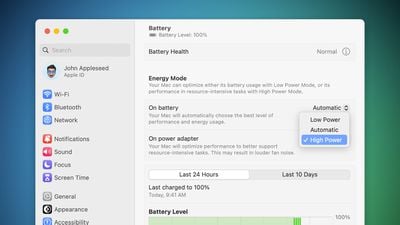
High Power Mode is designed to optimize and improve performance for resource-intensive tasks, such as color grading 8K ProRes video, according to Apple. When enabled, High Power Mode will de-prioritize resource-hungry system processes in order to leverage the full performance capability of the M4 Max chip. The setting is effectively the opposite of "Low Power Mode," which aims to decrease system performance in favor of prolonging battery life.
The M4 and M4 Pro chips do not feature High Power Mode, so if you want the ability to selectively push your processor to its limits, you will need to buy a machine with the M4 Max chip.
Battery Life
Owing to its larger size, the 16-inch MacBook Pro contains a larger battery and has longer-lasting battery life. The 14-inch model contains a 72.4-watt-hour battery, while the 16-inch model contains a 100-watt-hour battery.
Apple says the M4 14-inch MacBook Pro can deliver up to 24 hours of battery life when playing back video, but this drops to 18- or 22-hours when configured with the M4 Pro or M4 Max. The 16-inch model features 22-hours of battery life with the M4 Max and 24-hours with the M4 Pro when playing back video. For users who need maximum battery life, the M4 14-inch model or the M4 Pro 16-inch model will be the best options. That being said, the battery life of the other configurations is still good enough for most users.
Charging and Connectivity
The 14-inch MacBook Pro uses a 70W or 96W USB-C power adapter for charging, while the 16-inch model comes with a 140W power adapter. Both models support fast charging, but a 96W or higher USB-C power adapter is required. The 96W USB-C power adapter is a $20 option on the base model 14-inch MacBook Pro, but it comes as standard with M4 Pro configurations with a 14-core CPU and ones with the M4 Max.
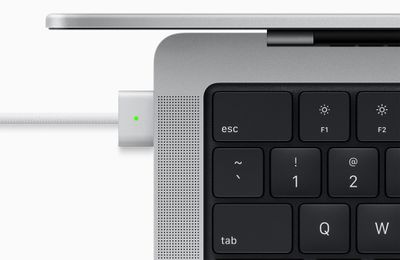
Both models can use the MagSafe 3 or USB-C ports to fast charge. They can charge with up to 100W via their USB-C ports, but since the 16-inch model has a larger battery, it is not classified as "fast charging" on this machine.
The MacBook Pro with the M4 Pro and M4 Max chips features Thunderbolt 5 ports, but the model with the standard M4 chip is limited to Thunderbolt 4. Thunderbolt 4 wired transfers should be more than sufficient for most users, but it is still a difference worth noting.
Final Thoughts
The 16-inch MacBook Pro is $500 more than the 14-inch model with the base M4 Pro chip, so you should be sure that you need the additional display area, battery life, and perhaps even High Power Mode support to justify its higher price. That being said, if you upgrade the 14-inch model to the same M4 Pro with 14-core CPU and 20-core GPU that the 16-inch model starts with, the price difference shrinks to $300, and it may be worth opting for the larger model—especially if you could take advantage of its longer battery life.
Buyers of the 16-inch model should be aware that it is considerably larger, thicker, and heavier than the 14-inch model, to the extent that it could be needlessly cumbersome to some users. The 14-inch MacBook Pro is clearly a more portable machine, so if you intend to carry your MacBook Pro around frequently or need the versatility of it easily fitting into a bag for transport, the smaller model is the better option by far.
If you need more than 16GB of memory and are interested in the 14-inch model with the M4 chip, a 24GB memory configuration pushes the price up to $1,799. The 14-inch MacBook Pro with the M4 Pro chip has 24GB of memory as standard and starts at $1,999. In this case, it may be worth spending the extra $200 to gain two extra CPU cores and six extra GPU cores, unless you are particularly concerned about losing two hours of battery life.


















































