

Apple Vision Pro's Developer Strap and Diagnostics Mode Revealed in More Detail - MacRumorsOpen MenuShow RoundupsShow Forums menuVisit ForumsOpen Sidebar
Skip to Content

Apple Vision Pro's Developer Strap and Diagnostics Mode Revealed in More Detail

Code discovered by MacRumors reveals a clearer look at how Apple stores will support Vision Pro headsets that are in need of servicing or support.
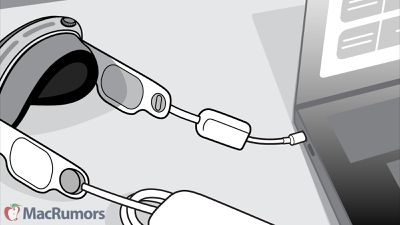
vision pro developer strap diagnostics
Back in June, Apple published its "Platform State Of The Union" video for developers, and multiple times throughout that video, a Vision Pro with a mysterious USB-C adapter could be seen, leading to speculation as to what it could be.

A recent update to one of Apple's diagnostic tools has shed new light on this by providing a new look at the "developer strap" which was first referenced in iOS 17.0 developer beta 1. The tool, which has a model number of A2776, is designed for use by Apple retail stores when interfacing with a malfunctioning Vision Pro. Interestingly, developers who received the Vision Pro developer kit last year were also provided access to this strap.

Code from the diagnostic tools also reveals more information on steps Apple retail stores can take to enter diagnostics mode on a malfunctioning Vision Pro to perform a restore:

  1. Remove the right audio strap and install the developer strap onto the Apple Vision Pro.
  2. Start up the ‌Apple Vision Pro‌ to Diagnostics Mode.
    – Press and hold down the Digital Crown.
    – Attach the battery cable while holding the Digital Crown.
    – Continue holding the Digital Crown for 8 to 10 seconds until the Apple logo appears.
  3. Plug the ‌Apple Vision Pro‌ into this computer using a USB-C cable.

With ‌Apple Vision Pro‌ officially launching today and Apple publishing a wealth of information about the new device, make sure to keep tabs on all of our coverage for the latest on what Apple CEO Tim Cook calls "the era of spatial computing."
Related Roundup: Apple Vision Pro
Buyer's Guide: Vision Pro (Neutral)
Related Forum: Apple Vision Pro

Popular Stories

General visionOS watchOS and tvOS Betas Feature Redux

Apple Seeds watchOS 26.5, tvOS 26.5 and visionOS 26.5 Release Candidates

Monday May 4, 2026 10:11 am PDT by
Apple today provided developers with the release candidate versions of upcoming watchOS 26.5, tvOS 26.5, and visionOS 26.5 betas for testing purposes. The software comes a week after Apple released the fourth betas for each platform. The software updates are available through the Settings app on each device, and because these are developer betas, a free developer account is required....
visionOS 26 Feature

Apple Releases visionOS 26.5

Monday May 11, 2026 10:01 am PDT by
Apple today released visionOS 26.5, the fifth update to the visionOS 26 operating system that launched in September. visionOS 26.5 comes close to two months after Apple released visionOS 26.4. ‌visionOS 26‌.5 can be downloaded on all Vision Pro headsets by navigating to the Settings app, selecting the General section, and choosing the Software Update option. To install an update, the...
M5 Vision Pro Thumb 2

Gurman: New Apple Vision Pro Won't Arrive for at Least Two Years

Monday May 11, 2026 5:16 am PDT by
Apple hasn't fully abandoned the Vision Pro, but anyone hoping for a successor will be waiting at least two more years, according to Bloomberg's Mark Gurman. Writing in his latest Power On newsletter, Gurman resisted suggestions that Apple has walked away from the headset entirely. The well-connected reporter says the company continues to develop new technologies and materials behind the...

Top Rated Comments

30 months ago
I'm surprised this isn't done through the Power connector, given that it has a multi-pin Lightning-like connector. So there's USB on both sides of the Vision Pro. Interesting.
Score: 5 Votes (Like | Disagree)
zakarhino Avatar
30 months ago
Wait so the right strap bracket actually contains a secret serial connector? Or am I understanding this incorrectly? Interesting
Score: 4 Votes (Like | Disagree)
gaximus Avatar
30 months ago

As the other connector might get dusty or even damaged by everyday use, it’s quite clever they are using a separate one as exclusive diagnostics connection.
I actually thought it replaced the battery connector side, and thought you could use it as a plug in option, then thought it was weird that the picture showed it plugged into the Mac directly(without extension usb) like you would wear it while it’s plugged in. But this makes since as you would t have to shut it down and reboot everytime you built to it. Pretty clever. Not as clever as having a built in battery so that it could swap power sources without having to shut down but clever.
Score: 2 Votes (Like | Disagree)
30 months ago
I miss these line-art drawings! The manuals for Macs back in the 80s and 90s were actually really fun to read.
Score: 2 Votes (Like | Disagree)
30 months ago
Very Interesting to know about this.
Score: 1 Votes (Like | Disagree)
Shirasaki Avatar
30 months ago
Apple has been touting to cut the need for computer for about a decade. And here, this Vision Pro still needs a Mac to perform certain diagnosis and checks, rather than through iPad or iPhone.
Score: 1 Votes (Like | Disagree)

🔗 Related Apple News & Rumors

Stay updated with the latest Apple ecosystem news and verified rumors











































