

Everything New in iOS 17.1 Beta 2 - MacRumorsOpen MenuShow RoundupsShow Forums menuVisit ForumsOpen Sidebar
Skip to Content

Everything New in iOS 17.1 Beta 2

Apple today released the second beta of an upcoming iOS 17.1 update, and the software further refines some of the new features that were added both in iOS 17 and the initial iOS 17.1 beta.
iOS 17
This guide covers everything new in the second iOS 17.1 beta.

StandBy Display Options

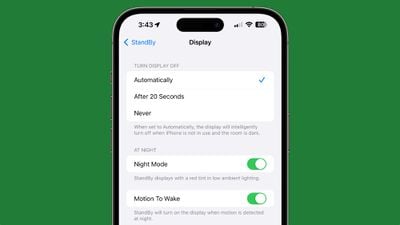
Apple added a new "Display" section to the StandBy section of the Settings app, which houses some new customization options. The display can be set to turn off automatically, after 20 seconds, or never.
standby display settings ios 17 1
The existing Night Mode function that adds a red tint and dims the screen has been relocated to this section, as has the Motion to Wake toggle. The Display section also replaces the prior Always On toggle that limited the display to turning off intelligently.

Ringtones and Text Tones

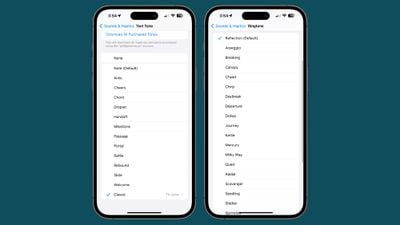
iOS 17.1 beta 1 removed the more than 20 ringtones and text tones that were added in the launch version of iOS 17, but they have been reintroduced.
ios 17 1 ringtones
The new ringtones include Arpeggio, Breaking, Canopy, Chalet, Chirp, Daybreak, Departure, Dollop, Journey, Kettle, Mercury, Milky Way, Quad, Radial, Scavenger, Seedling, Shelter, Sprinkles, Steps, Storytime, Tease, Tilt, Unfold, and Valley. Reflection continues to be the default ringtone option.

Compared to the old ringtones, many of the new ringtones are longer in length and sound more modern. Apple has moved all of the prior ringtones to the "Classic" section so they are still accessible for those who prefer options like Illuminate, Night Owl, Constellation, and Twinkle.

There are more than 10 new text tones that can be used for incoming text messages, voicemails, incoming mail alerts, reminder alerts, and more.

80% Charging Limit Fix

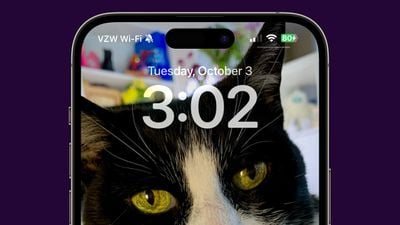
With the iPhone 15 models, Apple added a toggle that prevents the devices from charging past 80 percent in order to keep the battery healthy for a longer period of time. In the prior beta, the iPhone would ignore this setting and charge past 80 percent, but that no longer happens following the second beta update.
ios 17 1 80 percent charge

Double Tap

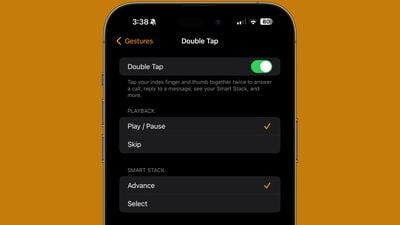
Double Tap is enabled in the second watchOS 10.1 beta that was provided to developers today, but the settings for it can be managed using the Apple Watch app.
watchos 10 1 double tap

More iOS 17.1 Beta 2 Features

Know of a feature that we left out in this list? Let us know in the comments below.

Related Forums: iOS 17, iPadOS 17

Popular Stories

Apple Event Logo

Apple Working on All-New Operating System

Wednesday July 29, 2026 11:39 am PDT by
Apple is developing an all-new operating system that is essentially a mix of tvOS, watchOS, and iOS, according to Bloomberg's Mark Gurman. In a report this week, he said the operating system will feature a grid of icons, widgets, and apps, along with customizable clock faces. The new software platform is intended for Apple's long-rumored smart home hub. With built-in facial recognition,...
imac video apple feature

Apple Made Its Second-Biggest Acquisition Ever This Year

Wednesday July 29, 2026 12:03 pm PDT by
Apple this year acquired Israeli startup Q.ai for close to $2 billion, according to the Financial Times. That would make this Apple's second-biggest acquisition ever, after it paid $3 billion for the popular headphone maker Beats in 2014. This is also the largest known Apple acquisition since the company purchased Intel's smartphone modem business and patents for $1 billion in 2019. Q.ai...
Dynamic Island iPhone 18 Pro Feature

iPhone 18 Pro: Twelve Changes Coming to Apple's Next Flagship

Thursday July 30, 2026 3:43 am PDT by
We're less than two months out from the launch of Apple's premium next-generation smartphone lineup, and while we're not expecting a dramatic change in terms of functionality, there are still several enhancements rumored to be coming to the iPhone 18 Pro and iPhone 18 Pro Max. One thing worth noting is that Apple is reportedly planning a major change to its iPhone release cycle this year,...

Top Rated Comments

AppleTO Avatar
37 months ago

With the iPhone 15 models, Apple added a toggle that prevents the devices from charging past 80 percent in order to keep the battery healthy for a longer period of time
Why only iPhone 15 models? Clearly the percentage can be determined on every model.
Score: 27 Votes (Like | Disagree)

klasma Avatar
37 months ago

I created an automation to tell me to stop charging once the battery hits 80%.
Very convenient to be woken up at night.
Score: 15 Votes (Like | Disagree)
37 months ago

>Standby Display Options

Is anybody using this? I have a stand that I can wirelessly charge in landscape orientation, and expected to use the mode a lot. I used it for the first day, and forgot about it until I read this article.
Every night. It’s fantastic as a bedside clock.
Score: 10 Votes (Like | Disagree)
37 months ago
They fixed a layout issue where the dynamic island was too wide in third-party apps

Attachment Image
Score: 10 Votes (Like | Disagree)
JosephAW Avatar
37 months ago
New tones are nice but I like to make my own but hate having to use GarageBand to make them and the 1.6GB it consumes on my iPhone.
Be nice if they opened up apps to save them directly. :rolleyes:
Score: 10 Votes (Like | Disagree)
37 months ago

I don’t let my phone charge over night. This is how you get a low battery health.
I wouldn't stress it unless you keep your phones for 5 years.
Score: 7 Votes (Like | Disagree)

🔗 Related Apple News & Rumors

Stay updated with the latest Apple ecosystem news and verified rumors











































