

iOS 17 Enables Cinematic Mode Video Editing in Third-Party Apps - MacRumorsOpen MenuShow RoundupsShow Forums menuVisit ForumsOpen Sidebar
Skip to Content

iOS 17 Enables Cinematic Mode Video Editing in Third-Party Apps

As outlined in a WWDC 2023 video, iOS 17 includes a new Cinematic API that enables developers to support Cinematic mode video playback and editing in third-party apps.
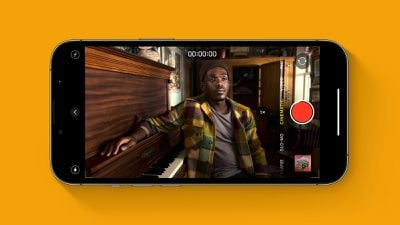
Cinematic Mode iPhone Feature
"The Cinematic framework enables you to add professional-level editing and playback features to movies, recorded with the Camera app's Cinematic mode, to your apps," says Apple's developer documentation. "These are the same features used in applications such as Final Cut Pro, Photos, and iMovie. For example, this enables your apps to change focus distance and aperture in movies, creating a bokeh effect, even after recording."

Apple offers Cinematic mode in the Camera app on iPhone 13 models and newer. Inspired by professional Hollywood films, the feature allows users to record video with a shallow depth of field and automatic focus changes between subjects.

Cinematic mode uses a technique called "rack focus" to seamlessly shift the focus from one subject to another. It does this by locking the focus on the subject in a scene and blurring the background to achieve depth of field. If you subsequently move the camera to center on a new subject, or a new subject enters the scene, Cinematic mode automatically switches the focal point to this new subject and blurs out the background.

For more details, read How to Shoot Video in Cinematic Mode on iPhone 13 and iPhone 14.

Popular Stories

iOS 27 Next to iPhone

Here's When iOS 27 Rolls Out Today in Every Time Zone [Update: It's Out]

Sunday September 13, 2026 3:00 am PDT by
Update 10:04 a.m.: iOS 27 is rolling out now, though it may take a bit for all users to see it, so keep checking! Apple is about to release iOS 27, which will finally deliver more advanced Siri AI capabilities as well as a variety of other refinements, improvements, and new features to iPhones. It's Apple's biggest software update of the year, and Apple announced at Wednesday's iPhone event...
iOS 27 Icon iPhone

iOS 27 Available Now With These 8 New Features

Monday September 14, 2026 9:00 am PDT by
Update — 10 a.m. Pacific Time: Apple has released iOS 27. During its iPhone 18 Pro and iPhone Duo event last week, Apple announced that iOS 27 will be released widely on Monday, September 14. iOS 27 should be available around 10 a.m. Pacific Time / 1 p.m. Eastern Time today via the Settings app, under General → Software Update. Below, we have highlighted eight new features and...
Apple iCloud Plus expansion hero

iCloud+ Now Includes Apple TV, Apple Arcade, and Curated Apple Music Stations in Over 100 Countries

Tuesday September 15, 2026 1:43 am PDT by
Apple today announced a new subscription initiative that turns paid iCloud+ subscriptions into a broader services bundle in more than 100 countries. In select countries, Apple says every paid iCloud+ plan, including the cheapest 50GB tier, now includes Apple TV and Apple Arcade "at no additional cost," while family sharing extends the storage, TV and Arcade access to up to five people....

Top Rated Comments

lazyrighteye Avatar
43 months ago

Remember the big to-do they made about Cinematic Mode in the keynote when the iPhone 13 was introduced? I wonder how many people have used it.
It's a neat feature that I'm glad is available, but one I seldom use.
1) I honestly forget about it and 2) that feature doesn't work so well from the soccer pitch sidelines. 😉
But when I have used it, in more controlled settings (where subjects offer the depth of field for the feature to work properly), it's pretty sweet. Especially for a built-in feature of a camera on a phone.
Score: 4 Votes (Like | Disagree)
Apple Fan 2008 Avatar
43 months ago
Apple seems to be opening things up more, hope this trend continues.
Score: 4 Votes (Like | Disagree)
Expos of 1969 Avatar
43 months ago
Remember the big to-do they made about Cinematic Mode in the keynote when the iPhone 13 was introduced? I wonder how many people have used it.
Score: 4 Votes (Like | Disagree)
43 months ago
Good to see this change in iOS 17
Score: 2 Votes (Like | Disagree)
43 months ago
Howdy friends. Great discussion. I thought I'd point you to a video I just did with the top end iPhone 14. This footage was shot with the 14, transferred to my MBP with a cable- into iPhoto. Then accessed through iMovie where I could adjust focus.




If this link isn't active, you can also go to YouTube and search "Glenwood Springs, Colorado parks, and recreation". The top video is called "South Canyon".

This was puzzling to figure out for the longest time, and I finally got it down. There are some tricks. For instance, when you transfer, you have to go into settings and choose transfer original format, or it will just spit out an MOV file where depth of field cannot be adjusted.
Score: 2 Votes (Like | Disagree)
43 months ago

I actually use cinematic mode sometimes when shooting video, but the focus switches sometimes, and adjusting the focus during editing isn’t available on iMovie. So I’m stuck either having to edit the focus on the iPhone or I’m forced to get Final Cut Pro which I wouldn’t need otherwise.

If I’m wrong and it’s doable in iMovie please correct me.
You can adjust the focus points in Photos on your Mac. If you select the video and go to Edit, it'll give you that same timeline focus point interface you get in iOS.

And then from there I believe you could probably import it into iMovie? You might need to export from Photos to an MOV file or something to "freeze" the focus points? Or maybe iMovie would recognize where you set them in Photos. Worth experimenting with.
Score: 2 Votes (Like | Disagree)

🔗 Related Apple News & Rumors

Stay updated with the latest Apple ecosystem news and verified rumors










































